Twitter auto post: how to post to X from RSS, a blog or another app
Auto posting to X still works in November 2026, but only through X's API. IFTTT still lists X applets, Zapier connects if you supply your own X developer app, and RSS tools such as dlvr.it advertise X posting. Make removed its X app in May 2025 and Jetpack Social has no X. Under pay-per-use, link posts reportedly cost far more than plain posts.
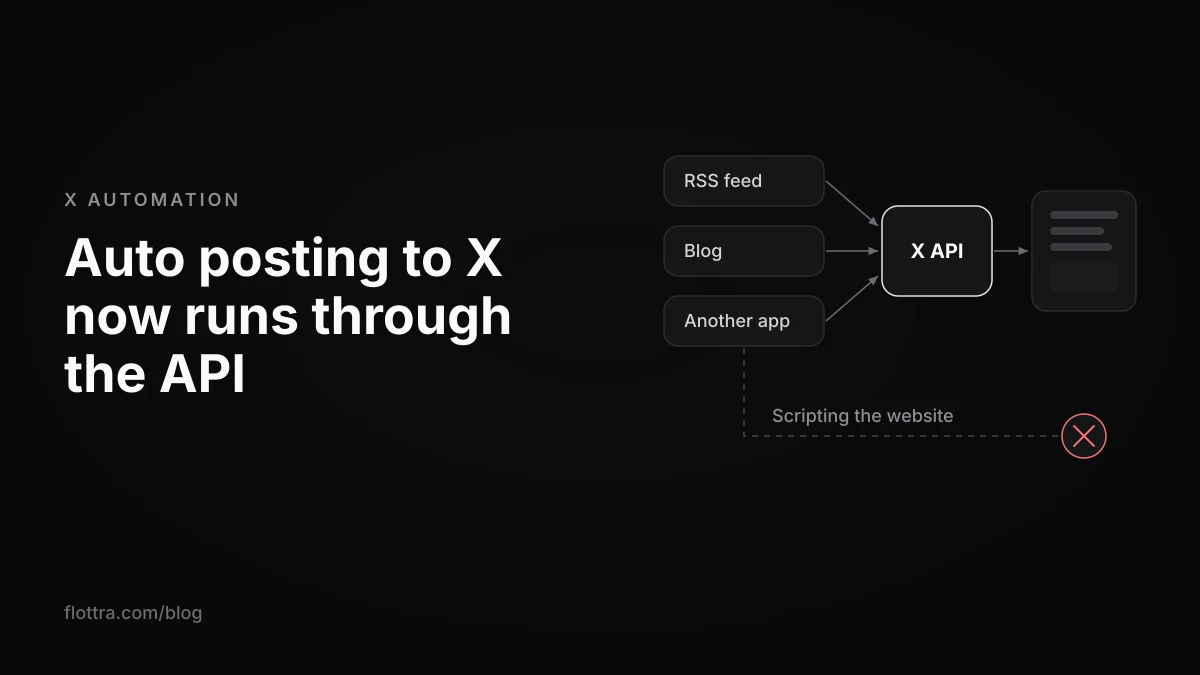
Auto posting to X (formerly Twitter) from an RSS feed, a blog or another app still works in November 2026, but only through X's official API, because X's automation rules ban scripting the website. The bridges have moved. Make removed its X app on 30 May 2025, Jetpack Social stopped posting to X in 2023, Zapier now asks you to bring your own X developer app, and IFTTT still lists X applets. API posting is now billed per use, according to third-party reports (X's own pricing page could not be read), and a post that contains a link reportedly costs far more than one without, which matters because nearly every feed post is a link post. This guide covers posting set off by something else. If you only want to pick a time for a post you wrote yourself, see how to schedule tweets on X instead.
Which auto posting tools still work with X
In November 2026 the routes that still post to X from a trigger are IFTTT applets, Zapier with your own X developer app, dedicated feed tools such as dlvr.it, Circleboom Publish, OpenTweet and upload-post, a WordPress plugin that sends through Buffer, and your own script on the X API. Make's X app and Jetpack Social's X sharing are gone. Prices are printed below only where the vendor's own page states them.
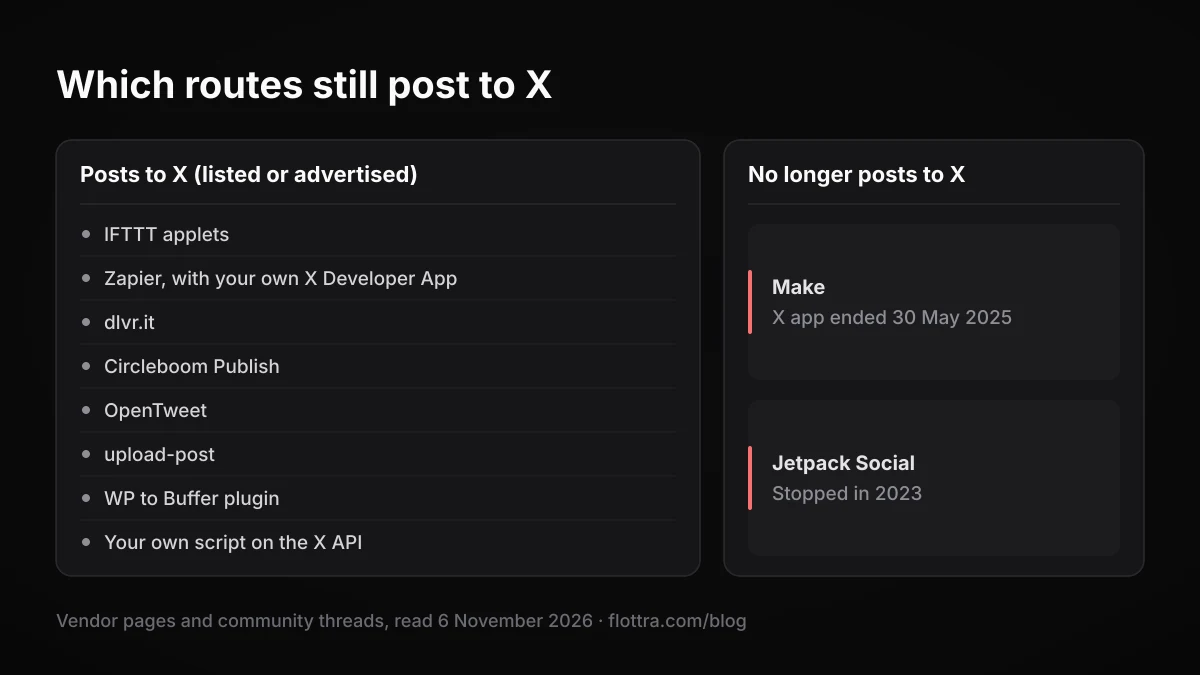
| Route | Posts to X today? | Cost or access, as stated by the source | Source |
|---|---|---|---|
| IFTTT (YouTube, Blogger, Tumblr, email, RSS Feed, Webhooks) | Yes, X applets listed | Plan needed for X applets not stated | IFTTT |
| Zapier | Yes, with your own X Developer App | API usage on your developer account (inferred) | Zapier community |
| Make | No, X app ended 30 May 2025 | Only via the HTTP module and your own API access | Make community |
| Jetpack Social (WordPress) | No | Not applicable | Jetpack |
| WP to Buffer plugin (WordPress) | Listing says yes, through Buffer | Buffer's price for X not verified | WordPress.org |
| dlvr.it (RSS, Atom) | Advertised, instant or queued | Not verified | dlvr.it |
| Circleboom Publish (RSS) | Advertised, including several accounts | Not verified | Circleboom |
| OpenTweet (RSS) | Advertised | Paid plans from $19.99/month after a 7-day free trial | OpenTweet |
| upload-post | Advertised | Plain posts on every plan, Free is 10 uploads a month; links on X are a $19/month add-on | upload-post |
| Your own script on the X API | Yes | Pay-per-use, billed to you | See the cost section below |
What the X API costs per auto post, and why links cost more
Third-party trackers report that X's API is now pay-per-use, that creating a plain post costs $0.015 while a post containing a link costs $0.20 (Outstand and upload-post, read 6 November 2026). X's own developer pricing page could not be read when this was checked, so treat both figures as reported, not official, and confirm them in your developer console before you budget.
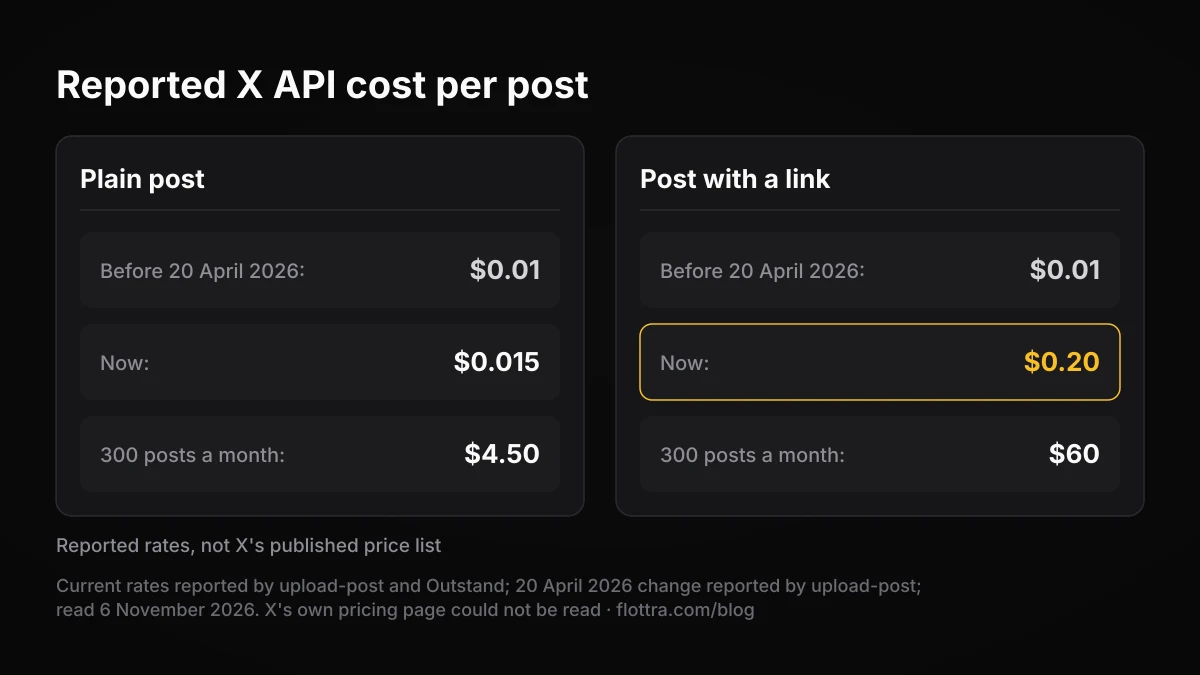
According to upload-post, the link price changed on 20 April 2026: a post with a URL went from $0.01 to $0.20, and a plain post from $0.01 to $0.015. That makes a link post roughly thirteen times the price of a plain one, and RSS and blog auto posting is almost entirely link posts, since the point is to send readers to the item.
The background, also from third-party reports rather than X's page: pay-per-use launched on 6 February 2026 and the old Free tier closed to new developers at the same time; the legacy Basic ($200 a month) and Pro ($5,000 a month) tiers are closed to new sign-ups (SocialCrawl). Since October 2026, X reportedly gives pay-per-use accounts one-time starter credits, $20 for saving a first eligible card plus a match of the first auto-recharge up to $50, which expire after three months (Sorsa).
X's own developer support FAQ still says: "Free: Free, instant access to the X API. Includes 500 Posts and 100 Reads per month and a single App environment." That conflicts with every 2026 pricing report and looks stale. Do not plan on it without checking what your console actually offers.
Illustrative: one feed for a month
Take a blog feed that publishes 10 items a day and posts each to one X account with its link: 300 link posts in a 30-day month. At the reported $0.20 that is $60 for the month on your own developer app. The same 300 posts without links would be $4.50. These are reported rates, not X's published price list.
Who pays depends on the route. With Zapier, Make's HTTP module or your own script, you call the API with your own developer app, so the bill is yours. A vendor that posts through its own app pays X and sets its own prices; upload-post, for example, lists a $19 a month add-on for links on X.
How to auto post an RSS feed to X
To auto post an RSS feed to X you need a service that checks the feed, turns each new item into post text and sends it to X through the API. Dedicated feed tools such as dlvr.it, Circleboom Publish and OpenTweet do all three in one place. IFTTT does it by pairing its RSS Feed service with X. Zapier and your own script do it with your own X developer app.
The setup is similar whichever tool you pick:
- Copy the feed URL (RSS or Atom) from the site you want to post from.
- Connect the X account. Tools that post through the API ask you to authorise them on X. With Zapier you first create an X Developer App and paste its Client ID and Client Secret.
- Write the template: usually the item title plus its link. Decide here whether every item needs a link, because under the reported pricing a link is what makes an API post expensive.
- Set the pace if the tool lets you. dlvr.it says it can post items instantly or queue them; Circleboom says it posts a set number of items per interval. A queue stops a burst of new items landing on X in the same minute.
- Start from new items only, if the option exists, so connecting the feed does not push its whole back catalogue to X at once.
- Watch the first few posts on X itself: check the text, the link preview, and that one feed item produced one post, not two.
If the feed publishes a lot, check it against X's daily post limit (covered below) before you connect it. A news site's feed can pass 50 items a day on its own.
How to auto post WordPress blog posts to X now Jetpack Social dropped it
Jetpack Social no longer posts WordPress articles to X at all. Its support page says: "Jetpack Social does not support Twitter/X sharing, including for existing connections." Jetpack stopped Twitter sharing on 1 May 2023 after X changed its API terms and pricing (Jetpack, read 6 November 2026). It still shares to Facebook, LinkedIn, Tumblr, Mastodon, Nextdoor, Instagram Business, Threads and Bluesky.
For X, WordPress sites have two practical routes:
- A plugin that sends through another service. The Social Media Auto Poster plugin (WP to Buffer) sends new WordPress posts to X through Buffer, and its listing says X auto posting still works. Templates use tags such as
{title},{excerpt},{url}and{tags}(WordPress.org). Buffer's plan and price for X were not verified, so check them on Buffer before you install. - The site's RSS feed into a feed tool. Every route in the RSS section above works for a WordPress feed, and it keeps the posting outside WordPress, so a plugin update cannot break it.
Blogger users have a third option: IFTTT lists a ready-made "Share new Blogger posts to X" applet.
IFTTT, Zapier and Make: which still post to X
Of the three general automation services, IFTTT still lists X applets, Zapier works again if you bring your own X developer app, and Make no longer has an X app at all. Zapier and Make changed at different times, both after X's API changes: Zapier staff said X told them the integration was not a supported use case, and Make's email cited X's API policy requirements and pricing.
IFTTT
IFTTT's X automation page, published 18 August 2026 and updated 16 September 2026, lists applets that post to X: "Share new YouTube uploads to X", "Share new Blogger posts to X", "Share new Tumblr posts to X" and an email-to-X "Post a tweet" action. It also lists RSS Feed and Webhooks as services that pair with X, which covers most feed and app triggers. The email connection is described as: "Send an email to IFTTT and it posts to X as a tweet." What the page does not say is which IFTTT plan the X applets need; that was not found on IFTTT's pages.
Zapier
Zapier's X integration was deprecated, with Zapier staff saying X had told them Zapier's integration was not a supported use case, and it later came back with a condition. Staff in Zapier's community forum wrote: "To use X with Zapier, you will need to set up your own X Developer App and use its Client ID and Client Secret when connecting." Zapier does not say who pays for the API calls in that thread, but the inference is that they run on your own developer app and its pay-per-use bill. The year of the deprecation is not visible in the thread, so check Zapier's X app page for the current state before relying on it.
Make
Make removed its X (formerly Twitter) app. According to Make's email, as quoted in its community forum, no new X scenarios could be created from 3 April 2025, and existing scenarios stopped working on 30 May 2025; the email cited X's API policy requirements and pricing. No evidence was found that Make has added an X app back. Community members suggest calling the X API yourself with Make's generic HTTP module, which works but means you hold the developer app, handle the sign-in and pay for each post.
Auto posting to X with your own script or bot
You can post to X from your own script, as long as the script uses the X API. X's automation rules list, as something not to do: "Use non-API-based forms of automation, such as scripting the X website. The use of these techniques may result in the permanent suspension of your account." (X automation rules, checked 19 September 2026.) A script that polls a feed and calls the API's post endpoint is the API route that X's rules point to.
- Create an X developer account and an app, and set up pay-per-use billing (check the starter credits your console shows).
- Authorise the app on the X account that will post, so the script posts as that account.
- Poll the feed or receive a webhook, and keep a record of item IDs already posted so a restart does not post them twice.
- Build the post text from the item, and decide per item whether the link is worth the reported link price.
- Send it to the create-post endpoint and log X's response, including failures, so a rejected post is not retried in a loop.
upload-post states X's limits for that endpoint (POST /2/tweets) as 100 per 15 minutes per user and 10,000 per 24 hours per app. That is a third party's statement and was not verified on X's pages. The account's own daily post limit, below, applies whichever endpoint limit you stay under. For a full build path, see Twitter bots on X in 2026, and for the API versus browser trade-off in general, X automation in 2026: what actually works.
Is automated posting allowed on X, and how many posts a day
Automated posting through the X API is allowed, but the account owner answers for it, and the automated posts count against the same daily limit as posts typed by hand. X's rules say: "For X users: You are ultimately responsible for the actions taken with your account, or by applications associated with your account." (X automation rules, checked 19 September 2026.) A feed tool that misfires is your problem, not the tool's.
X's limits page (checked 19 September 2026) gives the daily post limit as: "Posts: 50 original posts and 200 replies per day for unverified accounts. The daily update limit is further broken down into smaller limits for semi-hourly intervals." It adds: "These limits include actions from all devices, including web, mobile, phone, API, etc." Further down, the same page still says "The post limit of 2,400 updates per day is further broken down into semi-hourly intervals." The page contradicts itself; the 50 and 200 figures are the ones in the current-limits list. It does not state a different number for Premium accounts. More detail is in X rate limits in 2026.
Two points follow for auto posting. A busy feed can hit 50 original posts in a day, and anything you post by hand that day comes out of the same allowance. And because the limit is split into semi-hourly intervals, a feed that releases many items at once can hit a short-window limit long before the daily one, which is another reason to queue items rather than post them instantly.
If your trigger reposts rather than posts, X's rules allow automated reposts for "entertainment, informational, or novelty purposes", then add: "Automated Reposts often lead to negative user experiences, and bulk, aggressive, or spammy Reposting is a violation of the X Rules."
Auto posting one feed to several X accounts
Some tools, Circleboom Publish among them, advertise posting one RSS feed to several X accounts. The tool will do it; X's authenticity rules are what make it risky. Identical posts appearing on many accounts at once is close to what those rules describe.
X's authenticity policy (checked 19 September 2026) says: "Content Spam: You may not share or post content in a bulk, duplicative, irrelevant or unsolicited manner that disrupts people's experience." and "Multiple Accounts and Coordination: We prohibit coordinated inauthentic activity that artificially influences conversations or disrupts X." X does not publish how it detects either, so there is no known safe number of mirrored accounts.
Do not mirror one feed across accounts
The same link with the same text from several accounts in the same minute is the pattern the content spam rule names: bulk and duplicative. If several accounts genuinely need the same item, give each its own template and wording, its own timing, and ideally its own feed or a subset of the items that fits that account's topic.
Each extra account also multiplies the API cost: one item posted with a link to five accounts is five link posts.
Some operators of several accounts ask whether a multi-account panel covers this. Flottra, for one, does not: it has no RSS or app trigger and does not post automatically today. Posts can be queued for many accounts, sending from its desktop app is still being switched on, and it works through a real browser per account rather than the X API, which is the distinction X's automation rule quoted above is drawn on. For the wider choice of setups, see how to manage multiple X accounts.
Questions
Can you still auto post to Twitter with IFTTT?
Yes, as far as IFTTT's own pages show. Its X automation page, updated 16 September 2026, lists applets that share new YouTube uploads, Blogger posts and Tumblr posts to X, an email action that posts a tweet, and RSS Feed and Webhooks as services that pair with X. What the page does not say is which IFTTT plan the X applets need, so check the applet's own page before you build around it, and send one test post with a link to see how it renders.
Does Zapier still work with X (Twitter)?
Yes, again, with a condition. Zapier staff said in its community forum that the X integration had been deprecated because X told them it was not a supported use case, and it later returned. To connect now you create your own X Developer App and enter its Client ID and Client Secret in Zapier. Zapier does not say who pays for the API calls in that thread, but the inference is that they land on your own pay-per-use developer account.
Why did Make.com remove the X (Twitter) integration?
Make's email to users, quoted in its community forum, cited X's API policy requirements and pricing. From 3 April 2025 no new X scenarios could be created, and existing ones stopped working on 30 May 2025. No sign was found that Make has added an X app back. The workaround community members suggest is Make's generic HTTP module calling the X API directly, which needs your own developer app and puts each post on your own API bill.
Is there a free way to auto post to X in 2026?
Not fully free for most feeds. upload-post's own page lists a Free plan with 10 uploads a month and no card, but links on X are a $19 a month add-on, and feed posts nearly always carry links. Calling the X API yourself is billed per post under pay-per-use, though third-party reports describe one-time starter credits that expire after three months. IFTTT lists X applets, but which IFTTT plan they need was not found.
Does Buffer auto post from RSS?
That could not be confirmed. Buffer does post to X: the WordPress plugin Social Media Auto Poster (WP to Buffer) sends new WordPress posts to X through Buffer, and its listing says X auto posting still works. But whether Buffer's own feed feature publishes items automatically or only offers them for you to queue was not found on Buffer's pages, and neither was Buffer's price for X. If the feed must publish untouched, test it before relying on it.
How many posts a day can an X account send?
X's limits page lists 50 original posts and 200 replies per day for unverified accounts, split into smaller semi-hourly limits, and says the limits include actions from every route, the API included. The same page still mentions 2,400 updates a day further down, which contradicts its own list; the 50 and 200 figures are the current ones. It does not publish a different number for Premium accounts, so do not assume a higher allowance for an auto posting account.