How to post tweets to Discord automatically: the methods that still work
In October 2026 you can post tweets to Discord automatically with a hosted bot (MEE6 Premium, TweetShift, CommunityOne), an RSS service that posts through a Discord webhook (RSS.app) or an IFTTT applet. None of these asks for your own X API key. Building your own bot means paying for X API reads, and Nitter-based RSS feeds stopped being dependable in September 2026.
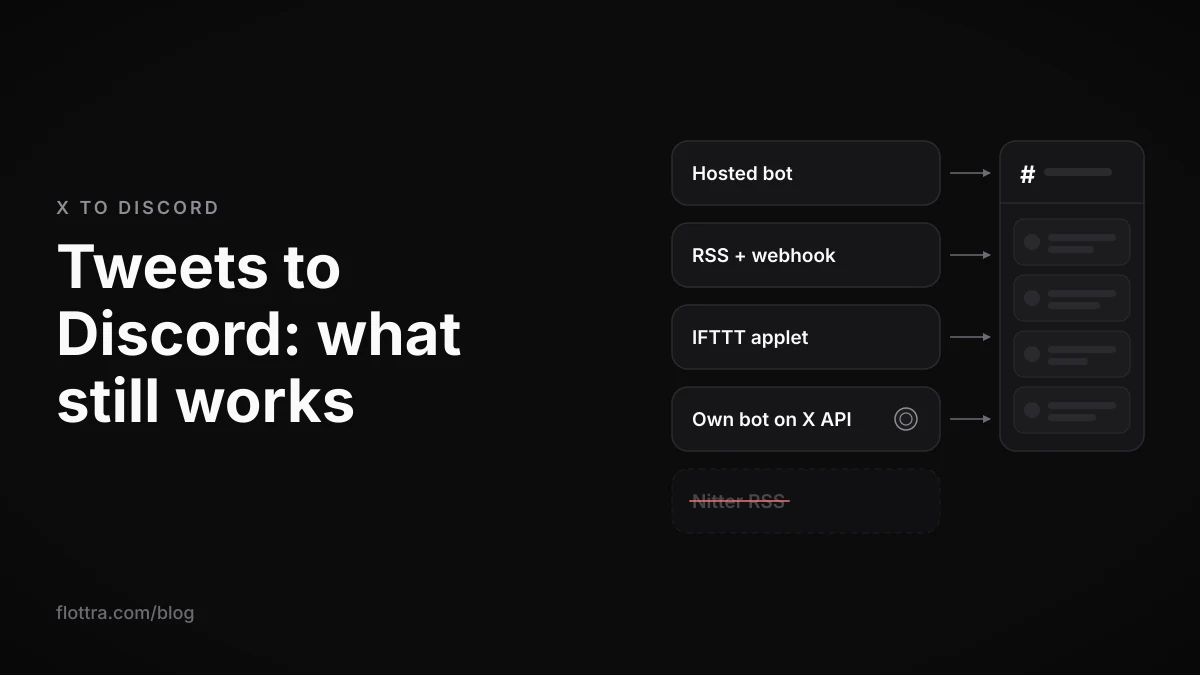
In October 2026 there are three no-code ways to post tweets to Discord automatically. You can use a hosted Discord bot (MEE6 Premium, TweetShift, CommunityOne or RSS.app's bot), an RSS feed service that posts through a Discord webhook (RSS.app), or an IFTTT applet. None of them asks for your own X (formerly Twitter) API key. Building your own bot now means buying X API credits, because X reportedly closed its free API tier to new developers in February 2026. The free Nitter RSS feeds that older guides rely on stopped being dependable in September 2026, when the Nitter project was archived and XCancel shut down. Below: what each method needs, how fast it is by the vendor's own account, what it skips, and why an old feed bot goes quiet.
Which Twitter to Discord methods still work in 2026
Four routes still deliver X posts to a Discord channel in October 2026: a hosted Discord bot, an RSS service that posts through a webhook or its own bot, an IFTTT applet, and a bot you write yourself on the paid X API. A Zapier template also exists, but its requirements were not confirmed. Nitter-based RSS feeds are no longer something to build on. The table compares the methods using only what each vendor says on its own pages.
| Method | Your own X API key? | Delay, as the vendor states it | What it skips or caps | Price on the vendor's own page |
|---|---|---|---|---|
| MEE6 Social Alerts | No | Varies; MEE6 gives no figure | No reposts, private accounts or sensitive posts; up to 75 X accounts per server | Premium feature; price not shown on the pages checked |
| TweetShift | No | Not stated on the pages checked | Keyword filtering offered; caps not checked | Not confirmed, check vendor page |
| CommunityOne | No | Not stated on the pages checked | Not checked | From $15 per month |
| RSS.app (bot or webhook) | No ("No coding or API setup required") | Every 15 minutes; faster on Premium | Profiles, hashtags, lists and searches; advanced filters on Premium | Free plan stated; prices not shown |
| IFTTT applet | No | Every hour on Free, every 5 minutes on Pro and Pro+ | One user, a hashtag, or mentions per applet | Check IFTTT's pricing page |
| Zapier template | Not confirmed | Not confirmed | Posts from an X query | Check Zapier's pricing page |
| Nitter RSS plus webhook | No | Not applicable | Project archived in September 2026 | Not recommended |
| Your own bot on the X API | Yes, pay-per-use credits | Whatever your code polls | Whatever you build | Reported at $0.005 per post read (third-party sources) |
Two gaps in the table are deliberate. A price appears only where the vendor's own page prints one. And none of the vendor pages checked says how the tool gets its X data, whether through the official API or some other route. That second gap matters for reliability, and it comes back in the section on feeds that stop.
Do you need X API access to send tweets to Discord?
No, not if you use a hosted service. MEE6, TweetShift, CommunityOne, RSS.app and IFTTT handle the X side themselves. You authorise their bot in Discord or paste a webhook URL into their settings, and none of them asks for your own X developer key. RSS.app's Twitter Discord bot page says it outright: "No coding or API setup required." (checked 18 October 2026).
You need your own X API access only if you write the bot yourself, and since February 2026 that access is reportedly paid per use. The one hosted option with an open question is Zapier, covered in the IFTTT and Zapier section. For the wider picture of what the API can and cannot reach compared with a browser, see X automation in 2026: what actually works.
Hosted Discord bots for Twitter: MEE6, TweetShift and CommunityOne
A hosted Discord bot is the simplest Twitter to Discord setup. You invite the bot to your server, give it the X account to watch and the channel to post in, and it posts each new post there as a message. The bots differ in what they skip, how many accounts they allow per server and what they charge, and that is what decides between them.
MEE6
MEE6's social connectors page still markets X alerts: "Every time you post a tweet, MEE6 will automatically send it to a pre-configured channel of your choice." MEE6 now files this under Social Alerts. Tutorials that send you to a "Twitter" plugin with a "Connect your Twitter Account" button describe an older menu. The limits are on MEE6's own limits and restrictions article (checked 18 October 2026):
- X alerts are a Premium feature. MEE6 Premium allows alerts for at most 75 X accounts per server. Other platforms have different caps: Twitch 300, YouTube 100, RSS 100, Bluesky 10, TikTok 10.
- "X/Twitter: retweets/reposts, private accounts and NSFW/Sensitive Content posts are not supported."
- The account you follow must be public and searchable.
- MEE6 says delivery delays vary and does not give a figure.
- The MEE6 pages checked do not show the Premium price. It is also unconfirmed whether any free MEE6 tier includes even one X alert.
TweetShift
TweetShift is a Discord bot built for this one job: "Using Feeds, you can set a X/Twitter account to automatically post right into your Discord channels or threads." It offers keyword filtering and a web dashboard. Its top.gg listing showed 119,181 servers when checked on 18 October 2026. Its pricing could not be confirmed on a current TweetShift page. Its older homepage says free, a competitor says there is no free plan, and third-party blogs quote a small monthly fee, so check TweetShift's own site before you budget.
CommunityOne
CommunityOne is a Discord engagement bot that includes X alerts. Its Twitter Discord bot page says: "Our Twitter bot starts at $15 per month, with advanced features available on higher tiers." (checked 18 October 2026). CommunityOne also publishes a comparison of Discord Twitter bots on its own blog, which places CommunityOne first and mentions a free plan for one account. The product page and the blog disagree, so confirm on the product page before relying on either.
One trap in older bot lists: they mix feed bots with link-fixing bots such as FxTwitter. A link-fixing bot changes how a pasted X link displays. It does not watch an account or post anything by itself.
How to post tweets to Discord with a webhook and an RSS feed
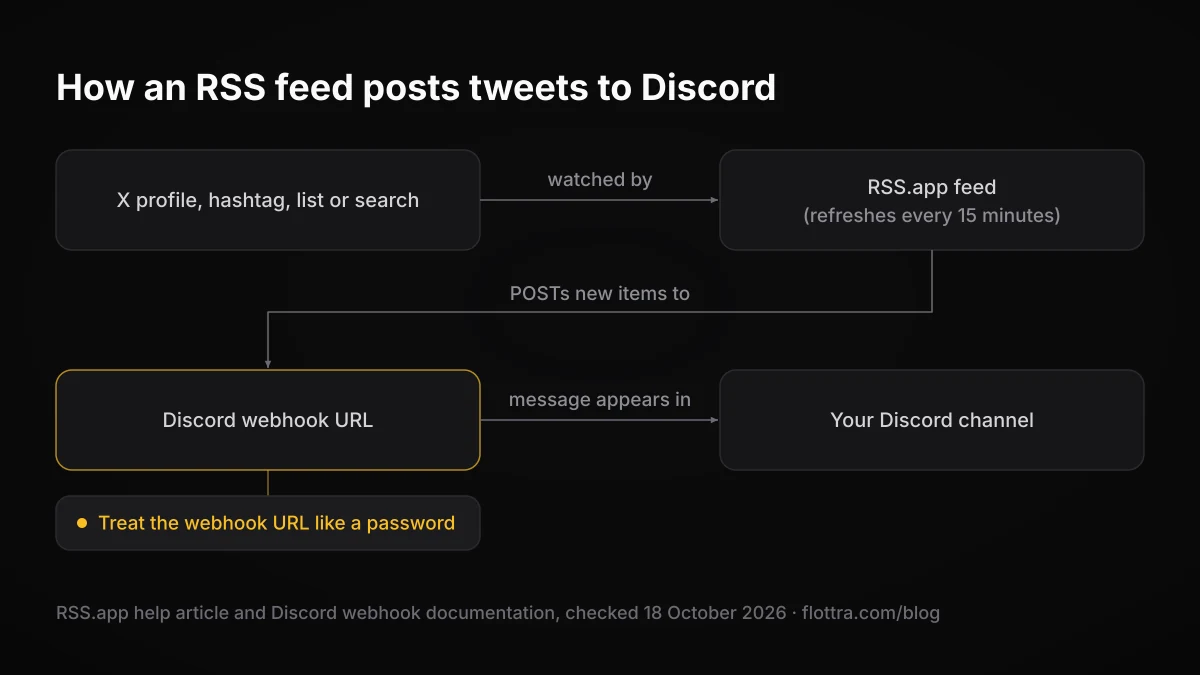
To post tweets to Discord with a webhook, you need two parts: a Discord webhook URL for the channel, and a service that watches X and sends new posts to that URL. Discord's webhook documentation describes the first part plainly: "You POST a payload to the URL and the message appears in that channel. No bot or persistent connection required." In 2026 the watching part is usually an RSS service such as RSS.app.
Create the Discord webhook
- Open your Server Settings and go to the Integrations tab.
- Choose Create Webhook.
- Pick the channel the posts should land in.
- Name the webhook. Naming it after the X account it will carry saves confusion later.
- Copy the webhook URL. Treat it like a password: anything that POSTs to it can post in your channel.
These steps follow Discord's Intro to Webhooks support article (checked 18 October 2026).
Connect an RSS.app feed to Discord
RSS.app turns an X profile, hashtag, list or search into an RSS feed. It can then post new items to Discord through your webhook URL or through its own bot. The steps in its help article (checked 18 October 2026) are:
- Paste the X URL (a profile, hashtag, list or search) into RSS.app's X RSS generator.
- Click Generate, then Save to my Feeds.
- Click the Discord icon on the feed and authorise RSS.app.
- Pick the channel and click Save.
RSS.app says: "Feeds refresh every 15 minutes." It says it has a free plan, and that Premium plans add faster refresh rates and advanced filters. The page checked does not print prices, and it does not state a separate refresh interval for the free plan.
Nitter RSS is no longer a method
Many older webhook guides pair a Nitter RSS feed with a Discord webhook. TechCrunch reported that X sent Nitter a cease-and-desist in August 2026 over alleged "unlawful use and circumvention" of X's API. Nitter's GitHub repository was archived on 11 September 2026, and XCancel shut down. A community health tracker still listed a few fork instances with RSS enabled about three weeks before this was written, but instances come and go. A server feed that depends on one can break without warning.
Can IFTTT or Zapier still send tweets to Discord?
IFTTT can: it still lists applets that post new X posts from a chosen user to a Discord channel. They use the "New tweet by a specific user" trigger and a Discord action where "The IFTTT Bot sends a rich message to your selected Discord channel". One such applet showed 6.41k users enabled on 18 October 2026. IFTTT also lists applets for hashtags and for mentions.
The catch is speed. The X trigger is a polling trigger, and another IFTTT applet page states: "These trigger checks occur every 5 minutes for Pro and Pro+ users, and every hour for Free users." On Free, a post can reach Discord up to about an hour after it went out on X. Whether the X triggers still work on the Free plan at all was not confirmed against IFTTT's pricing page, so check that before you rely on it.
Zapier's X (Twitter) integrations page lists a template called "Send Discord channel messages for new posts from an X query". Several things were not confirmed: whether that Zap needs your own X developer credentials, whether it needs paid X API credits, and which Zapier plan it needs. Open the template and read what it asks you to connect before building a server feed on it.
Why your Twitter feed bot stopped working
Most Twitter feed bots that stop posting in Discord were broken by a change upstream, not by Discord. Match what you were running against the causes below. The first two have no fix except moving to a method that still works.
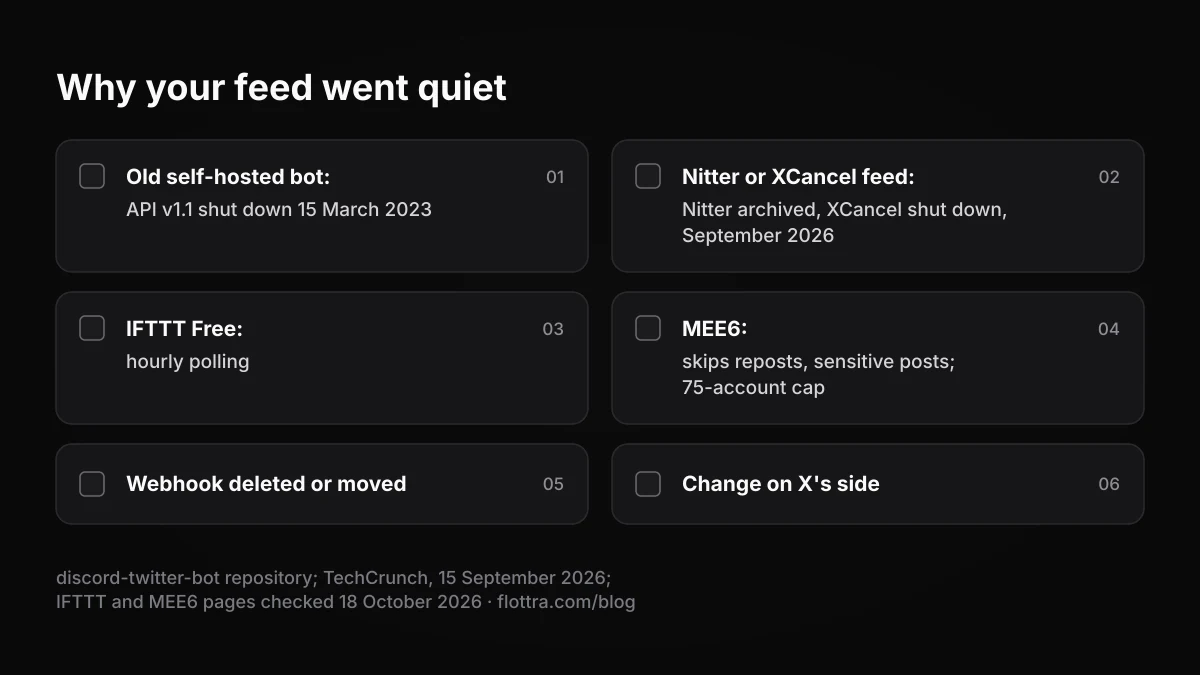
- A self-hosted bot from an old tutorial. The open-source discord-twitter-bot that many guides link to is dead. Its repository says Twitter API v1.1 was shut down on 15 March 2023.
- A Nitter or XCancel RSS feed. Nitter's repository was archived and XCancel shut down in September 2026, as described above.
- IFTTT on the Free plan. Hourly polling can look like a broken applet when it is only slow.
- MEE6 skipped one post. Reposts and sensitive posts are not supported, and an account that went private or stopped being searchable drops out.
- MEE6 account cap. Premium allows 75 X accounts per server. Beyond that, extra accounts will not alert.
- The webhook changed. Check the webhook still exists under Server Settings, Integrations, and that it still points at the channel you expect.
- Something changed on X's side. None of the vendor pages checked says how the tool reads X, so you cannot predict how an X change will affect it. If a hosted bot stops for everyone at once, check the vendor's own announcements before you change your setup.
Building your own Twitter to Discord bot: what the X API costs
A bot you build yourself that reads X posts through the official API now pays per post read. X's own developer documentation was not reachable when this was checked, so the figures below come from third-party write-ups (invisibleapi.ai and outstand.so, checked 18 October 2026). Confirm them on X's developer pricing page before you budget.
- X reportedly closed its free API tier to new developers on 6 February 2026 and moved to pay-per-use credits.
- Posts: Read is reported at $0.005 per post returned.
- User: Read is reported at $0.010 per user.
- Owned Reads, for your own account's data only, are reported at $0.001 per resource.
- The legacy Basic ($200 a month) and Pro ($5,000 a month) plans are reported closed to new signups.
- The sources disagree on the monthly cap on post reads, so check that figure on X's page.
Purely as an illustration, at the reported rate, a bot that returns 1,000 posts in a month would spend about $5 on post reads, plus any user lookups. Billing is reported per post returned, so the design matters. A bot that asks only for posts newer than the last one it delivered should cost less than one that re-reads a whole timeline on every poll. The delivery half is free: your bot POSTs each new post to a Discord webhook, exactly as the RSS services do. The same pay-per-read logic applies to follower trackers, covered in which follower trackers still work.
Do not scrape X with a logged-in account
The tempting shortcut is a script that logs in to X and reads posts from the website, avoiding the API bill. X's automation rules name exactly that under what not to do: "Use non-API-based forms of automation, such as scripting the X website. The use of these techniques may result in the permanent suspension of your account." (checked 19 September 2026).
The account at risk is the one doing the reading, which is often the brand account you were trying to mirror. For how such accounts get caught, see why X accounts get suspended.
Mirroring several of your own X accounts into Discord
If you run several X accounts and want each one's posts in Discord, give each account its own channel, or at least its own named webhook. When one feed stops, you will see which account it was, and you can delete or move one feed without touching the others. With MEE6, count against the 75-account cap per server. With IFTTT, each account is a separate applet with its own polling delay.
If you build your own bot and every account it reads is yours, the reported owned-read rate ($0.001 per resource, against $0.005 per post for general reads) may apply. That rate comes from a third-party rate card, so confirm on X's developer pricing page that your use qualifies before you design around it. For the multi-account side itself, see how many X accounts you can have and how to run them.
Where flottra fits
flottra runs many X accounts from a panel, with a real browser per account on your own Windows PC. It does not post anything to Discord. Mirroring posts into a server is a separate job for one of the tools above.
Questions
- Is there a free Twitter to Discord bot that still works?
- RSS.app says it has a free plan that can send an X profile, hashtag, list or search to Discord, refreshing every 15 minutes. IFTTT applets for X to Discord are still listed, with hourly checks for Free users, though whether X triggers need a paid plan was not confirmed. TweetShift's free tier is disputed between sources, and MEE6's X alerts are a Premium feature. Free routes exist, but each is slower or less certain than a paid one.
- Does MEE6 still post tweets to Discord, and is it free?
- Yes. MEE6 still posts new X posts to a Discord channel through its Social Alerts feature, but X alerts need MEE6 Premium, so the feature is not free. Premium covers up to 75 X accounts per server. MEE6 does not post reposts, posts from private accounts or posts marked sensitive, and the account must be public and searchable. The Premium price was not shown on the MEE6 pages checked in October 2026.
- How fast do tweets appear in Discord?
- It depends on the method, and only vendor claims are available. RSS.app says its feeds refresh every 15 minutes, with faster refresh on Premium. IFTTT checks every 5 minutes on Pro and Pro+ and every hour on Free. MEE6 says only that delays vary. A bot you write yourself is as fast as you poll, but every poll that returns posts costs API credits, so polling very often raises the bill.
- Can a Discord bot post retweets, replies or tweets from private accounts?
- MEE6 states it does not post reposts (retweets), posts from private accounts or sensitive posts. The limits checked for this post do not mention replies. None of the other hosted tools checked documents support for private (protected) accounts. If reposts matter to your server, test a candidate bot with a repost on a spare channel before relying on it.
- How do I post only tweets with a certain keyword or hashtag to Discord?
- Three documented routes exist. RSS.app can build a feed from an X hashtag or search URL, with advanced filters on its Premium plans. TweetShift offers keyword filtering on its feeds. IFTTT lists a hashtag to Discord applet. Zapier has a template that sends Discord messages for new posts from an X query, though its account requirements were not confirmed. Put filtered feeds in their own channel so they do not bury your main feed.
- Does Nitter RSS still work for Discord feeds?
- Not reliably. X sent Nitter a cease-and-desist in August 2026, the Nitter repository was archived on 11 September 2026 and XCancel shut down, as reported by TechCrunch. A few fork instances still appeared on a community tracker weeks later, but instances appear and vanish without notice. A Discord feed built on one can stop at any time, so move to a hosted bot, RSS.app or IFTTT.