Twitter bots on X in 2026: what is allowed, the label, and how to build one
Bots are allowed on X (formerly Twitter) if they run through the official X API, show the automated account label, say in their bio what they are and who runs them, and follow the Automation Rules: no automated likes, no bulk following, replies only when invited. The API is now pay-per-use, so you buy credits upfront and pay per request.
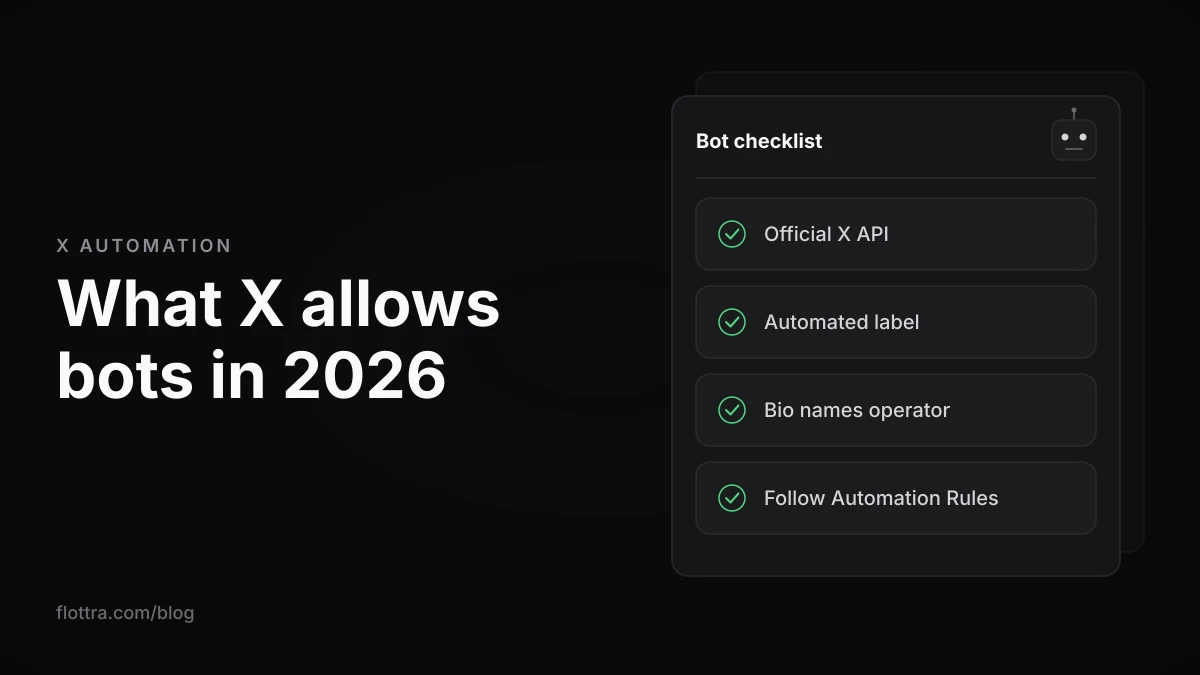
A Twitter bot is an account run by software instead of a person. On X (formerly Twitter) it is allowed in 2026 if it works through the official X API, carries the automated account label, says in its bio what it is and who runs it, and only automates what X's Automation Rules permit. Posting its own content on a schedule is fine. Automated likes, bulk following and unsolicited replies, mentions or DMs are not. Since late February 2026 the self-serve API itself refuses replies unless the other person mentioned or quoted the bot. Access is pay-per-use: you buy credits and each request is deducted.
Are Twitter bots allowed on X in 2026?
Yes, with conditions. X has no rule against bots as such. It has rules about how a bot is built and what it does. The ground rule is that automation goes through the API: among the things X's Automation rules (checked 19 September 2026) list as Don't is “Use non-API-based forms of automation, such as scripting the X website. The use of these techniques may result in the permanent suspension of your account.”
The authenticity policy (checked 19 September 2026) names the other side of it: “Unauthorized automation: Automated or scripted accounts that do not comply with our Developer Policy.” Responsibility does not move to the software either. The Automation rules say: “For X users: You are ultimately responsible for the actions taken with your account, or by applications associated with your account.”
X's Developer Guidelines (checked 18 October 2026) boil this down to four requirements for an automated account:
- Turn on the “Automated” profile label.
- Say in the bio that the account is a bot and who runs it.
- Link it to a human-managed account.
- Honour opt-out requests immediately, for example by detecting “stop”.
What an X bot may and may not automate
X's Automation Rules let a bot publish its own posts and, for entertainment, information or novelty, repost or quote other posts. They prohibit automated likes and bulk or aggressive following outright. Automated replies, mentions and DMs are allowed only to people who asked for them, and an AI reply bot needs X's written approval before it goes live.
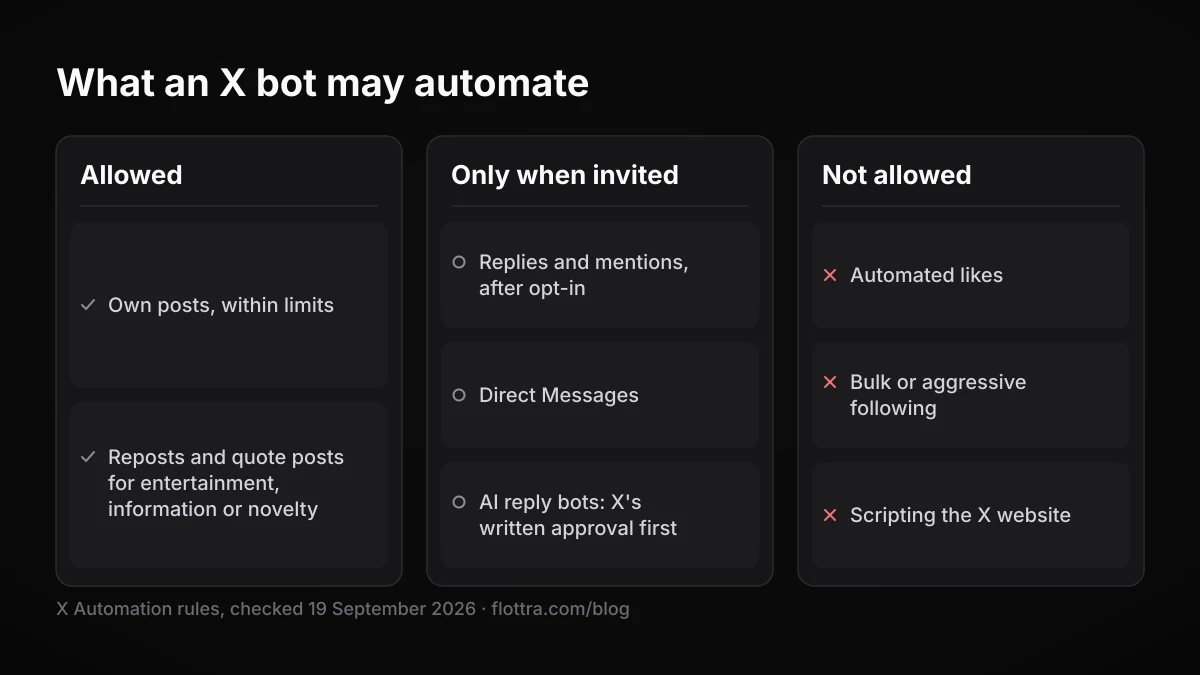
| Action | What X's rules say | In practice |
|---|---|---|
| Original posts | Allowed, within the posting limits | 50 original posts and 200 replies a day for unverified accounts, API posts included |
| Reposts and quote posts | “you may Repost or Quote post in an automated manner for entertainment, informational, or novelty purposes” | “bulk, aggressive, or spammy Reposting is a violation of the X Rules” |
| Likes | “You may not like posts or hide replies in an automated manner.” | No exception for bots, labelled or not |
| Follows and unfollows | “You may not follow or unfollow X accounts in a bulk, aggressive, or indiscriminate manner.” | Apps that claim to get users more followers are also prohibited |
| Replies and mentions | Only after the user opts in, with an opt-out, and one automated reply per user interaction | “sending automated replies to posts based on keyword searches alone is not permitted”; a follow is not opt-in |
| AI reply bots | “the deployment or operation of any AI reply bot requires prior written and explicit approval from X.” | Approval comes before launch, not after |
| Direct Messages | “You may not send unsolicited Direct Messages in a bulk or automated manner” | Being technically able to DM someone is not consent |
The reply rule is no longer only a policy. In a developer announcement dated around 24 February 2026, X said self-serve API replies (legacy Free, Basic, Pro and pay-per-use) only work when the original author mentions your account or quotes your post, and that mentions and quotes in ordinary posts are limited to people already in the conversation. X put it as: “This update closes the avenue of programmatically replying to conversations without being invited.” The X Developers post says Enterprise and Public Utility apps are not affected, and reporting at the time notes that manual replies are not restricted. All checked 18 October 2026.
This post does not repeat the full automation picture. For API versus browser automation and what each can reach, read X automation in 2026: what actually works. The reply and like rules have their own guides: X reply bots and X like bots.
How to get the automated account label on X
The automated account label is a line on a bot's profile reading “automated by @handle”, naming the human-run account responsible for it. X's help page on automated account labels (checked 18 October 2026) says: “Our Automation rules require these accounts to display labels and remain connected to a human-run account.” The same page says the label can also appear on the bot's posts.
The label launched in February 2022. TechCrunch reported that “a small robot icon appears next to the words “Automated by” followed by the name of the account’s operator”, and that about 500 developer accounts had tested it from the previous September. X's 2022 announcement described it as a way for automated accounts “to self-identify as bots” and gave these steps (both checked 18 October 2026):
- Log in to the bot account. Forum users report that label changes made in the app do not always stick (see below), so a web browser is the more reliable place to do this.
- Open Settings, then Your account, then Your account information.
- Select Automation, then Managing account.
- Choose the human-run account that runs the bot.
- Enter the password when asked.
- Look for the confirmation screen, then check that the label shows on the bot's profile.
X still calls the label a test
X's profile labels page still describes automated account labels as “currently in testing”, and the automated label help page describes the label appearing once an account accepts an invitation to a test group. Both checked 18 October 2026.
The documentation also disagrees on where the switch lives. The Developer Guidelines say to enable the label in your app settings. The help page and the 2022 announcement put it under account settings, Automation. Your screens may match either. Developers on X's forum report the Automation option missing or the label disappearing, for example a February 2025 thread titled “Automated Account Labeling Not Visible as Option”. If you cannot find it, the bio disclosure below is still required, and that part is entirely in your control.
The bio line every bot needs
X's Developer Policy (checked 18 October 2026) says an API bot must disclose itself: “you must clearly indicate what the account is and who is responsible for it.” The bio is the obvious place. An illustrative example, not a template X publishes: “Posts each new earthquake report for the Bay Area. Automated, run by @yourname. Reply stop to opt out.” It tells a reader what the account does, that software runs it, who to contact, and how to make it leave them alone.
Removing the automated label
There is no official page on removing it. Users on X's developer forum (checked 18 October 2026) report that turning it off in the app does not stick, and that “you need to turn it off via a web browser not the app itself”. Treat that as a user report. If the account is still automated, removing the label puts it back in breach of the disclosure requirement.
What a Twitter bot costs to run on the X API
The X API has no subscriptions now. It is pay-per-use: you “Purchase credits upfront. Deducted as you use the API.” (docs.x.com introduction, checked 18 October 2026). Reading a post costs $0.005 on X's official price list. Creating a plain post is reported at $0.015, and a post containing a URL at $0.20, so links are what make a posting bot expensive.
The model started as a pilot in late 2025 at $0.01 per created post. At the time X said: “It won’t be available to all developers, and there’s no guarantee it will become a permanent offering.” According to a third-party account citing X's changelog, pay-per-use launched on 6 February 2026 and the free tier closed to new developers, while Public Utility apps keep free scaled access. The same source reports the post price rising to $0.015, and $0.20 with a URL, effective 20 April 2026. X also advertises up to 20% back in free xAI API credits on the introduction page.
| Request | Price | Where the figure comes from |
|---|---|---|
| Posts read | $0.005 per resource | Official, docs.x.com pricing |
| User read | $0.010 | Official, docs.x.com pricing |
| DM event read | $0.010 | Official, docs.x.com pricing |
| Following/Followers read | $0.010 | Official, docs.x.com pricing |
| List, Space and Community read | $0.005 | Official, docs.x.com pricing |
| Post create | $0.015 per request | Third-party table |
| Post create with URL | $0.200 | Third-party table |
| Post create (summoned reply) | $0.010 | Third-party table |
| DM create | $0.015 | Third-party table |
| User Interaction create | $0.015 | Third-party table |
| Interaction delete | $0.010 | Third-party table |
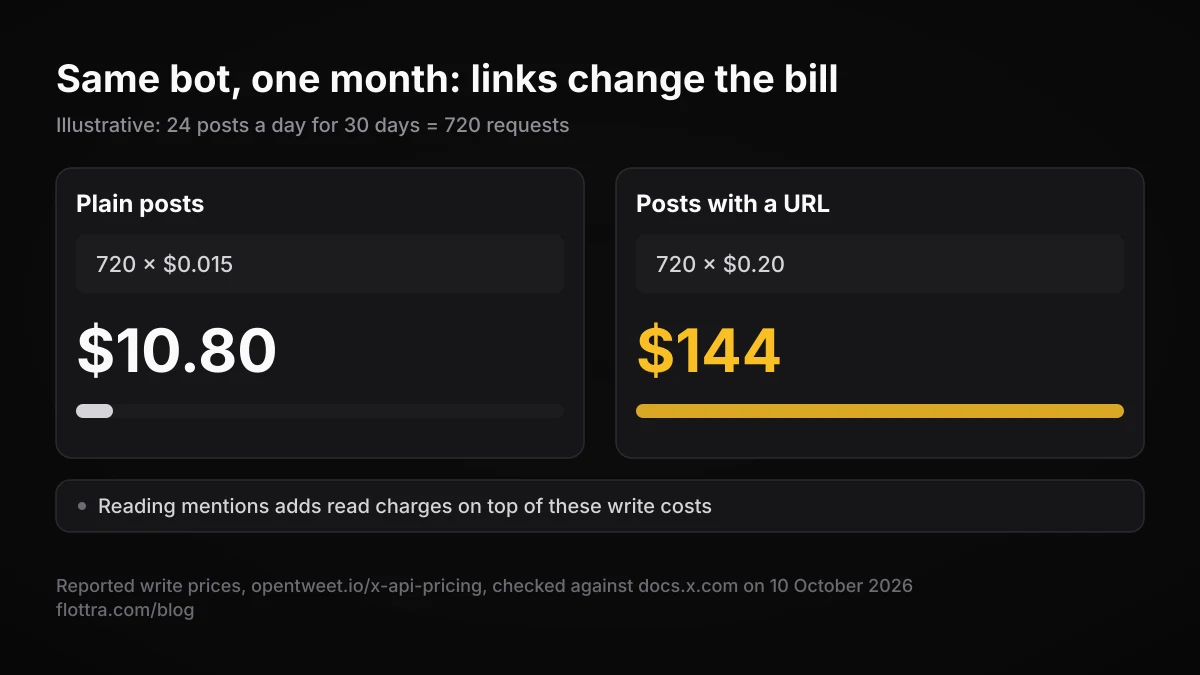
An illustrative calculation using those reported rates: a bot that posts 24 plain posts a day for 30 days makes 720 requests, which is 720 x $0.015 = $10.80 for the month. If every one of those posts carried a link, the same month would be 720 x $0.20 = $144. Reading mentions to catch opt-outs and summoned replies adds read charges on top.
Two things are unsettled. X's post cap page says “Pay-per-usage plans are subject to a monthly cap of 2 million Post reads”, while several third-party trackers say it rose to 3 million in September 2026. Check the figure in your Developer Console. Separately, third-party reports say likes, follows and quote posts were removed from self-serve API access in April 2026, which conflicts with the “User Interaction create” price row. Neither change is confirmed on an official page. For likes it changes nothing, since automated likes are banned by the rules regardless. If your bot depends on quote posts or follows, test those requests in your own app before you build around them.
How many tweets a bot can post per day
Bots get the same limits as everyone else. X's limits page (checked 19 September 2026) says: “Posts: 50 original posts and 200 replies per day for unverified accounts. The daily update limit is further broken down into smaller limits for semi-hourly intervals.” It adds: “These limits include actions from all devices, including web, mobile, phone, API, etc.” The same page, lower down, still says “The post limit of 2,400 updates per day is further broken down into semi-hourly intervals.” The page contradicts itself, and the 50 and 200 figure is the one in the current-limits list. It states no number for Premium accounts. More on this in X rate limits in 2026.
How to make a Twitter bot through the API, step by step
To make a Twitter bot that X permits, you create a separate account for it, register an app in the X Developer Console, buy credits, authorise the app to post as the bot, and call the create-post endpoint from a scheduled script. Then you add the label, a disclosing bio, opt-out handling and logging. The steps below avoid pasted code, because most published snippets target interfaces X no longer offers on the old terms.
- Decide what the bot does and check it against the table above. A bot that publishes its own content is the simple case. Anything that replies, mentions or DMs needs an opt-in design, and an AI reply bot needs X's written approval first.
- Create the bot's own account and write a bio that says it is automated and names who runs it. Keep a human-run account to manage it.
- Create an app in the X Developer Console and buy credits. Set a budget you are comfortable losing to a bug that loops.
- Authorise the app to act as the bot account with user-context tokens. Check docs.x.com for the authentication flow posting currently requires, since tutorials disagree.
- Post with the create-post endpoint (
POST /2/tweets). Vary the content. The Developer Policy forbids posting identical or substantially similar content across multiple accounts. - Schedule it with cron, Windows Task Scheduler or a cloud function, and spread posts out instead of firing them in bursts.
- Handle opt-outs. If the bot reads its mentions, detect “stop” and honour it at once, and send no more than one automated reply per user interaction.
- Turn on the automated label using the steps above.
- Log every request, its response and its cost. Keep tokens out of the code and out of public repositories.
Making a bot in Python with Tweepy
Tweepy is the usual Python library for the X API. Many tutorials that still rank, including Real Python's, use the older interface (tweepy.API, OAuthHandler and Stream), written for the days of free access. Their keyword stream listener that replies to matching posts is exactly the trigger the reply rules now name as not permitted, and the API now blocks it. Check the current Tweepy documentation for method names before copying anything, and use the endpoints listed on docs.x.com.
Making a bot without coding
No-code bot tools exist, and some, such as OpenTweet, describe building a bot “without an X developer account” through their own API. The tool still publishes to X through X's API on your account's behalf, so the label, the bio disclosure, the posting limits and the reply restriction all still apply to you. Their prices were not checked for this post. Before paying, confirm the tool works under pay-per-use pricing and the February 2026 reply change.
Can you make a Twitter bot without the API, using a browser script?
You can write one, but X's rules address it directly. Scripting the X website is listed as non-API automation that “may result in the permanent suspension of your account” in the Automation rules (checked 19 September 2026), and the Developer Guidelines (checked 18 October 2026) state: “Non-API automation (scraping, browser automation) results in permanent suspension.” The only kind of bot X documents as permitted is one that runs through the API.
Read the rule before you script anything
Adding the automated label or a disclosing bio does not change how X's rules treat a browser script: the Developer Policy describes disclosed bots that use the API, and scripting the website is still non-API automation. Whatever you call it, the account owner carries the consequences.
For transparency: flottra, which publishes this blog, is a browser-based tool. It does not use the X API. Its desktop app opens a real browser per account on your own Windows computer. It is not a bot builder, does not claim to comply with X's automation rules, and does not promise that any account will avoid suspension. If what you want is a public, labelled bot, the API route above is the one X documents.
Bot accounts on X: telling good bots from spam bots
A good bot on X is labelled, says in its bio what it is and who runs it, and posts something people chose to follow, such as earthquake alerts or museum images. A spam bot hides that it is automated and uses posts, replies or engagement to look popular or push something. X's policies are written against the second kind, not against automation itself.
TechCrunch's 2022 launch article named label testers such as @earthquakesSF, @AltTxtReminder and @met_drawings as examples of the good kind. Whether each is still active was not checked for this post. On the spam side, X's authenticity policy describes the markers to look for:
- “Fake personas: You may not use manufactured identities to engage in disruptive or deceptive behavior. This may include using stock, stolen or AI-generated profile photos, copied or stolen profile bios, and/or misleading profile information for the purpose of deceiving others.”
- “Content Spam: You may not share or post content in a bulk, duplicative, irrelevant or unsolicited manner that disrupts people's experience.”
- “Engagement Spam: We prohibit inauthentic use of X engagement features to artificially impact traffic or disrupt people's experience.”
- “Multiple Accounts and Coordination: We prohibit coordinated inauthentic activity that artificially influences conversations or disrupts X.”
Two signs come from X itself. A disclosed bot shows the “automated by” label naming its operator. And X's locked and limited accounts page (checked 19 September 2026) says that when an account is locked or limited, “people who visit your profile may see a message letting them know the account has displayed unusual activity and asking them to confirm they still want to view it.” No credible current figure for the share of X accounts that are bots was found, so none is given here.
Why you lost followers during a bot purge
X has been removing automated accounts in 2026. PiunikaWeb reported that X head of product Nikita Bier called the wider effort “Operation Kill the bots”. Postory reports that Bier said X was suspending 208 bots a minute on 9 April 2026, and on 24 July 2026 that 42,000 accounts automating replies with chatbots had been removed. Bier's original posts were not found, so treat those figures as Postory's. Accounts X removes no longer follow anyone, and X's enforcement options page (checked 19 September 2026) notes that even “when an account has been locked pending completion of a challenge (such as being required to provide a phone number), it is removed from follower counts, Reposts, and Likes.” So a sudden drop can come from a sweep rather than from people choosing to leave. To find out which, see how to see who unfollowed you on X.
Questions
- Is the X API still free for making a bot?
- Not for new developers, according to third-party accounts of X's changelog, which say the free tier closed when pay-per-use launched on 6 February 2026. X's own documentation describes credits bought upfront and deducted per request, with no subscription. Apps with Public Utility status are reported to keep free scaled access, but the criteria for that status were not found on an official page. Budget for a small amount per month for a simple posting bot, and much more if posts carry links.
- Does my bot have to say it is a bot?
- Yes. X's Developer Policy says an API bot must clearly indicate what the account is and who is responsible for it, and the Developer Guidelines ask for both the automated profile label and a bio line naming the operator. The label is still described as testing and some developers cannot find the option, but the bio line works on every account, so there is no reason to skip it.
- Can I run an AI reply bot on X?
- Only with X's prior written and explicit approval, according to the Automation rules. Without that, an AI bot replying to posts breaks the rules, and since February 2026 the self-serve API also blocks replies to anyone who has not mentioned or quoted your account. An AI bot that only writes its own original posts is a different case: it needs the label and disclosure, not reply approval.
- How do I remove the automated label from my account?
- X has no help page on removing it. Developers on X's forum say the change made in the mobile app does not stick, and that turning it off from a web browser works, under the account's Automation settings. Only remove it if the account genuinely stops being automated, because an automated account without the label and disclosure breaks X's developer requirements.
- Can a bot like or follow accounts automatically?
- Likes, no: the Automation rules say you may not like posts in an automated manner, and the Developer Guidelines add that auto-liking by keyword, hashtag, user or schedule is prohibited. Follows are prohibited when bulk, aggressive or indiscriminate, and so are apps that promise followers. Third parties also report that self-serve API access to likes and follows was removed in April 2026, though that is not confirmed officially.
- How many tweets can a bot post per day?
- The same as any unverified account: X's limits page lists 50 original posts and 200 replies a day, broken into smaller semi-hourly limits, and says API actions count towards them. The page also mentions an older 2,400 a day figure further down, so it contradicts itself. It gives no separate number for Premium accounts. As an illustration at the third-party-reported $0.015 a post, 50 plain posts a day for 30 days would come to $22.50.