How to manage multiple X accounts: switcher, X Pro, browser profiles and panels
To manage multiple X accounts, match the method to the number: the official app switcher for two to a handful (X publishes no ceiling), Delegate for a team on one account, X Pro columns if you pay for Premium+, one browser profile per account to keep several open at once, and an API scheduler or browser panel beyond that. One email address can belong to only one account.
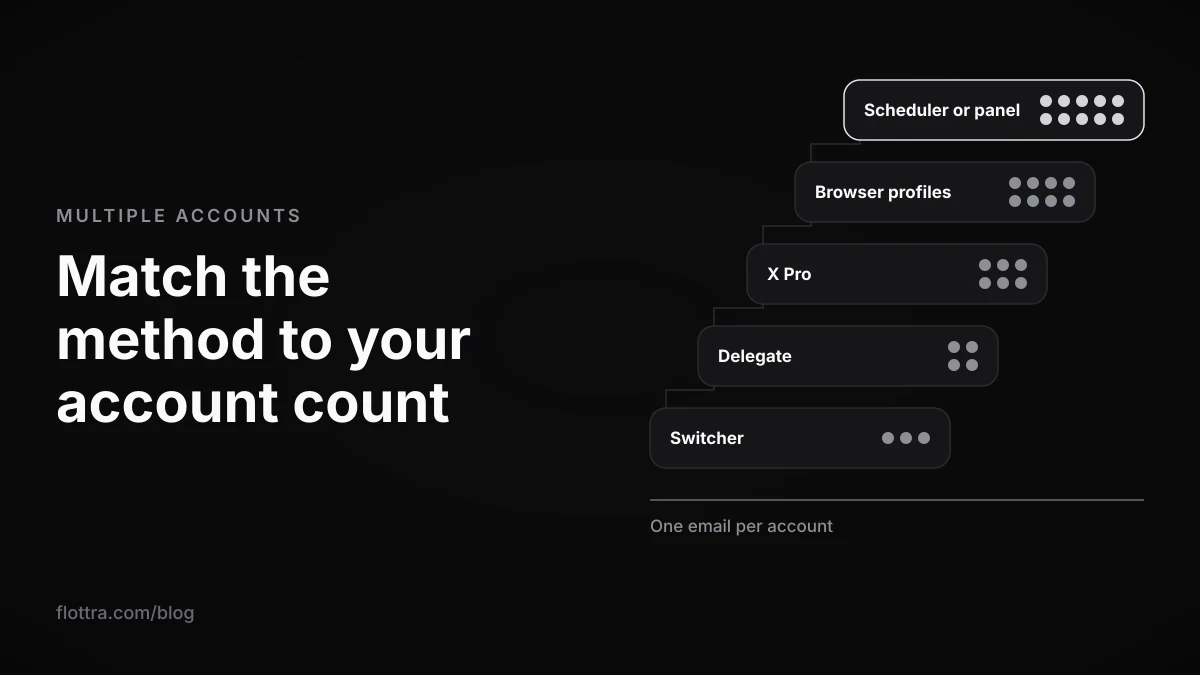
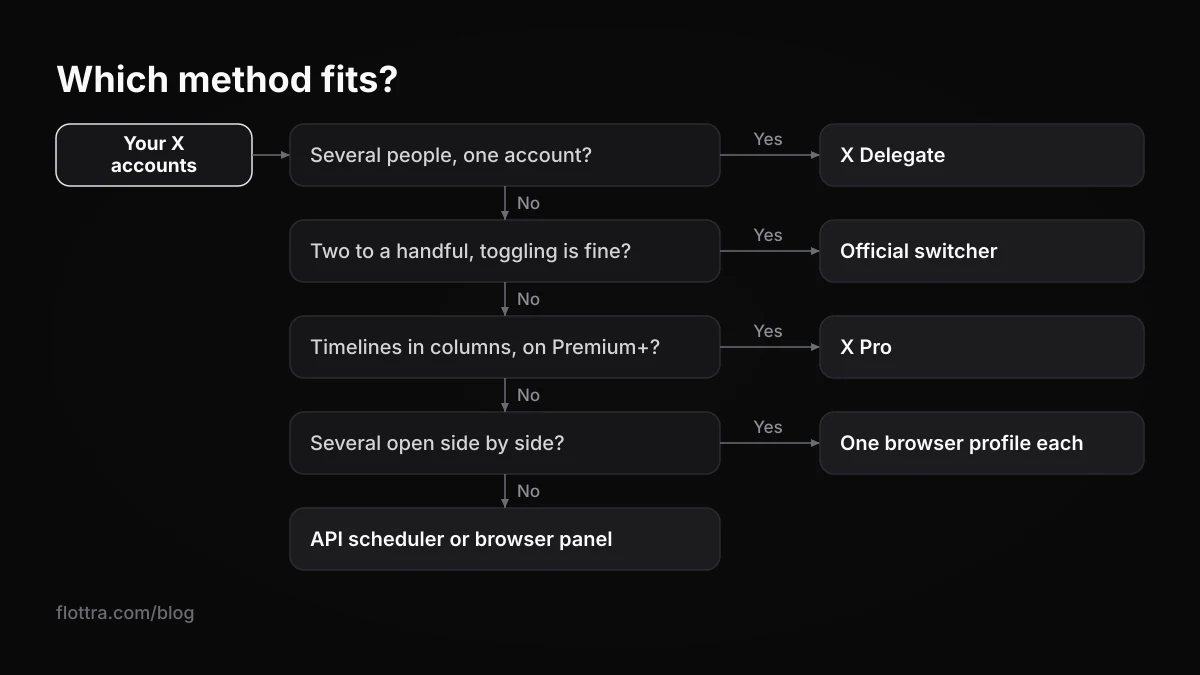
To manage multiple X (formerly Twitter) accounts, choose the method by how many accounts you run and who touches them. For two to a handful, add them to the official account switcher in the app or on x.com and toggle between them. For a team working on one account, use X Delegate. For timelines in columns, use X Pro, which now needs Premium+. To keep several accounts open side by side, give each its own browser profile. Beyond that, use an API scheduler or a browser panel with one profile and one proxy per account. Whichever you choose, every account needs its own email address.
Which method fits how many X accounts you run
The right setup for several X accounts depends on three things: how many accounts there are, how many people use them, and whether they need to be open at the same time. The official switcher covers most people with a personal and a brand account. Browser profiles cover anyone who needs accounts visible side by side. Dedicated tools cover larger numbers and client work. The table is the short version, and each row has its own section below.
| Method | Fits | Needs | What it does not do |
|---|---|---|---|
| Official account switcher | One person, two to a handful of accounts | Nothing beyond the X app or x.com | X publishes no maximum; you toggle between accounts rather than seeing them side by side |
| X Delegate | Several people on one account | Enabling Delegate and inviting collaborators on x.com | Run many accounts; it shares one account with a team |
| X Pro (formerly TweetDeck) | Watching several timelines in columns | Premium+ since late March 2026 (Engadget, Social Media Today) | Run each account in its own browser; the other accounts are connected to one X Pro login |
| One browser profile per account | Several accounts open at once on one computer | Chrome or Firefox profiles, or Firefox containers | Change your IP address or your computer |
| API scheduler | Brands and clients posting on a schedule | A vendor plan and X's official sign-in per account | Anything outside what the X API allows |
| Browser panel or antidetect browser | Many accounts, each in its own browser | A browser profile and usually a proxy per account | Guarantee anything about suspensions |
How to add and switch accounts with the official X switcher
The official X account switcher lets you stay signed in to several accounts and move between them without logging out. X's help page says: "If you have more than one X account, it's simple to add and access them from your X for iOS or Android app, and on desktop, mobile.x.com, X Lite, and X for Windows." (X Help Center, managing multiple accounts, checked 18 October 2026).
Add an account on iPhone, Android or desktop
- Tap or click your profile icon.
- Tap the more icon or the plus icon.
- Choose Add an existing account.
- Log in with the other account's username or email and its password.
Switch between accounts
On desktop, the help page says: "Once you've added your account(s), you can toggle between them by clicking your profile icon, and then tapping the smaller, additional profile icon(s) next to the more icon". On Android, the X for Android FAQ confirms "X for Android supports multiple accounts" and explains: "If you have more than one account added, tap the navigation menu icon or your profile icon in the top menu. Then, tap on the downward-facing arrow in the header to access your other accounts." (checked 18 October 2026).
How many accounts the switcher holds
X does not publish a maximum for the switcher. Several pages that rank for this query say it holds five, or that it "expanded" to ten; neither figure appears on the official help page. The ten comes from X's authenticity policy, which is about how many accounts you may operate, not how many fit in the switcher. In practice the switcher is comfortable with a handful. If you run more than that, the methods further down suit you better.
Can several X accounts share one email address or phone number?
No, two X accounts cannot share an email address. X's help page is categorical: "An email address can only be associated with one X account at a time." (X Help Center, email, phone number or username already in use, checked 18 October 2026). Each account needs its own address. To find out whether an address is already attached to an account, the same page suggests sending yourself a password reminder to it.
You will see advice to use Gmail plus aliases or dot variants as separate addresses. No official X source says whether X treats them as distinct, so do not build a setup on it.
Phone numbers are less clear. X publishes no figure for how many accounts one number may verify. The authenticity policy confirms a limit exists, because it lists as a violation "Employing workarounds to exceed the technical limits of account creation (e.g., account phone number limits)." (checked 18 October 2026). The in-use page adds a practical detail: "If you don't delete your phone number from your Settings before deactivating an account, you won't be able to use the phone number on another account for 30 days."
How many X accounts are you allowed to run?
X's authenticity policy sets the number: "X allows users to create and/or operate up to ten (10) accounts for different, non-duplicative purposes." (authenticity policy, checked 18 October 2026). The words "non-duplicative purposes" matter as much as the number. Pages that tell you to "feel free to create however many accounts you want" contradict the current policy.
The same policy allows people to "control multiple accounts on behalf of a third-party (e.g. “Social Media Managers”), provided that no violations of X Rules (including this policy) occurs". So an agency running client accounts is a recognised case. The policy does not count each client's own accounts against your personal ten in any stated formula, and it does not publish how it decides who operates what. For what people can actually see, and the three setups from switcher to one proxy per account, read how many X accounts you can have.
Letting a team post on one account without sharing the password: X Delegate
X Delegate lets several people work on one X account with assigned roles, so nobody needs the account password. The help page says: "Delegate is available on X.com and X Pro, but you need to enable Delegate and invite collaborators on X.com." (X Help Center, Delegate, checked 18 October 2026).
Use Delegate when the problem is people, not accounts: a client who wants an assistant to post, or a brand account with three editors. Handing round a password means every editor's device logs in as the owner, and one leaked password exposes the whole account. Delegate does not help you run many accounts; it shares one.
X Pro (formerly TweetDeck): columns for several accounts, now on Premium+
X Pro is X's column-based client, formerly TweetDeck. Its help page says: "X Pro gives you a more convenient experience with multiple timelines in one interface, plus advanced features like managing multiple accounts and scheduling posts." (How to use X Pro, checked 18 October 2026). Since late March 2026 it has been available only on the Premium+ tier, not Premium, as reported by Engadget and Social Media Today.
Connect accounts in X Pro
- Log in to X Pro and click your profile photo.
- Choose Manage accounts.
- Choose Add an existing account.
- Enter the other account's username or email and its password.
X adds one recommendation for the account you log in with: "We recommend that you use a X account that is not shared with other individuals." If a team needs access, combine X Pro with Delegate rather than sharing the login.
What X Pro costs now
Engadget reported in March 2026 that X moved X Pro behind Premium+, priced at $40 a month at that time, with no advance notice, and Social Media Today confirmed the change on 29 March 2026. Many guides still say X Pro needs Premium, which is out of date.
X's own Premium page now lists Basic, Premium and Premium+ with "localized pricing starting at $3/month or $32/year", and the Premium FAQ says "X Premium is now part of The X Subscription, one plan for X, Grok, and Cursor." On 18 October 2026 the current Premium+ price could not be read on X's own pages, and the tier summaries did not mention X Pro, so check at checkout. GIGAZINE reported that X's Nikita Bier promised a more powerful replacement within one to two weeks; whether it has launched could not be confirmed. For how X Pro compares with running accounts separately, see X Pro against a multi-account runner.
Keeping several X accounts open at once: browser profiles and containers
To have two or more X accounts open side by side on one computer, give each account its own browser profile or container. X stores your login in cookies, so one browser profile normally shows one active account at a time. Separate profiles keep separate cookies, and each can stay signed in to a different account.
Chrome profiles
Google's help says: "With profiles, you can keep all your Chrome info separate, like bookmarks, history, passwords, and other settings." (Chrome Help, checked 18 October 2026). Click the profile icon at the top right, choose Add Chrome profile, then log in to one X account in each profile. Each profile opens as its own window.
Firefox profiles and Multi-Account Containers
Mozilla describes Firefox profiles as allowing "complete separation of all data between profiles", including "browsing data (such as cookies and logins)" (Firefox profile management, checked 18 October 2026). For several accounts in one window, Mozilla's Multi-Account Containers extension works per tab: "Cookies are separated by container, allowing you to use the web with multiple accounts". Give each X account its own colour-coded container.
Separate cookies, same connection
Profiles and containers separate logins. They do not change your IP address, your computer or the browser itself, so every account still reaches X from the same network. For a personal and a work account that is ordinary. For a larger group of accounts, read choosing proxies for X accounts and whether you need an antidetect browser. X does not publish which of these signals it weighs.
Tools that manage many X accounts: schedulers, antidetect browsers and panels
Multi-account tools for X come in three kinds: API schedulers that post through X's official sign-in, antidetect browsers that give each account its own browser profile, and panels that run a real browser per account from a schedule. They solve different problems, and X's rules treat them differently.
API schedulers
A scheduler connects each account through X's official sign-in and posts through the X API, so it can only do what the API allows. Plan limits vary, and vendor pages do not always agree with themselves: OpenTweet's multi-account features page says its Agency plan connects up to 10 X accounts (checked 18 October 2026), while an older post on its own blog says 3. Read the pricing page on the day you buy. Whatever the tool, posting the same text from several accounts runs into the duplicate-content rule covered in the next section.
Antidetect browsers
Antidetect browsers manage many browser profiles, usually each with its own proxy and fingerprint settings. Multilogin's X page advertises separate browser profiles and Android cloud phones per X account, and a free plan with no card required (checked 18 October 2026). These tools manage the browser; the work inside X is still yours to do by hand or to script.
Browser panels
A panel combines the two ideas: it keeps a schedule and works through it in a separate browser per account. X's automation rules address this directly. Under "Don't", they say: "Use non-API-based forms of automation, such as scripting the X website. The use of these techniques may result in the permanent suspension of your account." (X automation rules, checked 19 September 2026).
flottra is a panel of this kind: the panel keeps the schedule, and a desktop app on your own Windows computer opens a real browser per X account, each with its own saved profile and its own proxy, and works through tasks one at a time. It does not use the X API and runs no browsers on its own servers. flottra's panel refuses to put more than five accounts on one static proxy, because accounts sharing one exit IP is what a farm looks like. You weigh that against the rule quoted above.
No tool removes the suspension risk
Some pages ranking for this query say that logging in through a particular browser avoids "the risk of platform bans". No source supports that, and X does not publish its detection rules. X's automation page is explicit about who carries the risk: "You are ultimately responsible for the actions taken with your account, or by applications associated with your account." (checked 19 September 2026). What actually gets accounts caught is covered in why X accounts get suspended.
What X does not let you do with multiple accounts
Running several X accounts is allowed, but a few things are not, whatever method you use. These are the rules most often missed by people moving from one account to several.
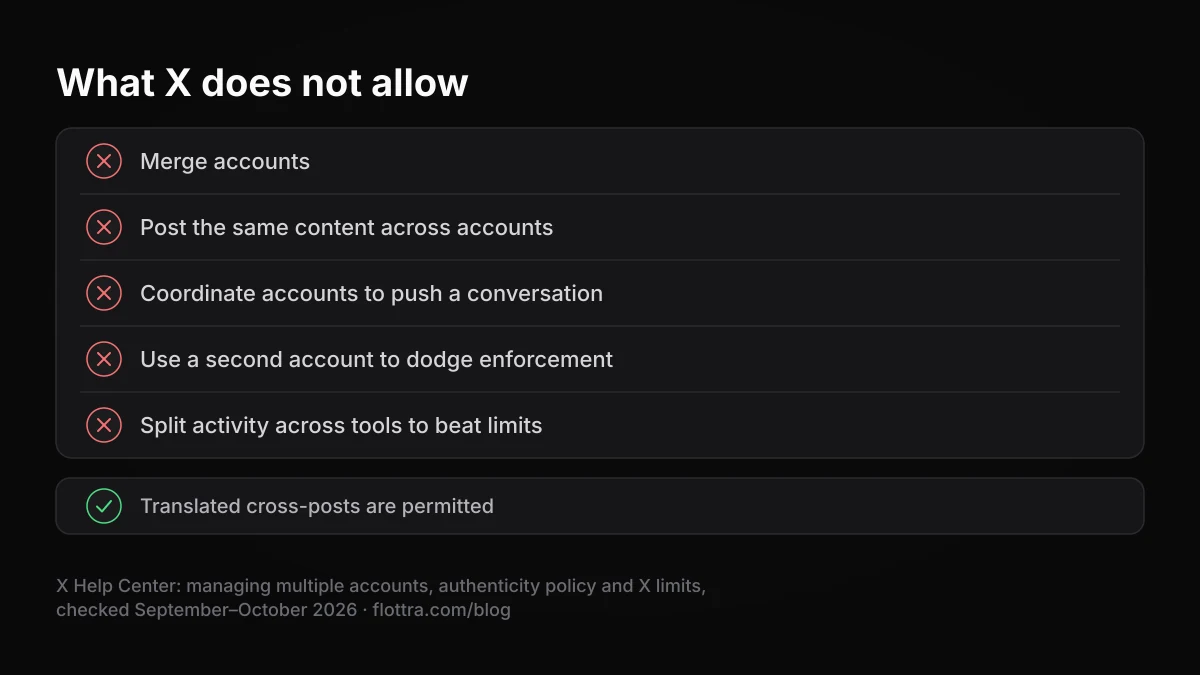
- Merge accounts. "We currently do not offer a way to merge multiple accounts into one or migrate data (posts, following, or followers) from one account to another." (managing multiple accounts, checked 19 September 2026).
- Post the same content across accounts. The authenticity policy prohibits duplicate "content across multiple accounts (content that is cross-posted but localized into another language is permitted)" (checked 18 October 2026). A translated version for a regional account is fine; the same post on five accounts is not.
- Coordinate accounts to push a conversation. "We prohibit coordinated inauthentic activity that artificially influences conversations or disrupts X." (authenticity policy, checked 19 September 2026).
- Use a second account to dodge enforcement. "Ban Evasion: You may not circumvent X enforcement actions." (authenticity policy, checked 19 September 2026).
- Split one account's activity across tools to get more out of the limits. "These limits include actions from all devices, including web, mobile, phone, API, etc." (X limits, checked 19 September 2026). Phone, desktop, X Pro and any scheduler all count against the same daily figures, which are set out in X rate limits.
Questions
- Can two X accounts use the same email address?
- No. X's help page on details already in use states that an email address can only be associated with one X account at a time, so each account needs its own address. If you try to register an address that is already attached, X refuses it. To find out which account holds it, request a password reminder to that address. Whether Gmail plus aliases or dot variants count as separate addresses is not stated in any official X source, so treat that as untested.
- Can two X accounts use the same phone number?
- X does not publish a number. Its authenticity policy refers to "account phone number limits" and treats workarounds to exceed them as a violation, which confirms a limit exists without stating it. Pages claiming one number covers 10 accounts, or "many", cite no official source. One documented detail: if you deactivate an account without first removing its phone number, that number cannot be used on another account for 30 days.
- How many accounts can the X account switcher hold?
- X's help page on managing multiple accounts gives no maximum. Figures of five or ten on other sites are not on any official page; the ten comes from the authenticity policy, which limits how many accounts you may operate for different purposes, not how many the switcher displays. In practice the switcher is comfortable with a handful. Beyond that, separate browser profiles or a dedicated tool are easier to keep track of.
- Is TweetDeck still free?
- No. TweetDeck became X Pro, and since late March 2026 X Pro has been limited to the Premium+ tier, as reported by Engadget and Social Media Today. Engadget gave the Premium+ price as $40 a month at that time. X now sells Premium as part of a bundled X Subscription, and the current Premium+ price was not readable on X's own pages on 18 October 2026, so confirm it at checkout.
- If one of my X accounts is suspended, are my other accounts affected?
- X publishes no statement that suspending one account automatically suspends others on the same email, phone or network, so claims either way are guesses. What the rules do say is that ban evasion is prohibited: using another account to get around an enforcement action on the first breaks the authenticity policy. Appeal the suspended account through X's own route rather than moving its activity onto a second account.
- Can I post the same tweet to several X accounts at once?
- Tools can do it, but the authenticity policy prohibits posting duplicate content across multiple accounts. The one stated exception is content cross-posted after being localised into another language, so a regional account carrying a translation is allowed. If several accounts cover the same news, write each post for that account's audience. Scheduling the same text everywhere is the pattern the rule describes.