Can you view a suspended X account? What visitors and the owner see
No. X shows a suspension notice in place of a suspended account's posts, bio and avatar, and offers no way for other people to read them. Older posts may survive only in outside copies such as Wayback Machine snapshots. If the account is yours, X's main routes start from inside it: phone or email prompts at login, and an appeal filed while logged in. X's page also says it covers how to request your data.
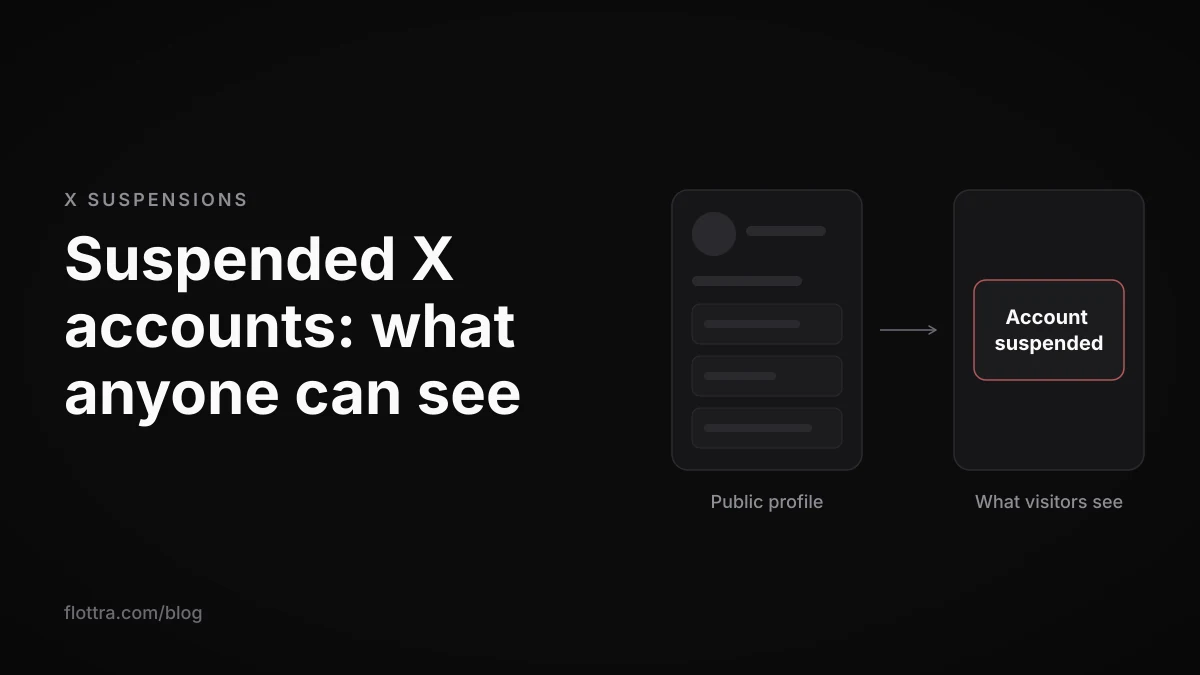
You cannot view a suspended X (formerly Twitter) account on X itself. The profile's posts, bio, avatar and media are replaced by a suspension notice, and no setting, link or trick brings them back. Anything still readable is a copy someone made before the suspension, mostly Wayback Machine snapshots. If the account is yours, you can still try to sign in, because X's main routes out of a suspension (phone or email prompts at login, and the appeal form) start from inside the account.
Can you see a suspended X account's posts?
Not on X. A suspended profile shows a notice where the posts, bio and avatar used to be. X's help pages describe suspension as an enforcement action and offer no way for other users to read a suspended account's posts. None of the guides currently ranking for this question found a way either. X's suspended accounts page opens plainly: "We may suspend accounts that violate the X Rules." (checked 18 October 2026).
Copies can still exist outside X:
- Web archives, mainly the Wayback Machine. These saved some profiles and posts as they looked on the day of capture.
- Screenshots and quotes that other people posted elsewhere.
- A text snippet in search results, which happens occasionally.
Google's cached-page links, which many older guides rely on, are no longer available (details below).
What a suspended profile looks like to visitors
Visitors to a suspended X profile see a suspension screen, not the account. The most concrete current description comes from a third-party logged-out check of a suspended profile on x.com in October 2026, published by xholic. That check found:
- a top bar reading "Profile" instead of the display name
- the heading "Account suspended"
- a line linking to the X Rules
- no posts, bio or avatar
That is an outside observation, not wording X publishes, and X can change the screen whenever it likes. The same check did not document the logged-in view or the app.
"Account suspended" or "this account doesn't exist"?
Several popular guides, including Postory and ClimbX, say a suspended profile returns a "this account doesn't exist" style message. The October 2026 logged-out check found "Account suspended" instead. If you land on a "doesn't exist" message, do not take it as proof that the account was suspended. It is not the suspension screen described in that check, and X's help pages do not say that a suspension produces it.
Not the same as a locked profile or a limited post
A locked profile and a visibility-limited post can look alarming, but neither hides the whole account:
- Locked profile. X's locked and limited accounts page says "people who visit your profile may see a message letting them know the account has displayed unusual activity and asking them to confirm they still want to view it." (checked 19 September 2026). The profile is still there behind the warning.
- Visibility-limited post. X's enforcement options page says "Starting in April 2023, posts identified as violating our Rules will begin to receive labels informing both post authors and viewers that we limited the post's visibility." (checked 19 September 2026). That label sits on one post, not on the whole profile.
The "shadowban" people talk about is closer to the second case. The X shadowban guide covers how to test for it.
Suspended, locked, read-only or limited: how to tell them apart
Suspension is the only one of these four states that replaces the whole profile with a notice. A lock puts a warning in front of a profile that still exists. Read-only mode restricts what the owner can do. A visibility limit applies to individual posts. The table matches what a visitor sees to what the owner can do, using X's own pages.
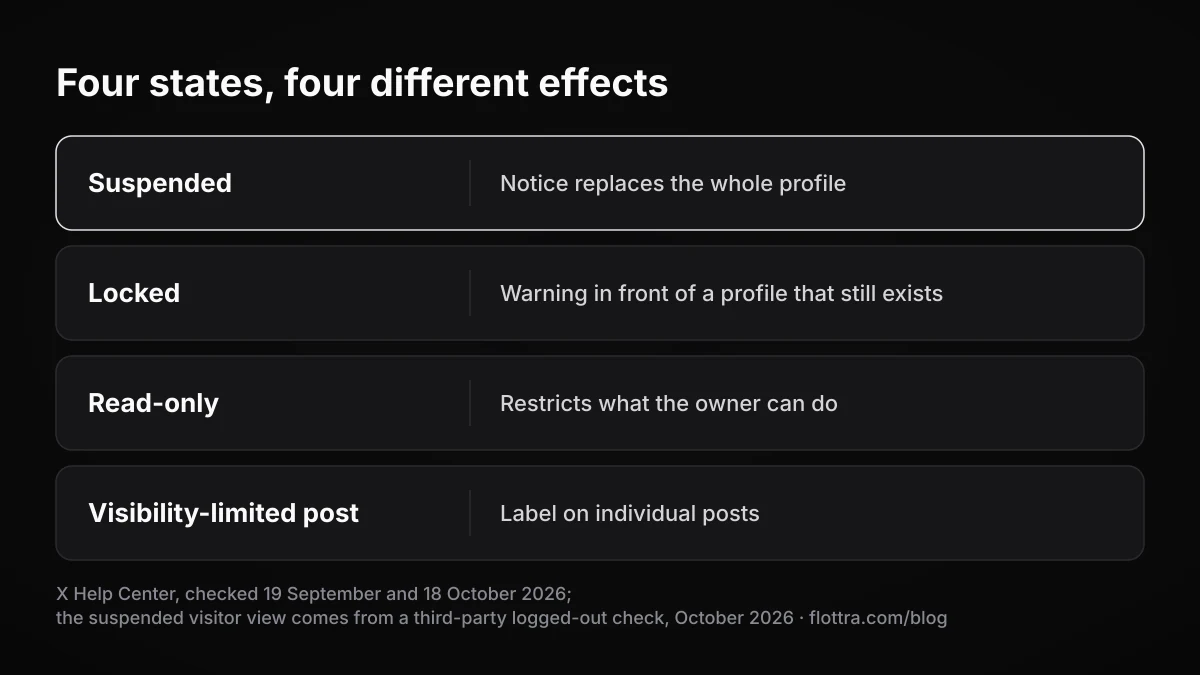
| State | What a visitor sees | What the owner can do | Official source |
|---|---|---|---|
| Suspended | A suspension notice instead of posts, bio and avatar (third-party logged-out check, October 2026) | Follow phone or email prompts at login, file an appeal while logged in, deactivate only after appealing; X's page also mentions requesting data (steps not confirmed) | Suspended accounts |
| Locked | Possibly an "unusual activity" warning, then the profile once they confirm | Verify ownership by phone, email or captcha | Locked and limited accounts |
| Read-only | X's page does not describe the visitor's view | Read timelines and send DMs to followers only; posting, Reposting and Liking are limited for a time | Enforcement options |
| Visibility-limited post | The post with a label, less discoverable; the rest of the profile as normal | Appeal the label | Enforcement options |
One line on the enforcement options page is easy to misapply to suspensions: "Note that when an account has been locked pending completion of a challenge (such as being required to provide a phone number), it is removed from follower counts, Reposts, and Likes." That sentence is about locked accounts. If your account is locked rather than suspended, the guide to clearing an X lock is the one you need.
How to view posts from a suspended account
The only dependable way to read a suspended account's posts is a web archive copy made before the suspension, and the Wayback Machine is where such a copy is most likely to exist. If nobody archived the profile while it was live, there is usually nothing to find.
- Write down the handle without the @, plus any post URLs you have. A post URL looks like
x.com/handle/status/followed by a long number. - Open the Wayback Machine at
web.archive.organd search fortwitter.com/handle, then search again forx.com/handle. An OSINT Team write-up suggests checking both, because captures may sit under either address. - Pick a snapshot from the calendar dated before the suspension. According to the same write-up, a profile snapshot holds the profile details and the posts, reposts and replies that were visible at the moment of capture.
- Search each individual post URL the same way, under both domains.
- Save what you need as screenshots with the snapshot date visible, so your copy does not depend on the archive page staying up.
What archived copies leave out
A March 2026 guide on X backups lists the gaps:
- Not every account was archived, so many suspended profiles have no snapshot at all.
- Images often fail to load in old captures.
- DMs, likes and bookmarks are not included.
- Posts from protected accounts are not saved.
Google cache no longer works
Several older guides ranking for this query still tell you to use Google's "Cached" button, or a bookmarklet that opens Google's cache of a twitter.com profile. ClimbX reports that Google retired its cached-page links in 2024, so those methods have nothing to open. Google's own announcement was not retrieved for this post. What remains is the text snippet under a search result, which sometimes quotes part of a post.
archive.today and mirror sites
ClimbX describes archive.today as hit-and-miss. It is worth a search if the Wayback Machine has nothing. No current source confirms that Nitter instances or other mirrors show suspended accounts, so do not count on them.
What you see when your account is currently suspended
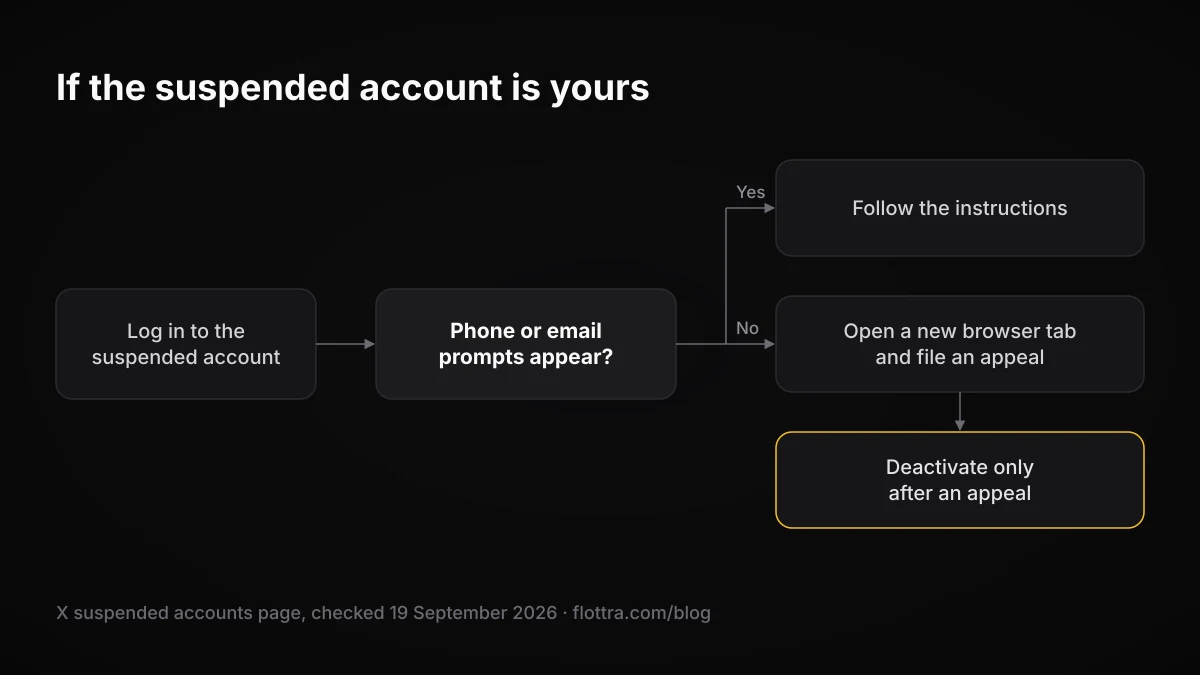
If the suspended account is yours, signing in is where you find out what X will let you do, and that is much narrower than normal use. X's suspended accounts page (checked 19 September 2026) sets out the routes: answer phone or email prompts if they appear, otherwise file an appeal while logged in to the account, and deactivate only after appealing. No official copy of the banner wording behind the search "your account is currently suspended" was found for this post. Go by the options your own screen offers rather than a remembered phrase.
Can you still log in and browse?
Sometimes, but no official page says what a suspended owner can do once signed in. On X's developer forum, one user describes an account as permanently suspended and in read-only mode. The reply pointed them to the appeals form. That is one report, not policy.
Read-only mode is a separate enforcement option with its own definition: "We may temporarily limit an account's ability to post, Repost, or Like. The user can read their timelines and will only be able to send Direct Messages to their followers." (enforcement options page, checked 19 September 2026). If your screen says read-only, that definition applies. If it says suspended, assume the stricter state.
Getting out: prompts, appeal, deactivation
X's page says "If you think that your account was mistakenly suspended, you may be able to unsuspend it." The routes, in order:
- Prompts at login. "If you log in and see prompts that ask you to provide your phone number or confirm your email address, follow the instructions to get your account unsuspended."
- The appeal form. "First, log in to the account that is suspended. Then, open a new browser tab and file an appeal." The form is at help.x.com/en/forms/account-access/appeals.
- Deactivation, only after an appeal. "In order to deactivate your account, you'll first need to file an appeal."
What to write in the appeal, and when it is not worth the effort, is covered in the guide to appealing an X suspension.
The appeal form checks which account you are signed in to
If the browser tab is signed in to a different account, or to none, the form shows "You are not currently logged into a suspended X account." This is easy to hit if you switch between several accounts in one browser. Sign in to the suspended account itself, then open the form in a new tab of that same session.
Downloading your data
Downloading your data while suspended may or may not work, and the sources disagree. X's suspended accounts page describes itself (meta description, checked 18 October 2026) as covering "how to request your data". The steps in that section could not be confirmed for this post. A March 2026 guide says the self-serve "Download an archive of your data" screen cannot be reached while suspended. Postory says you can sometimes request it.
X's How to access your X data page gives the self-serve path and points to the contacts in X's Privacy Policy for requests. It does not say whether the self-serve path works for a suspended account. Try the settings path once. If you cannot reach it, read the data section of the suspended accounts page in a browser and use the route given there.
X Money
X's suspended accounts page includes a section on X Money that was not in the 19 September reading used for this post (checked 18 October 2026):
- "If your X account is suspended for violating Child Safety or Violent and Hateful Entities policies, you will lose Money access and any remaining funds will be mailed to you via check."
- "If your X account is suspended for policies other than Child Safety or Violent and Hateful Entities, you will continue to be able to use all Money features with no interruption."
How long an X suspension lasts, and what happens to your followers
X does not publish a duration for suspensions or a response time for appeals. On abusive behaviour, its suspended accounts page says "we may suspend it temporarily or, in some cases, permanently." It also admits errors: "Sometimes a real person’s account gets suspended by mistake, and in those cases we’ll work with the person to make sure the account is unsuspended." (checked 18 October 2026). Figures such as "24 to 72 hours" that circulate online have no official source.
Several questions have no official answer on the pages read for this post:
- whether a suspended account's follows drop out of other people's follower and following counts
- whether its likes, replies and DMs disappear for the people who received them
- whether its handle is ever released for reuse
Treat any confident claim on these points as a guess.
On why accounts are suspended, the same page is blunt: "Most of the accounts we suspend are suspended because they are spammy, or just plain fake, and they introduce security risks for X and for everyone using X." The signals behind that are covered in why X accounts get suspended.
If you run several accounts, export each archive while it is healthy
The surest way to keep an X account's posts is to download its data archive before anything goes wrong. After a suspension the self-serve export may be out of reach, and outside archives hold only whatever happened to be captured. X's data page says "You can also download a machine-readable archive of information associated with your account in HTML and JSON files." (checked 18 October 2026). The self-serve path it lists:
- Open More, then Settings and privacy.
- Choose Your account, then Download an archive of your data.
- Confirm your password.
- Select Request archive, and download the file when X makes it available.
- Store the file outside X, labelled with the handle and the date.
For each account, also keep a record of the login email and phone number and make sure both still reach you. X's first route out of a suspension is a phone or email prompt at login, and you cannot complete it if the inbox or number is gone. If you run accounts in separate browser profiles, keep a note of which profile holds which account. That way you can sign in to the right one before opening the appeal form.
flottra's desktop app opens each account in a real browser with its own saved browser profile and proxy, on your own Windows computer, so each account's session is kept apart from the others. It does not appeal suspensions, and it does not check the status of other people's accounts. For the wider question of running many accounts, see how many X accounts you can have.
Questions
- Can you see a suspended Twitter account's tweets?
- Not on X. A suspended profile shows a notice instead of the posts, and X offers no viewer or setting that reveals them. Your best chance is the Wayback Machine. Search for the handle under both twitter.com and x.com and open a snapshot dated before the suspension. Expect gaps: many accounts were never archived, images often fail to load, and protected accounts' posts were not saved.
- Does Google cache still work for suspended Twitter accounts?
- No. ClimbX reports that Google retired its cached-page links in 2024, so the "Cached" button and the bookmarklets in older guides have nothing to open. At most, a search result may show a short text snippet quoting part of a post. For anything more complete, use a Wayback Machine snapshot, or try archive.today, which is unreliable for X profiles.
- Can I still log in when my X account is suspended?
- Often you can, and you need to, because X's routes out of a suspension start inside the account. Phone and email prompts appear at login, and the appeal form only works when you are signed in to the suspended account. No official page lists what else a suspended owner can do. Read-only mode is a separate, defined state: the owner can read timelines and DM followers only.
- Can I download my X data while my account is suspended?
- Possibly, but do not rely on it. X's suspended accounts page says it covers how to request your data. One outside guide reports that the self-serve "Download an archive of your data" screen is unreachable during a suspension. Try the settings path first. If it fails, use the route on X's suspended accounts page or the Privacy Policy contacts listed on its data page.
- Can I deactivate or delete a suspended X account?
- Not straight away. X's suspended accounts page says "In order to deactivate your account, you'll first need to file an appeal." Sign in to the suspended account, open the appeal form in a new tab of the same session, and submit it. Deactivation is only available after that. No one else can do this for you, including any third-party tool.
- How long does an X suspension last?
- X does not say. Its suspended accounts page states that abusive behaviour can lead to a temporary or, in some cases, a permanent suspension, and that when a real person is suspended by mistake, X will work with them to get the account unsuspended. It gives no duration for either kind and no response time for appeals. Treat any specific number of hours or days you read elsewhere as unsourced.