How to see who unfollowed you on X, and which follower trackers still work
X does not show who unfollowed you or send an unfollow notification; it shows a follower total. To see names, you must save snapshots of your follower list and compare them: by hand, with two data archives, through your own X API app ($0.001 per follower since 20 April 2026), or with a tracker such as Fedica, Circleboom or Unfollr. No method shows unfollows from before your first snapshot.
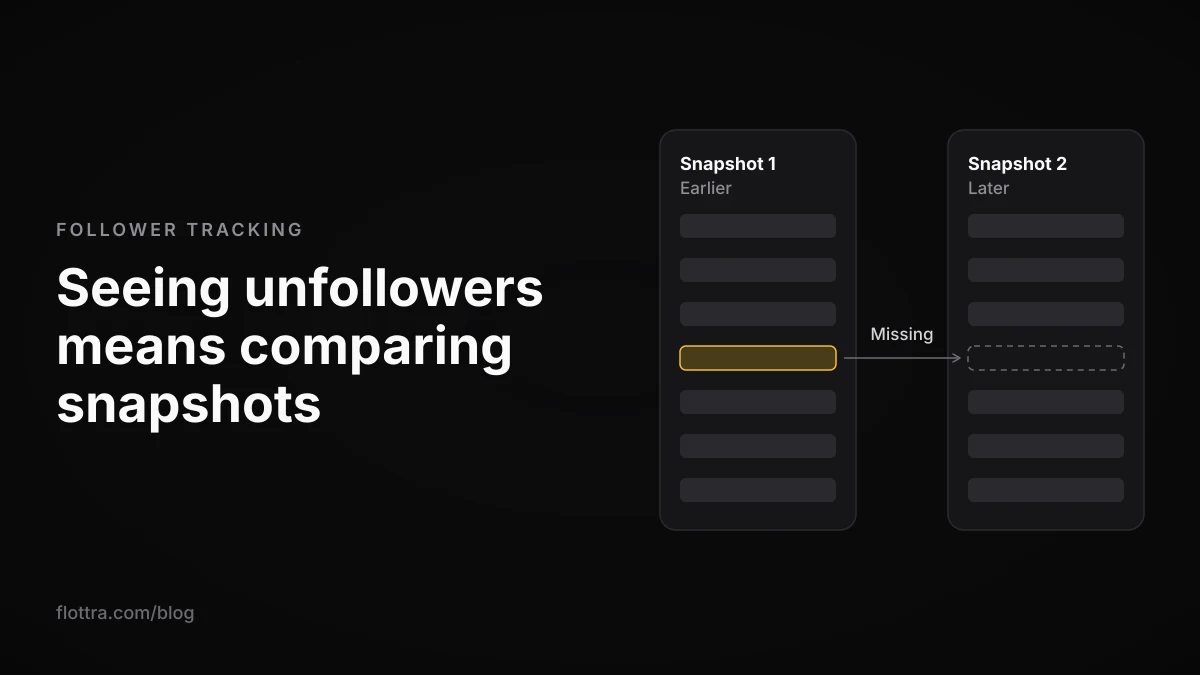
X (formerly Twitter) does not tell you who unfollowed you. It shows a follower total and your current follower list, and it sends no notification when someone leaves. The only way to see unfollowers by name is to save snapshots of your follower list and compare them: by hand, from two of your own X data archives, through your own X API app, or with a third-party tracker. None of these can show unfollows from before your first snapshot, and a missing name is often a suspended or locked account rather than a real unfollow.
Can you see who unfollowed you on X?
Not from X itself. X lists who follows you now, but it does not offer an unfollow notification or a history of who left. Every unfollower tracker, paid or free, works the same way: it saves your follower list, saves it again later, and reports the accounts that were in the first list and are missing from the second.
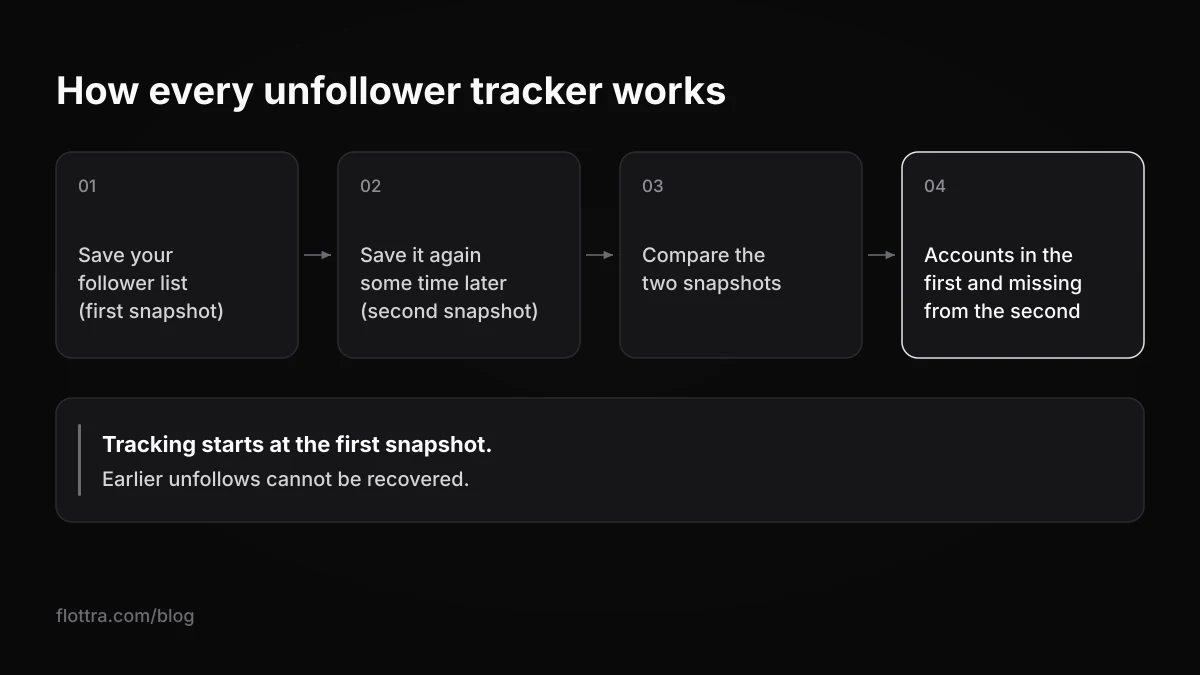
That has one consequence most people learn too late: tracking starts when the first snapshot is taken. Fedica states this on its own unfollower tracker page (checked 18 October 2026): tracking begins at your signup date and is not retroactive. If someone unfollowed you last month and nothing saved your list before that, no tool can name them now.
The second consequence: a name that disappears from your list is not always an unfollow. Accounts drop off when they are suspended, deactivated, removed for inactivity or locked pending a challenge. A good tracker separates these, and the section on follower drops below quotes X's own reasons.
Four ways to track followers and unfollowers on X
There are four practical ways to get follower snapshots on X. They differ in what you hand over, what they cost and how much work they take. The free routes give a third party nothing; the paid ones save time in exchange for access or code.
| Method | What you grant | Cost | Catch |
|---|---|---|---|
| "Follows you" label, checked by hand | Nothing | Free | One profile at a time, no history |
| Two of your own X data archives, compared | Nothing to any third party | Free | Not live: you request each archive and wait |
| Your own X developer app reading your own followers | Nothing beyond your own developer account | $0.001 per follower returned (Owned Reads, since 20 April 2026) | Needs a developer account and a short script |
| OAuth tracker (Fedica, Circleboom) | App access through X's sign-in | Fedica: Grow plan or higher; Circleboom: price not confirmed on its own pricing page | Another app holding access to your account |
| Browser extension (Unfollr) | An extension reading the X page you have open | No API fees, per Unfollr | Reads the X website; see X's scripting rule below |
Free ways to check unfollowers: the "Follows you" label and two data archives
You can check unfollowers on X for free without connecting any app: either look for the "Follows you" label on individual profiles, or compare the follower lists in two X data archives taken at different dates. The first answers a question about one person; the second gives you a full list of who left between the two dates.
The manual check
Open a profile. If that account follows you, X shows a "Follows you" label next to its name. SocialRails (re-checked 25 July 2026) describes this as the free manual method and says X has no built-in unfollower feature. It answers "does this one person still follow me" and nothing more: you cannot work through a few thousand followers like this, and it keeps no record.
Compare two X data archives
Your official X data archive includes your follower list (follower.js) and the accounts you follow (following.js). One archive shows who does not follow you back. Two archives taken at different dates show who left in between, and no third-party app ever gets access to your account.
- Request your X data archive now. This is your baseline, and nothing before it can be recovered.
- When it arrives, keep
follower.jsandfollowing.jssomewhere safe, named with the date. - After the period you want to cover (a month, say), request a second archive.
- Compare the two follower lists. Accounts in the first file and missing from the second are your lost followers.
- Open each missing account. If the profile loads normally and no longer shows "Follows you", it was a real unfollow. If it does not load normally, the account was more likely suspended, deactivated or locked.
unfollowertrackers.com/x (checked 18 October 2026) reads these files in your browser and works out non-followers, fans and mutuals from one archive. For unfollows you need the two-archive comparison, which its page does not spell out. The limit is speed: an archive is not a live export, so this suits a monthly check, not a daily one.
Tracking your own followers with the X API: what it costs in 2026
Reading your own follower list through your own X developer app is now cheap. Since 20 April 2026, X prices Owned Reads, which include requests your own app makes for your own followers, at $0.001 per account returned. A full snapshot of 1,000 followers costs about $1, and 10,000 followers about $10.
X's developer overview (checked 18 October 2026) says: "Requests for your own posts, bookmarks, followers, likes, and more are priced at $0.001 per resource." The change was announced in an X developer forum post, which defines the term: "Owned Reads are requests made by your own developer app for your own posts, bookmarks, followers, likes, lists & more." Outside Owned Reads, X's pricing page says "The X API uses pay-per-usage pricing." and lists reading followers or following at $0.010 per resource returned.
| Followers | One snapshot at the Owned Reads rate ($0.001) | One snapshot at the standard rate ($0.010) |
|---|---|---|
| 1,000 | about $1 | about $10 |
| 10,000 | about $10 | about $100 |
| 50,000 | about $50 | about $500 |
- Create a developer app in your own X developer account, so the requests are your app reading your own data.
- Call
GET /2/users/{id}/followerswith your user ID, page through the results, and save the follower IDs with the date. - Repeat on a schedule your budget allows. At the Owned Reads rate, weekly snapshots of 1,000 followers come to about $4 to $5 a month.
- Compare each snapshot with the previous one, then look up the missing IDs to see whether they unfollowed or disappeared.
Two cautions. The point that the owned rate applies only when you own the developer app comes from a developer forum discussion, not a definitive documentation statement; a commercial tracker reading your followers through its own app may be paying the $0.010 rate. And X's pricing page bills a follow.unfollow Activity API webhook event at $0.010 per event, so a tool can have unfollow events pushed to it instead of comparing lists. The price is on docs.x.com, but the exact behaviour of the event was only seen on an unofficial copy of the docs, so test it before you rely on it.
This also replaces an older figure that still circulates. Unfollr's guide to tracking unfollowers estimated a personal API setup at about $40 a month for a 1,000-follower account scanned weekly; that estimate predates the Owned Reads rate. For the wider trade-off between the API and the browser, see X automation in 2026: what actually works.
Twitter unfollow trackers that still work
The X unfollow trackers still running in October 2026 fall into two groups: services you connect through X's own sign-in (OAuth), which read your followers through the official API, and browser extensions that read the follower page you have open. Prices are left out here wherever they could not be confirmed on the vendor's own pricing page on the day of writing.
OAuth services
- Fedica, which also now runs who.unfollowed.me: connects through the official X API and does not ask for your password. Unfollower tracking needs the Grow plan or higher; a free account covers post scheduling. Reports come by email daily, weekly or monthly, and Fedica sorts each drop into a deliberate unfollow, a deactivation or an X suspension. Its cross-platform page adds Bluesky, Mastodon and Pixelfed on the same plan. Fedica's own blog posts quote conflicting Grow prices, so check its pricing page before you buy.
- Circleboom: its unfollow tool page has you authorise it by signing in with your X account, describes Circleboom as an official X Enterprise developer, and offers one-click bulk unfollowing next to the unfollower tracker. A current price was not confirmed on a Circleboom pricing page for this post.
Browser extensions
Unfollr is a Chromium extension that snapshots follower lists and compares them, with no OAuth and the data kept on your computer. Its comparison post says it reads follower data from the X page you have open, so there are no API fees. The trade-off sits in X's automation rules (checked 19 September 2026), which list as a Don't: "Use non-API-based forms of automation, such as scripting the X website. The use of these techniques may result in the permanent suspension of your account." X does not say whether an extension passively reading your own follower page counts. The rule is quoted so you can decide.
Tools that do not say how they reach your account
The Google Play listing for Followers Analyzer for Twitter (updated 21 September 2026) offers unfollowers by date and a not-following-back list, but does not say whether it uses OAuth, your login or scraping. Tweeksocial says its scanning runs on its servers rather than in your browser; the page is mainly an unfollow manager. If a tool will not tell you how it reaches your account, find out before you grant anything.
Trackers that stopped or changed names
Unfollower Stats, once the most-cited free tracker, has shut down. Its homepage (checked 18 October 2026) says the new Twitter API plans would not work for its operations, that it applied for Enterprise access with no response, and that it was cancelling and refunding subscriptions.
who.unfollowed.me sent its users to Fedica in a pinned post in September 2023, and Tweepsmap rebranded to Fedica in 2023, according to TheGuideX. A guide that still recommends these by their old names is out of date.
Is it safe to connect a follower tracker to your X account?
Connecting a tracker through X's sign-in is safer than handing over your password, but it is still a grant of access, and what the app can do depends on the permissions you approve. X's help page on third-party apps (checked 18 October 2026) says: "Depending on its permissions, an authorized app may be able to obtain information from and use your account in various ways, such as reading your posts, seeing who you follow, updating your profile, posting posts on your behalf, accessing your Direct Messages, or seeing your email address."
Tracking unfollowers only requires reading your follower list. Before you authorise anything, check:
- The permission screen. If it asks to post, read Direct Messages or see your email address, ask why a follower tracker needs that.
- Your password. Never type it into a tracker. The same X page warns against giving apps your username and password; a legitimate tracker uses X's sign-in.
- Bundled unfollowing. A tool that can unfollow for you needs write access to your account, not just read access.
- Where the data goes. Server-side services keep your follower history on their machines; local extensions and archive tools keep it on yours.
- Whether you still use it. An old grant you forgot about is still a grant.
X's compromised account page (checked 18 October 2026) lists revoking unrecognised third-party apps as a recovery step and adds: "Occasionally, a third-party application can have a bug that causes unexpected behavior."
How to remove a tracker's access
- Open your X account settings.
- Go to the Apps and sessions section. X's help page says: "You can review and revoke access for apps by visiting the Apps and sessions section of your account settings."
- Review each connected app and the permissions it holds.
- Revoke any tracker you no longer use or do not recognise. Do this on X itself even if you have closed your account with the tracker, so you can see the grant is gone.
Why your follower count dropped when nobody unfollowed you
A sudden drop in your X follower count is often not people choosing to leave. X removes accounts locked pending a challenge from follower counts, may permanently remove inactive accounts, and suspends accounts it judges spammy or fake. Fedica counts suspensions and deactivations among the causes of follower drops. Each of these looks like an unfollow to a tracker that only compares names.
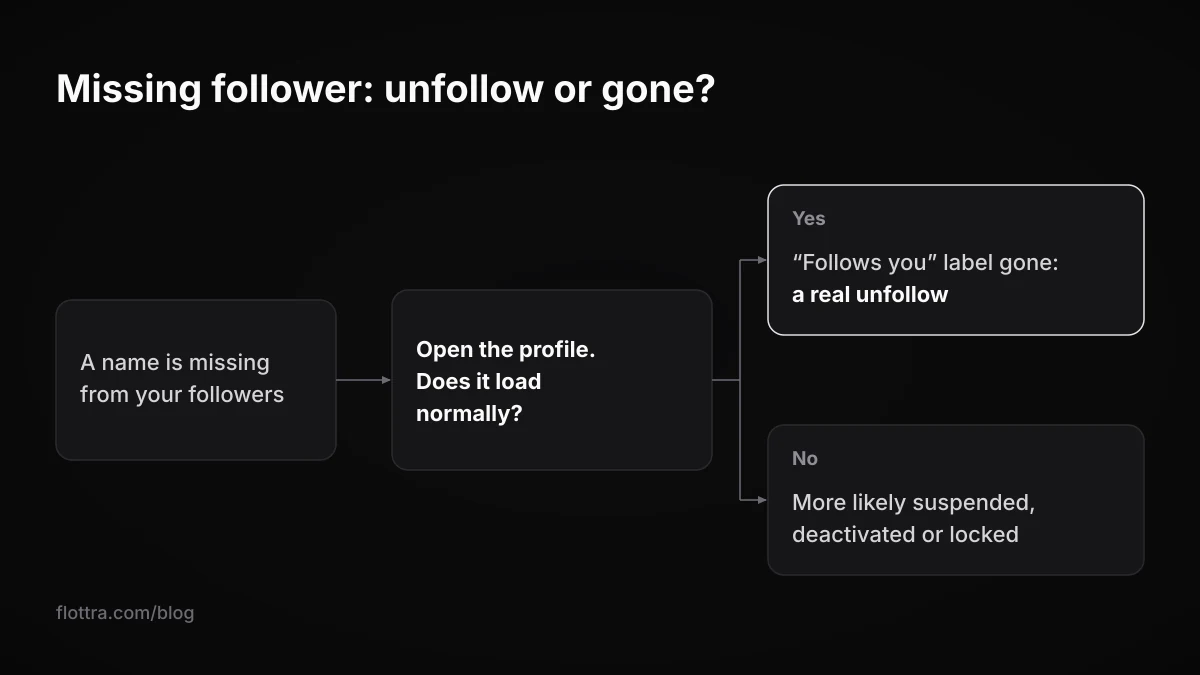
- Locked accounts. X's enforcement options page (checked 19 September 2026): "Note that when an account has been locked pending completion of a challenge (such as being required to provide a phone number), it is removed from follower counts, Reposts, and Likes." X's page does not say what happens to the count once the lock is cleared. If the locked account is one of yours, see what to do when an X account is locked.
- Suspensions. X's suspended accounts page (checked 19 September 2026): "Most of the accounts we suspend are suspended because they are spammy, or just plain fake, and they introduce security risks for X and for everyone using X." Fedica lists an X suspension as one of the three causes it assigns to a follower drop.
- Inactive accounts. X's inactive account policy (checked 19 September 2026): "To keep your account active, be sure to log in at least every 30 days. Accounts may be permanently removed due to prolonged inactivity."
- Deactivations. People who deactivate their own account leave your follower list too.
Fedica says, from its own tracking data, that a normal week on X costs 0.1 to 0.2% of your followers and that only some of those are real unfollows; a tagline on its blog puts 75 to 85% of drops down to suspended, deactivated or restricted accounts. These are a vendor's figures, not independent ones, but they point the same way as X's own descriptions: check the missing profiles before you assume anyone left on purpose.
Before you mass unfollow: what X's rules say
Many trackers offer to unfollow everyone who does not follow you back in one click. X's automation rules (checked 19 September 2026) say: "You may not follow or unfollow X accounts in a bulk, aggressive, or indiscriminate manner. Aggressive following is a violation of the X Rules." A tracker that only reads your followers does nothing to your account; acting on its list in bulk is where the rules apply.
X's follow limits page (checked 19 September 2026) also prohibits "'follow churn' - following and then unfollowing large numbers of accounts in an effort to inflate one's own follower count" and "duplicating another account's followers, particularly using automation". A tracker plus a mass unfollow button is the second half of that loop.
One-click unfollow is the risky part
Unfollowing hundreds of non-followers in one sitting is the pattern X's rules name. If you want to prune, do it by hand, a few accounts at a time, spread over days. X follow bots, follow limits, and why follow/unfollow dies covers why this loop is the one that gets accounts locked.
If you run many accounts
Each account you track is another OAuth grant to review under Apps and sessions and, with most services, another seat on a paid plan. The archive route stays free but means one archive request per account per check, which stops being practical past a handful of accounts; how many X accounts you can have covers how operators organise larger setups. flottra, which runs many X accounts from separate browsers, does not track unfollowers; its default hourly ceiling for follows is 6 per account, a ceiling rather than a target. The published daily follow limits are in X rate limits in 2026.
Questions
- Does X notify you when someone unfollows you?
- No. X does not offer an unfollow notification and keeps no history of who left. You can see your follower total and your current follower list, and that is all. To find out who unfollowed you, something has to save your follower list at one point and compare it with a later version. That is why every tracker, from a paid service to a pair of data archives, only works from the day you start it.
- Is there a free Twitter unfollower tracker that still works?
- The dependable free routes are not tracker apps: the "Follows you" label on each profile, and comparing two of your own X data archives, which unfollowertrackers.com/x can process in your browser. Unfollr, a Chromium extension, says it reads the follower page you have open and so pays no API fees (its own price was not checked for this post), but it reads the X website, which X's automation rules address. Unfollower Stats, the once-popular free service, has shut down.
- Why did Unfollower Stats and Tweepsmap stop working?
- Unfollower Stats closed because, as its homepage explains, the new Twitter API plans would not work for its operations; it applied for Enterprise access, received no response, and cancelled and refunded subscriptions. Tweepsmap did not close: it rebranded to Fedica in 2023, according to TheGuideX, and Fedica now also runs who.unfollowed.me. Unfollower Stats' own notice puts its closure down to X's new paid API plans, which turned reading follower lists at scale into a real cost.
- Can I see who unfollowed me without logging in to a third-party app?
- Yes. Request your X data archive, keep the follower.js file, request another archive later and compare the two lists; anyone in the first and missing from the second has left or disappeared. No app gets access to your account. The other route is your own X developer app reading your own followers at $0.001 per follower since 20 April 2026, which keeps the data in your hands but needs a short script.
- How do I see who doesn't follow me back on X?
- Compare the accounts you follow with the accounts that follow you. In a single X data archive that means following.js against follower.js, which unfollowertrackers.com/x does in your browser. Most trackers list non-followers as well, and for one account the "Follows you" label on its profile answers it. If you then unfollow the non-followers, do it a few at a time: X's rules prohibit bulk, aggressive or indiscriminate unfollowing.
- Can I track followers and unfollowers of someone else's account?
- Technically, yes. X's Follows endpoints return follower and following lists for any user, at the standard rate of $0.010 per account returned, so one snapshot of a 10,000-follower account costs about $100. Comparing snapshots works the same way as for your own account. Bear in mind that X's follow rules prohibit duplicating another account's followers, particularly using automation, so watching a competitor's audience is one thing and copying it is another.