How to remove followers on X: remove, soft block, block and bot clean-up
To remove a follower on X (formerly Twitter), open your followers list or their profile, click the more icon, choose Remove this follower and confirm with Remove. They stop following you without being blocked, and they can follow again. X documents no bulk remove. Third-party bulk removers that explain their method use a browser extension acting on x.com, and X's automation rules prohibit scripting the website.
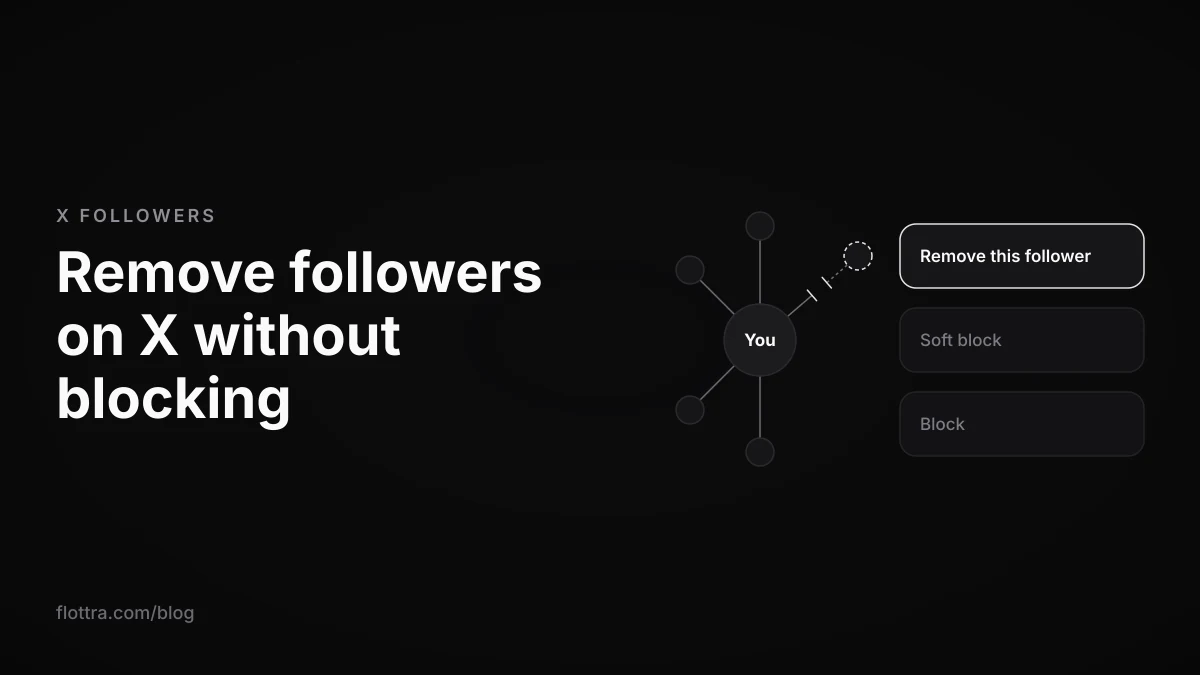
To remove a follower on X (formerly Twitter) without blocking them, use the built-in Remove this follower option. X's Following FAQ, checked 18 October 2026, gives the steps: "Navigate to your followers list. Find the account you’d like to remove and tap or click on the more icon to the right of the Follow button. Tap or click on Remove this follower. Confirm you want to remove the account by tapping or clicking on Remove." The same option is in the more menu on the follower's own profile. It removes one account at a time. X documents no bulk remove, so every bulk follower remover is a third-party tool, and the ones that explain their method do the clicking on x.com for you.
How to remove a follower on X without blocking them
X documents two routes for removing a follower without blocking them: from your followers list, or from the follower's profile. Both are in the Following FAQ (checked 18 October 2026), under the heading "Can I remove someone from following me instead of blocking them?" Neither route blocks the account. Some guides still say X has no native way to remove someone without blocking; X's own FAQ says otherwise.
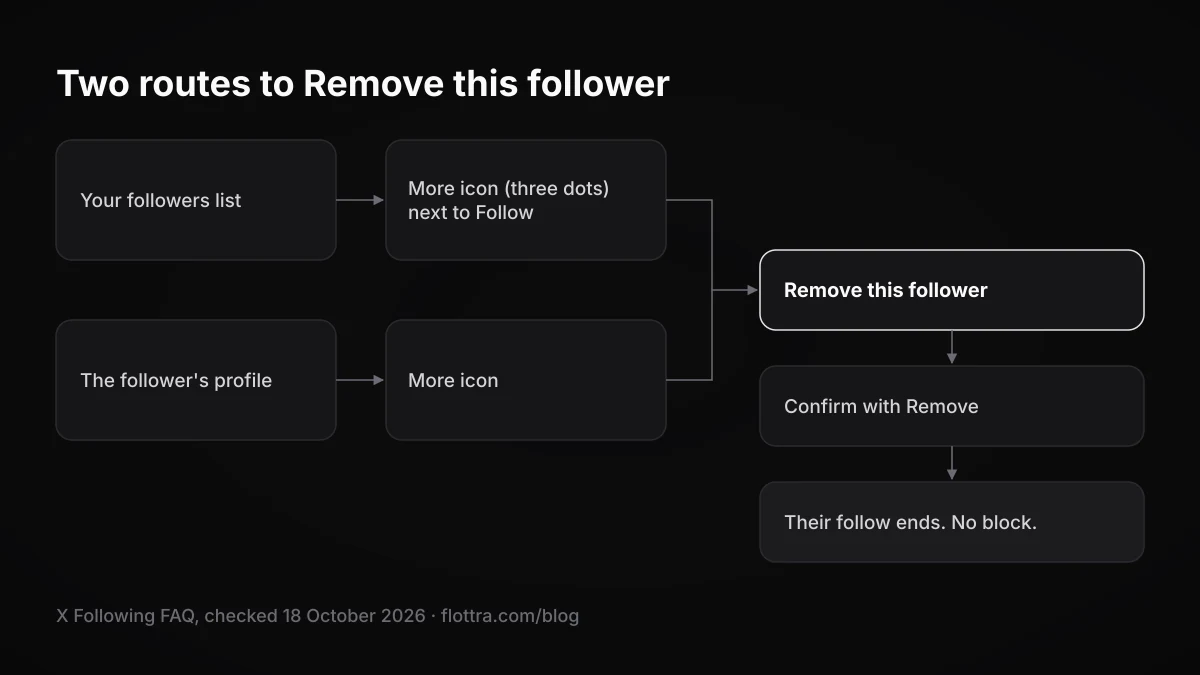
From your followers list
- Open your followers list from your profile.
- Find the account and click the more icon (the three dots) to the right of its Follow button.
- Choose Remove this follower.
- Confirm with Remove.
From the follower's profile
X's wording for the second route: "Navigate to the profile page of the account you wish to remove from following you. Tap or click on the more icon and select Remove this follower. Confirm you want to remove the account by tapping or clicking on Remove." TechCrunch reported in 2021 that this profile route was added alongside the list route, which helps large accounts where finding one person in a long followers list is slow.
The feature itself is not new. TechRadar reported that Twitter launched Remove this follower on the web in October 2021.
Does the removed follower find out, and can they follow you again?
Removing a follower on X is quiet but not permanent. TechRadar reported at the 2021 launch that the removed account is not notified and can follow you again, and current third-party guides agree. X's help pages checked for this post do not state the notification point in those words, so treat it as reported behaviour rather than an official promise.
- Their follow ends. That is the whole of the action. Your own follow of them, if you have one, is untouched.
- They can follow again. Nothing stops a removed account from pressing Follow the next day. If that happens repeatedly, a block is the tool that prevents it.
- Your public posts stay visible to them. If your account is public, removal hides nothing, just as it hides nothing from any other visitor.
- Direct Messages may still reach you. TechRadar reported in 2021 that removed accounts could still send DMs. Whether one can today depends on your own DM settings; no current help page checked for this post confirms it either way.
- They can work it out. If they visit your profile, they will see a Follow button where Following used to be.
If your account is protected
On a protected account, your posts are visible to approved followers only, so removing someone also takes away their view of your protected posts. Some guides say a removed follower then has to send a new follow request, which you can ignore. That fits how protected accounts work, but the help pages captured for this post do not say it in those words.
Can you remove a follower in the X iPhone or Android app?
Possibly, and the web is the reliable fallback. Guides disagree: some say Remove this follower is web only, others print app steps. X's FAQ wording says "tap or click", which reads as covering touch screens, but the FAQ as captured for this post does not settle the question with an explicit statement either way. Check the app, and if the option is not there, use the browser.
- In the app, open the follower's profile, tap the more icon and look for Remove this follower.
- If it is not there, open x.com in your phone's browser, signed in to the same account, and use the followers list route above.
- If neither is available to you, a soft block (next section) ends their follow, with one side effect worth knowing first.
Remove, soft block, block and mute: what each one does
Removing a follower ends their follow and nothing else. A soft block (block, then unblock straight away) also ends their follow, but because a block cuts the follow in both directions, it ends your follow of them too. A full block ends both follows and stops them engaging with your posts, but since late 2024 blocked accounts can still see your public posts. Muting changes only what you see.
| Action | Their follow of you | Your follow of them | Can they follow you again | Can they see your public posts |
|---|---|---|---|---|
| Remove this follower | Ends | Unchanged | Yes, at any time | Yes |
| Soft block (block, then unblock) | Ends | Also ends, if you followed them | Yes, once unblocked | Yes |
| Block | Ends | Ends | No, while the block stands | Yes, but they cannot like, reply or repost |
The block row is where many older guides go wrong. X's blocking page (checked 18 October 2026) now says: "If your posts are set to public, accounts you have blocked can see your posts. However, they cannot engage (like, reply, repost, etc.) with your posts." TechCrunch reported the plan in September 2024, X announced it on 16 October 2024, and Silicon Republic reported on 4 November 2024 that the rollout had begun. Any article written before that which says a block hides your posts is out of date.
The soft block works because of this line on the same page: "Accounts you have blocked cannot follow you, and you cannot follow an account you have blocked." The side effect is in the next one: "Blocking an account you are currently following will cause you to unfollow that account (and them to unfollow you)." If the person is a mutual, a soft block costs you your follow of them as well. Remove this follower does not.
How to soft block
- Open the account's profile and click or tap the more icon.
- Choose Block, then Block again to confirm.
- Still on their profile, where X's blocking page says "the Follow button will be replaced by a Blocked button", click Blocked to unblock.
- If you followed them and want to keep doing so, follow them again.
If you block and forget to unblock, your blocked accounts list is under Settings and privacy, then Privacy and safety, then Blocked accounts. X's advanced block options page says the list "is viewable via X.com and the X for iOS and Android apps."
Muting is not a way to remove anyone. It leaves the follow in place on both sides and changes your timeline, not your followers list.
How to remove followers in bulk on X, and what follower remover tools do
X has no bulk remove. Its Following FAQ describes removing one account at a time, and no setting clears many followers at once. Every bulk follower remover is a third-party tool, and the tools whose method is documented carry out the removals through a browser extension acting on x.com in your own browser, which runs into X's rule against scripting the website.
What the API can and cannot do
Vendors disagree about whether the X API can remove followers at all. Fedica's guide says neither X nor its API offers bulk removal. Circleboom's own blog says X's API does not support removing followers and that Circleboom carries out removals through its Chrome extension, while other Circleboom pages describe API-based removal. This post could not confirm the answer in X's developer documentation, so if a tool says it removes followers through the API, ask the vendor exactly how each removal is executed. The wider trade-off between API tools and browser tools is covered in X automation: what actually works.
The tools, as they describe themselves
- Circleboom: its Chrome Web Store listing describes the extension as auto-removing selected followers and calls Circleboom "an official partner of Twitter/X". That partnership is the vendor's own claim and was not verified with X.
- X Bot Remover: an open-source Chrome extension (store listing, code at github.com/vanrohan/xbotremover) that runs on your x.com followers page and removes followers matching criteria such as inactivity or bio text.
- Archivlyx: sells a browser extension offering bulk and rule-based automatic follower removal.
- Fedica: positions itself as an audit tool that identifies which followers to remove, with the removal itself done by hand.
No vendor price was confirmed on a vendor pricing page for this post, so none is given here.
What X's rules say
X's automation rules (checked 19 September 2026) list this under Don't: "Use non-API-based forms of automation, such as scripting the X website. The use of these techniques may result in the permanent suspension of your account." They also put the outcome on you: "For X users: You are ultimately responsible for the actions taken with your account, or by applications associated with your account." An extension that clicks Remove this follower on x.com for you is an application acting on your account, whatever the vendor's listing says.
The same page has a rule on bulk follow-graph actions, though it is written about following and unfollowing, not removing followers: "You may not follow or unfollow X accounts in a bulk, aggressive, or indiscriminate manner. Aggressive following is a violation of the X Rules." It is not a direct rule on removal; it shows how X views bulk changes to who follows whom. The follow side is covered in X follow bots and follow limits.
No published limit, no published safe pace
X publishes no daily or hourly limit for removing followers or for blocks, and no reliable reporting was found on whether bulk removal or block-unblock loops get accounts limited. That is an absence of information, not permission. The scripting rule is explicit, and the consequence it names is permanent suspension. A vendor's "without risking suspension" line is the vendor's claim. If an account does end up locked, see how to get out of an X lock without making it worse.
How to clear out bot followers by hand
Without a tool, you clear out bot followers by reading your followers list and removing the obvious ones one at a time with Remove this follower. No single sign proves an account is a bot, so treat the signs below as a heuristic and act only when several appear together.
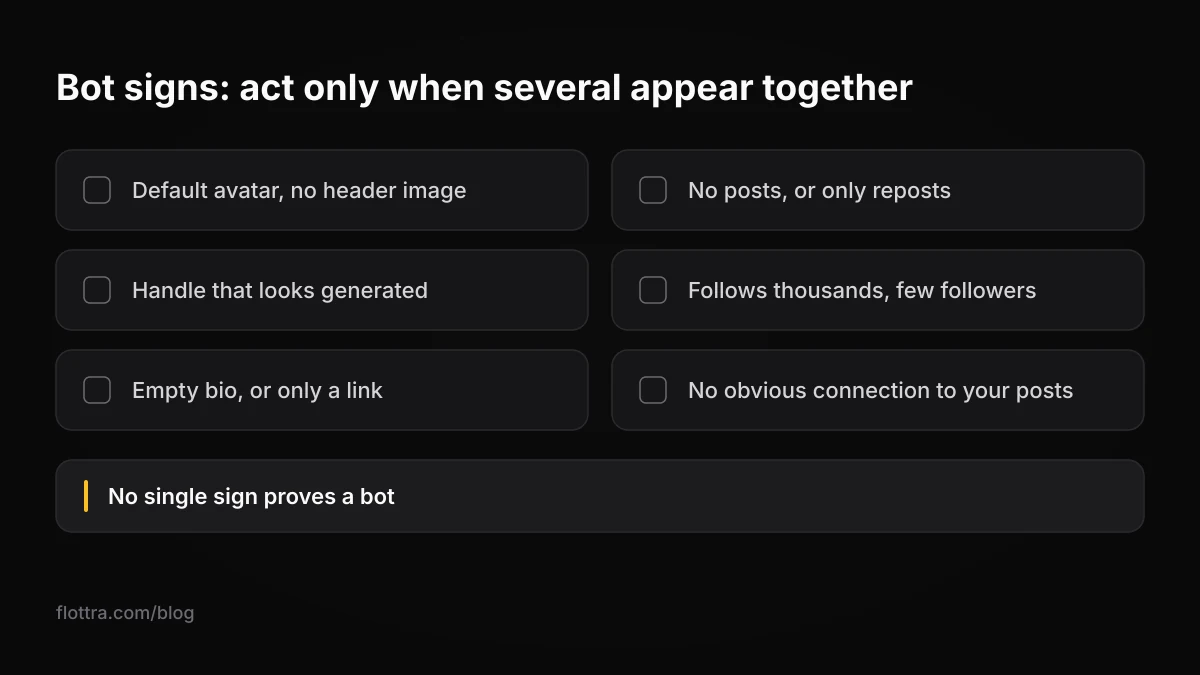
- Default avatar (the old egg or the plain silhouette) and no header image.
- No posts, or only reposts.
- A handle that looks generated, such as a name followed by a long string of digits.
- Following thousands of accounts with very few followers of its own.
- Empty bio, or a bio that is only a link.
- No obvious connection to anything you post about.
- Open your followers list and scan for accounts showing several of the signs above.
- Open each suspect profile and check its posts and follow counts before deciding. A quiet real person can look like a bot from the list alone.
- Use Remove this follower from the profile's more menu, then confirm with Remove.
- Leave borderline accounts. You cannot undo a removal yourself; only they can follow again.
- Split a large clean-up across several sessions instead of one long sitting. X publishes no safe number, so there is no target to aim for.
Why your follower count dropped by itself
A follower count can fall with no action from you because X removes some accounts from counts itself. X's enforcement options page (checked 19 September 2026) says: "Note that when an account has been locked pending completion of a challenge (such as being required to provide a phone number), it is removed from follower counts, Reposts, and Likes." When X locks a batch of suspicious accounts, every account they followed loses those followers at once.
X also suspends accounts, and its suspended accounts page (checked 19 September 2026) says: "Most of the accounts we suspend are suspended because they are spammy, or just plain fake, and they introduce security risks for X and for everyone using X." X is therefore already acting on many of the accounts a bot clean-up targets, and locked ones drop out of your count without you doing anything. Before mass-removing anything after a drop, check whether X has already pruned the accounts you were worried about. If you want names rather than a total, the four methods are in how to see who unfollowed you on X.
Does removing bot followers improve reach or engagement?
X does not publish any effect of bot followers on reach, and it does not say that removing them raises reach or ranking. Vendor pages that claim clean-up improves engagement or credibility cite no source. What removal changes for certain is arithmetic: your follower count falls, so any engagement rate calculated per follower rises, with the same likes and replies as before.
If your posts are reaching fewer people, the cause X documents is its visibility limits on posts it judges to break its rules. It documents nothing about who follows you. Those are covered, with a test that needs no tool, in X shadowban: how to test for one.
Removing followers across many X accounts
If you run several X accounts, clean each one from its own logged-in session, one account at a time. Removal is a per-account action: you can only remove followers of the account you are signed in as, and no account can clear another account's followers.
- Use the browser profile, device and network that account normally uses. X does not publish how it judges sessions, so the conservative choice is the session the account always has.
- Finish one account before starting the next, instead of switching back and forth mid clean-up.
- Pause anything else scheduled for that account while you clean it, so removals are not stacked on top of its usual likes, follows and posts.
- Expect to do it by hand. The bulk options are the extensions described above, with the rule that comes with them.
flottra, which runs each X account in its own browser profile with its own proxy on your Windows computer, has no follower-removal feature, and it does not sell followers or remove them. Setups for running many accounts, from the app switcher upwards, are compared in how many X accounts can you have.
Questions
- Does X notify someone when I remove them as a follower?
- Not as far as anyone has reported. TechRadar wrote at the 2021 launch that the removed account receives no notification, and current third-party guides say the same, though the X help pages checked on 18 October 2026 do not state it in those words. The person can still notice. If they visit your profile, they will see a Follow button where Following used to be, and their own following count will be one lower.
- Can a removed follower still see my posts?
- Yes, if your account is public. Removal only ends their follow, and they can follow you again whenever they like. Even a full block no longer hides public posts: X's blocking page says blocked accounts can see them but cannot like, reply or repost. If you need a specific person not to see what you post, protecting your account, so that only followers you approve can see posts, is the setting that does it.
- What is a soft block and does it still work?
- A soft block means blocking an account and then unblocking it straight away. It still works because X's blocking page says accounts you have blocked cannot follow you, so their follow ends with the block and does not come back when you unblock unless they choose to follow again. The catch is that blocking an account you follow also makes you unfollow it, so with a mutual you lose your own follow of them too. Use it only when Remove this follower is not available on your device.
- Is there an official way to mass remove bot followers?
- No. X's Following FAQ describes removing followers one at a time, from the list or from a profile, and offers no bulk option. Bulk removal comes only from third-party tools, several of which are browser extensions that act on x.com. X does some of the pruning itself: its enforcement page says locked accounts are removed from follower counts, and its suspension page says most suspended accounts are spammy or fake.
- Does the X API let tools remove followers?
- This post could not confirm it from X's developer documentation. Fedica's guide and Circleboom's own blog both say the API does not support removing followers, and Circleboom's blog says its Chrome extension does the removals, while other Circleboom pages describe API-based removal. Ask any vendor how each removal is carried out. If the answer is an extension clicking in your browser, X's rule against scripting the website applies, and X says you are responsible.
- What happens if my account is protected and I remove a follower?
- They stop following you, and since protected posts are visible only to approved followers, they lose sight of your posts as well. Some guides say they would then need to send a new follow request, which you can simply leave unanswered. That matches how protected accounts work, but the X help pages captured for this post do not state it directly, so check your follow requests if the person tries again.