Multi-account browsers explained: what each type isolates, and what X accounts need
A multi-account browser keeps each account's logins separate so several accounts can stay signed in at once. Profile and workspace browsers (Chrome profiles, Shift) and Firefox containers separate cookies. Antidetect browsers also give each profile its own fingerprint. None gives an account its own IP address unless you attach a proxy, and none changes the behaviour rules X publishes.
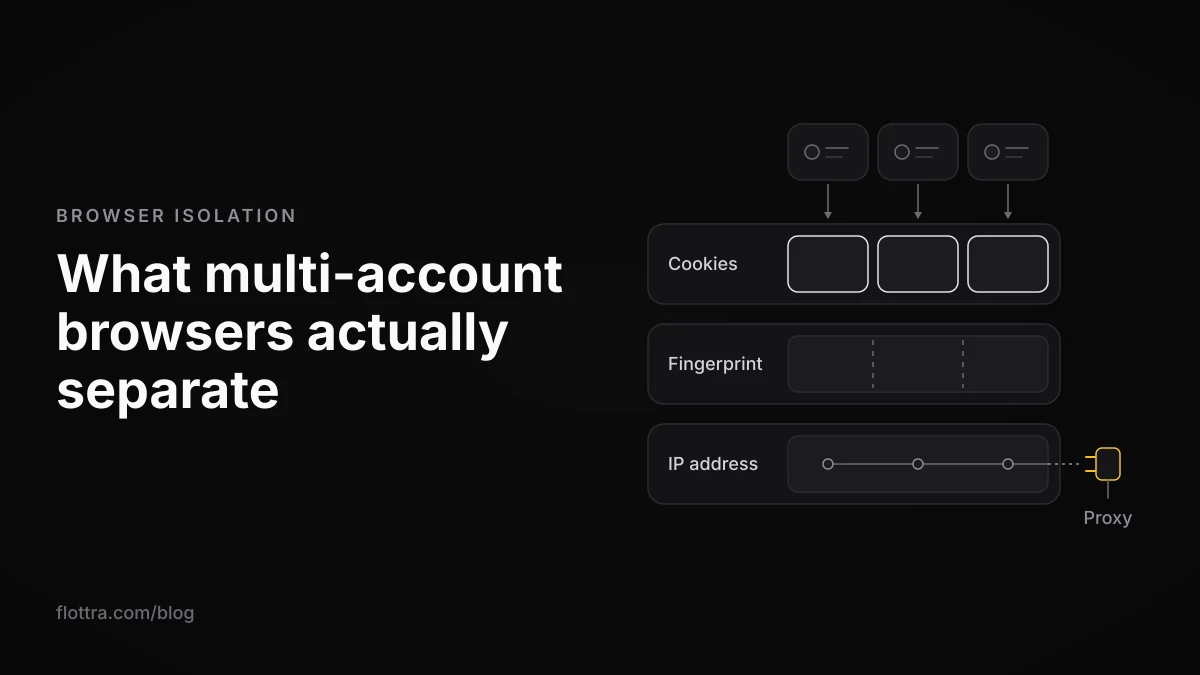
A multi-account browser is any browser setup that keeps each account's cookies and logins apart, so several accounts on the same site stay signed in at once without logging out and back in. There are three kinds: profile or workspace browsers (Chrome profiles, Shift), container extensions (Firefox Multi-Account Containers), and antidetect browsers (Multilogin, AdsPower, Donut Browser and others), which also give each profile its own browser fingerprint. None of them gives an account its own IP address unless you attach a proxy. And for X (formerly Twitter), none of them changes the behaviour rules X actually publishes, which apply whatever browser you use.
What a multi-account browser is, and the three things it can separate
A multi-account browser runs each account in its own compartment so the accounts do not share a login session. The useful question is which walls the compartment has. A site can notice that two accounts sit on one machine through three different things, and each category of product separates a different set of them.
- Cookies and logins. The session cookies that keep you signed in. If two accounts share a cookie store, logging into one logs you out of the other. Every multi-account browser separates these. It is the whole point of the category.
- Browser fingerprint. The traits a page can read about the browser and device: screen size, installed fonts, graphics output, time zone, language and so on. Two profiles in the same ordinary browser on the same computer present largely the same traits.
- IP address. The address your traffic leaves from. It belongs to your network connection, not to your browser, so every profile and container on one machine shares it unless that profile's traffic goes through a proxy or VPN.
Most vendor pages ranking for this query treat "multi-account browser" as another name for "antidetect browser". The category is wider than that, and the cheapest options separate only the first of the three layers. That can be enough, depending on what you are protecting against.
The three types: profile browsers, containers and antidetect browsers
Multi-account browsers fall into three groups. Profile and workspace browsers give each account a separate signed-in space. Container extensions split cookies inside one browser window. Antidetect browsers do both and also present a different, generated fingerprint for each profile. They are not three price points for the same thing: each isolates a different amount.
Profile and workspace browsers (Chrome profiles, Shift)
A Chrome profile is a separate browser user with its own sign-ins, so one X account per profile stays logged in independently. This post has not checked Google's help page on what else a profile keeps separate, so read it before relying on more than separate sign-ins. A profile does not change the device underneath: same machine, same screen, same fonts, same network.
Shift is a desktop workspace app for Mac and Windows that collects web apps in one window. Its support centre says you log into several accounts on one service by adding more "instances" of the same app, and that all of them can be signed in at the same time (checked 18 October 2026). The page describes separate logins only. It says nothing about a separate fingerprint or a separate proxy per instance.
Container extensions (Firefox Multi-Account Containers)
Containers split one Firefox window into colour-coded compartments, so a site opened in one container does not see the cookies of another. That makes them the lightest way to keep two logins apart. Check Mozilla's add-on page for exactly what a container isolates, and whether it can be given its own proxy or VPN location, before you rely on either. Everything else (fingerprint, network) is the one Firefox on the one computer.
Antidetect browsers (Multilogin, AdsPower, Donut Browser, ixBrowser)
An antidetect browser gives each profile its own cookie store and its own generated or edited fingerprint, and usually a field for a proxy per profile. What the vendors say about themselves, on their own pages checked 18 October 2026:
- Multilogin sells browser profiles plus Android cloud phones, with built-in residential proxies in "150+ countries" and a "Cookie Robot" for warming up profiles.
- AdsPower says each profile has its own isolated browser environment and a customisable fingerprint, offers Chrome-based and Firefox-based browsers, and includes RPA automation.
- Donut Browser is open source (AGPL-3.0), with unlimited local profiles free, a generated fingerprint per profile and proxy support, with time zone and language set to match the proxy.
- ixBrowser calls itself an anti-detect browser and describes its free version as "Permanently Free".
Whether any of this matters on X specifically is covered further down, in what X publishes about multiple accounts.
What each type keeps separate: cookies, fingerprint and IP
Every type of multi-account browser separates cookies and logins. Only antidetect browsers also separate the fingerprint. No type separates the IP address on its own: each profile gets its own IP only when you attach a proxy to it. The table sets this out, with X's own account switcher added for comparison.
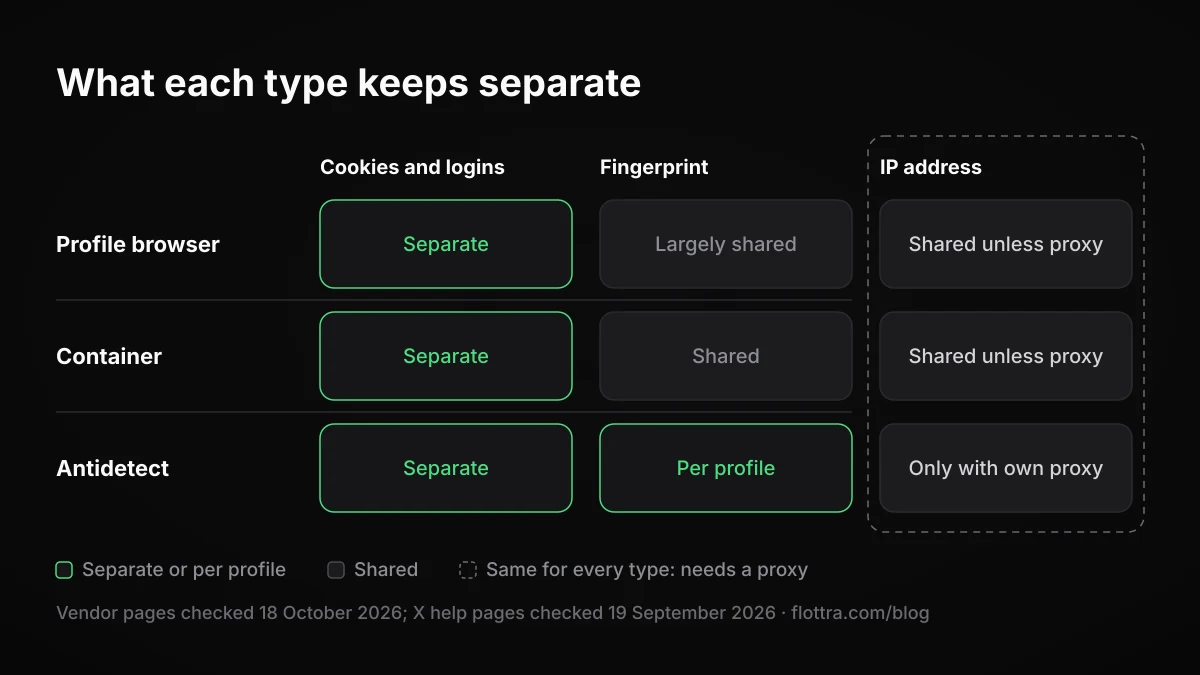
| Type | Examples | Cookies and logins | Fingerprint | IP address |
|---|---|---|---|---|
| X's own account switcher | X app or website | Several accounts signed in to one app | Shared | Shared |
| Profile or workspace browser | Chrome profiles, Shift | Separate per profile or instance | Largely shared (same browser, same machine) | Shared unless you add a proxy |
| Container extension | Firefox Multi-Account Containers | Separate per container | Shared (one Firefox) | Shared unless you add a proxy |
| Antidetect browser | Multilogin, AdsPower, Donut Browser, ixBrowser | Separate per profile | Generated or edited per profile | Separate only if each profile has its own proxy |
Two things follow from the table. First, if all you need is to stop logging in and out, a profile or container is enough and costs nothing. Second, the IP column is identical for every type: it depends on proxies, not on which browser you bought.
Free multi-account browsers and what they cost, checked on vendor pages
Several multi-account browsers have a free tier. On their own pages, checked 18 October 2026, Shift offers a Free plan at $0 forever, Multilogin lists a Free plan, Donut Browser is free and open source with unlimited local profiles, and ixBrowser describes a "Permanently Free" version. Chrome profiles cost nothing beyond Chrome itself.
| Product | Type | Free tier (vendor page) | Paid entry (vendor page) |
|---|---|---|---|
| Shift | Workspace browser | Free, $0 forever: 5 Spaces, 10 apps per Space, limited Shift AI usage | Advanced, $199.99 USD billed annually: unlimited Spaces and apps, expanded AI usage |
| Multilogin | Antidetect | Free plan listed (profile count not confirmed on the vendor page) | Pro 10, $11 a month: 10 profiles shared between Android cloud phones and browser profiles, 1 GB of Multilogin proxy traffic a month, 60 mobile minutes, 1 team seat, 50 API requests per minute |
| Donut Browser | Antidetect, open source | Unlimited local profiles, generated fingerprint, proxy support | Pro tier adds fingerprint editing and an automation API (price not checked) |
| ixBrowser | Antidetect | "Permanently Free" version (limits not checked) | Not checked |
| AdsPower | Antidetect | Not checked on a pricing page | Not checked on a pricing page |
Sources for the figures: Shift pricing, Multilogin plan comparison, Donut Browser and ixBrowser.
Why third-party price lists disagree
Prices in this category move, and listicles lag. Capterra still shows Shift Advanced at $149 a year, while Shift's own page says $199.99. Shift's support centre gives Shift for Teams at $199.99 USD per user per year, and an older support page still says $149. Multilogin recently moved to US dollar pricing, and third-party pages still quote older figures, euro prices and coupon prices. GoLogin, Dolphin Anty, Octo Browser, Incogniton and Kameleo are left out of the table because their prices were not confirmed on their own pricing pages.
Proxies: the separation no browser gives you by itself
A browser profile never changes your IP address on its own. Every Chrome profile, Shift instance, Firefox container and antidetect profile on one computer leaves through the same connection unless that profile is routed through a proxy, so accounts on one machine share an exit IP by default. Some antidetect browsers sell proxies or let you paste one per profile, but you still have to attach it.
Can each Chrome profile use a different proxy?
This post has not confirmed Chrome's proxy behaviour on Google's help pages. The common understanding is that plain Chrome on Windows follows the computer's system proxy setting, which would apply to every profile at once, and that per-profile routing needs an extension or launching each profile with its own proxy setting. Do not trust a setting screen: open an IP-check page in each profile and compare the addresses. If two profiles show the same address, they share an exit IP.
Do Firefox Multi-Account Containers change your IP?
Not by themselves. A container separates cookies. Whether a container can be sent through its own proxy or VPN location depends on add-on options this post has not confirmed on Mozilla's pages, so test it the same way: an IP-check page in each container.
One proxy per account
Many accounts behind one exit IP is the simplest pattern a platform could spot, because it needs no fingerprinting at all (X does not publish what it checks, so this is reasoning, not a published rule). The clean setup is one proxy per account, kept for the life of the account, with the profile's time zone and language consistent with the proxy's location (Donut Browser, for example, sets these to match the proxy).
What X publishes about multiple accounts, and what it does not
X publishes rules about behaviour, not about browsers. Its help pages, checked 19 September 2026, say limits count across every device, prohibit coordinated inauthentic activity across accounts, prohibit ban evasion and scripting the website, and hold you responsible for any tool you use. They say nothing about browser fingerprinting, so no vendor can show that its fingerprints keep X accounts unlinked.
- Limits are shared: "These limits include actions from all devices, including web, mobile, phone, API, etc." (About X limits). Spreading accounts across browsers raises no limit.
- Coordination: "Multiple Accounts and Coordination: We prohibit coordinated inauthentic activity that artificially influences conversations or disrupts X." (Authenticity policy)
- Fake personas: "Fake personas: You may not use manufactured identities to engage in disruptive or deceptive behavior." (same page)
- Scripting: "Use non-API-based forms of automation, such as scripting the X website. The use of these techniques may result in the permanent suspension of your account." (Automation rules)
- Responsibility: "For X users: You are ultimately responsible for the actions taken with your account, or by applications associated with your account." (same page)
- Locks: "If your account appears to have exhibited automated behavior that violates the X Rules, we may lock it and request that you pass a captcha challenge to confirm you are not a robot." (Locked and limited accounts)
Note what is missing. No X help page found for this post mentions canvas, WebGL, fonts or any other fingerprint signal. X does not publish its detection rules, so whether it reads fingerprints, and how much weight it gives them, is unknown. That cuts both ways: you cannot prove a spoofed fingerprint helps, and you cannot prove it does not.
Some vendors fill that gap with promises. Vision, for example, says its browser is built for running multiple accounts "without risk of bans or blocks". That is a marketing claim, not a result anyone can check against X's rules. The signals X does name (pace, coordination, automation) are the ones quoted above.
A new profile does not reset a suspension
One marketed use of antidetect browsers is coming back after a suspension in a fresh profile. X's authenticity policy names this directly: "Ban Evasion: You may not circumvent X enforcement actions." A new fingerprint and a new IP do not change what the rule says, and an account opened to replace a suspended one is exactly what it describes.
Do you need an antidetect browser to run several X accounts?
For most people running several X accounts, an antidetect browser is not required. A separate browser profile per account keeps the logins apart. What you can actually control beyond that is one proxy per account and restrained behaviour. A spoofed fingerprint is optional, and because X does not publish whether it reads fingerprints, its benefit on X is unproven.
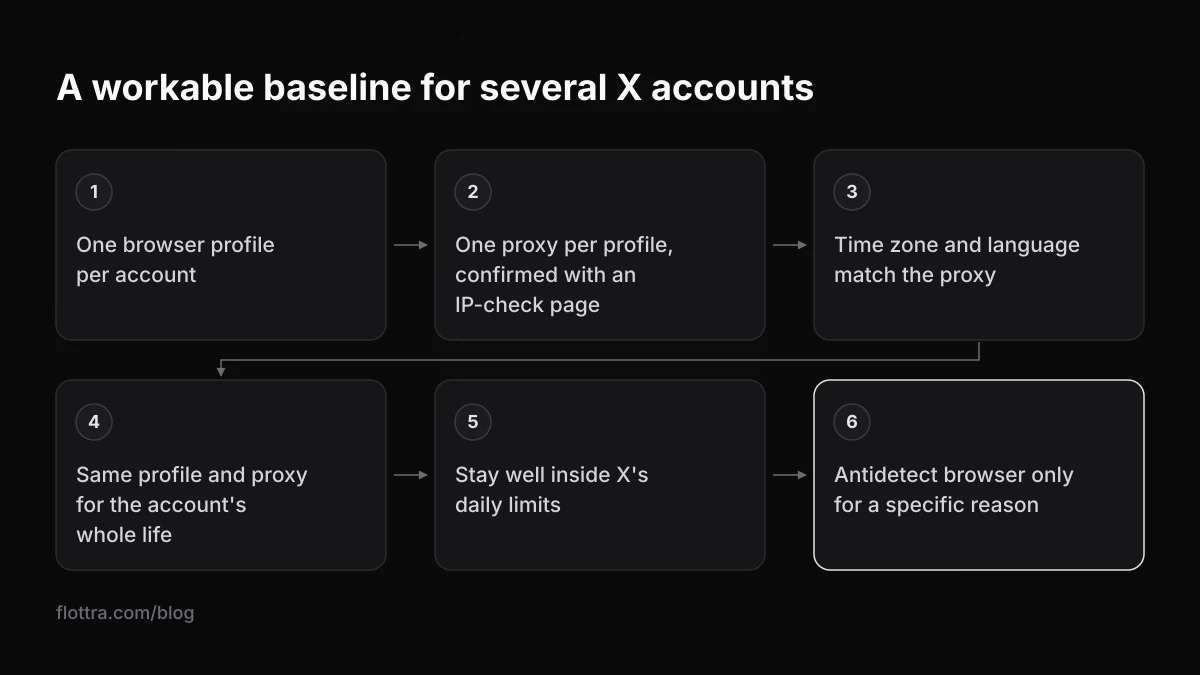
For a handful of accounts you use yourself, X's own switcher is the simplest route: add accounts from the profile icon, then "Add an existing account". The help page does not publish a maximum, and X states: "We currently do not offer a way to merge multiple accounts into one or migrate data (posts, following, or followers) from one account to another." No X help page checked for this post publishes a limit on how many accounts one person may hold. A workable baseline for more accounts:
- Give every account its own browser profile, and never sign two accounts into the same one.
- Attach one proxy to each profile and confirm it with an IP-check page inside that profile.
- Keep the profile's time zone and language consistent with where the proxy says you are.
- Keep each account on the same profile and proxy for its whole life rather than rotating them.
- Stay well inside X's published daily limits, remembering they count every device together.
- Read the automation rules quoted above before automating anything, because they apply whatever browser you use.
- Add an antidetect browser only if you have a specific reason, such as many accounts on one computer, and treat its effect on X as unknown.
Multi-account browser or X account runner
A multi-account browser gives you separated windows and leaves the work to you. flottra is not a multi-account browser and not an antidetect browser. It is a panel that keeps a schedule, plus a desktop app on your own Windows computer that opens a real browser per X account, each with its own saved browser profile and its own proxy, and works through that schedule one task at a time. No browser runs on flottra's servers, it does not use the X API, and it is not affiliated with X Corp.
Two points matter for this topic. The panel recommends one proxy per account and refuses to put more than five accounts on one static proxy, because accounts sharing one exit IP is what a farm looks like. And driving a browser on X's website is what the automation rule quoted above calls "scripting the X website"; the rule is there in X's words, and you decide. It does not promise that an account will not be suspended, locked or limited; some accounts get suspended whatever the tool.
Questions
- What is the difference between an antidetect browser, Chrome profiles and Firefox containers?
- All three keep each account's cookies and logins separate. Chrome profiles do it as separate browser users, containers do it inside one Firefox window, and antidetect browsers also give each profile a generated or edited fingerprint (screen, fonts, graphics output, time zone and similar traits). None of the three gives a profile its own IP address by itself. For that you attach a proxy to each profile, which antidetect browsers usually make easier with a proxy field per profile.
- Is there a free multi-account browser?
- Yes. Chrome profiles cost nothing. On vendor pages checked 18 October 2026, Shift has a Free plan at $0 forever with 5 Spaces and 10 apps per Space, Multilogin lists a Free plan, Donut Browser is open source with unlimited local profiles free, and ixBrowser describes a "Permanently Free" version. Free tiers come with limits (Shift's caps Spaces and apps, for example), so read the vendor's own plan page rather than a listicle, because third-party prices are often out of date.
- Can X tell that several accounts are run from the same browser or the same IP?
- X does not publish its detection rules, so nobody outside X can say exactly what it links. Its help pages talk about behaviour: limits counted across all devices, coordinated inauthentic activity, ban evasion and scripting the website. No help page mentions browser fingerprinting. Many accounts behind one exit IP is the easiest pattern a platform could notice without any fingerprinting at all, which is why one proxy per account is the usual baseline.
- Are antidetect browsers legal, and do they stop bans?
- Antidetect browsers are sold openly, and whether a particular use is lawful depends on where you are and what you do with them, which this post cannot settle. On bans, there is no published evidence that they reduce suspensions on X. X's rules target behaviour, apply whatever browser you use, and hold you responsible for any tool connected to your account. Vendor lines such as "without risk of bans" are marketing, not measured results.
- Is Shift a multi-account browser, and how much does it cost?
- Shift is a workspace browser for Mac and Windows that lets you add several instances of the same app, all signed in at once, so it works as a multi-account browser for logins. Its support pages say nothing about a separate fingerprint or proxy per instance. On Shift's pricing page, checked 18 October 2026, Free is $0 forever and Advanced is $199.99 USD billed annually. Some third-party listings still show an older $149.
- Do I need one proxy per account?
- If the goal is to keep accounts from sharing a network identity, yes. Every profile on one computer leaves through the same IP unless it has its own proxy, and many accounts behind one address is an easy pattern to notice, though X does not publish what it checks. Keep each account on the same proxy for its life, match the profile's time zone and language to the proxy's location, and check the address with an IP-check page inside each profile.