How to mass unfollow on X without getting limited
X has no bulk or “unfollow all” button and publishes no daily unfollow limit. Its automation rules say you may not follow or unfollow “in a bulk, aggressive, or indiscriminate manner”, and scripting the website may lead to permanent suspension. To mass unfollow, choose what to cut first, then remove it in small sessions over several days, and treat any tool's “safe limit” as that vendor's own number.
X (formerly Twitter) has no button to unfollow everyone or to unfollow in bulk. Its help pages describe unfollowing one account at a time. X also publishes no daily unfollow limit, and its automation rules say you may not follow or unfollow “in a bulk, aggressive, or indiscriminate manner”. A mass unfollow is therefore a staged cleanup: decide what to cut, then remove it slowly over several days, by hand or with a tool whose method you understand. The rest of this post covers the rules, the numbers that circulate and where each one comes from, the tools that still exist, and how to run the cleanup.
Is there a way to unfollow everyone on X at once?
No. X's own help page on unfollowing (checked 18 October 2026) describes three ways to unfollow: from a post, from your Following list, or from the account's profile. All three work on one account at a time. There is no “unfollow all” option in the app or on x.com. The page's summary of what unfollowing does: “Unfollowing an account removes their posts from your timeline, but you can still visit their profile anytime.”
Unfollowing from your Following list
This is the fastest native route because the list puts many accounts on one screen.
- Open your profile and select Following to see the accounts you follow.
- In X's words: “Tap the Following icon next to the account you'd like to unfollow. Tap Unfollow to confirm.”
- Repeat for the next account. On x.com the button should turn red when you click it; if it does not, see the next section.
When the Unfollow button does nothing
X's common following issues page (checked 18 October 2026) gives the fallback for the web: “If it doesn't turn red or click, refresh the page and try again, or click the account's name to visit their profile page and unfollow them there.” If the button keeps failing during a long session, take that as a reason to stop for the day rather than to click faster.
The people you unfollow are not told. X's following FAQ says: “You can unfollow other accounts at any time. X does not send a notification when you unfollow someone.” They can still notice through a follower tracker, which is covered in how to see who unfollowed you on X.
How many accounts can you unfollow per day on X?
X does not publish a daily unfollow limit. Its limits page (checked 19 September 2026) lists a following limit, “The technical follow limit is 400 per day”, and nothing for unfollows. The only unfollow number X publishes anywhere is an API request ceiling: 50 requests per 15 minutes per user on the unfollow endpoint, in the X API rate limit table (checked 18 October 2026). Every other figure you will see comes from a vendor or a blog.
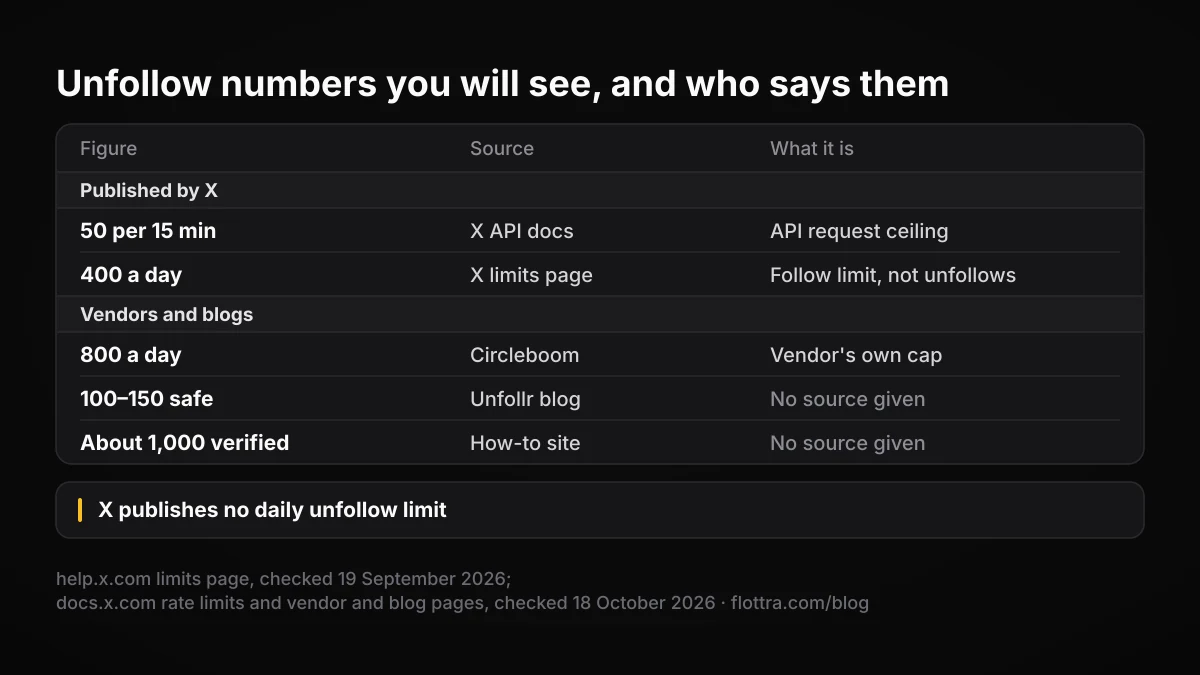
| Figure you will see | Where it comes from | What it actually is |
|---|---|---|
| 50 per 15 minutes | X API documentation, unfollow endpoint | An API request limit per user. Not a statement about safe behaviour |
| 400 a day | X limits page | The daily follow limit. It says nothing about unfollows |
| 800 a day | Circleboom's blog | Circleboom's own cap for its tool. Not on any X page |
| 100 to 150 safe, 400 or more risky | A table on Unfollr's blog | No source given. X publishes no such tiers |
| About 1,000 for verified accounts | A how-to site | No source given. X's limits page states no verified or Premium multiplier |
| 5 per 15 minutes | A 2023 developer forum post about the Basic API tier | One developer's report, dated, possibly no longer true |
The API figure is a ceiling on requests a program may send. It tells you when X will refuse a call, not what X considers acceptable behaviour, and its rules on bulk unfollowing still apply below it. The documented and real numbers have also differed: a developer reported on X's developer forum in 2023 that the Basic tier allowed only 5 unfollows per 15 minutes although the docs said 50. Whether that still applies was not verified. The wider picture of published and observed limits is in X rate limits in 2026.
There is no honest “safe number” because X does not publish its detection rules. What can be said is what the rules target (volume, speed, unrelated accounts, automation and churn) and that a cleanup spread over many short sessions looks less like any of those than one long run does.
What X's rules say about mass unfollowing
X's rules name unfollowing directly, not only following. The automation rules (checked 19 September 2026) say: “You may not follow or unfollow X accounts in a bulk, aggressive, or indiscriminate manner. Aggressive following is a violation of the X Rules.” This applies whatever tool you use, including your own hands.
The follow limit page (checked 19 September 2026) lists two prohibited patterns that both involve unfollowing:
- Follow churn: “following and then unfollowing large numbers of accounts in an effort to inflate one's own follower count”.
- Indiscriminate following: “following and/or unfollowing a large number of unrelated accounts in a short time period, particularly by automated means”.
The same automation page sets ground rules on method. Among the things not to do (wording confirmed 18 October 2026): “Abuse the X API or attempt to circumvent rate limits. Use non-API-based forms of automation, such as scripting the X website. The use of these techniques may result in the permanent suspension of your account.” It also says: “For X users: You are ultimately responsible for the actions taken with your account, or by applications associated with your account.” A tool's own safety claims do not move that responsibility.
If X locks the account
X does not publish where it draws the line or what it does at each step. Its locked and limited accounts page (checked 19 September 2026) says: “If your account appears to have exhibited automated behavior that violates the X Rules, we may lock it and request that you pass a captcha challenge to confirm you are not a robot.” The same page also describes phone and email verification routes. If that happens mid-cleanup, stop, clear the challenge, and do not resume the same pace. The routes out are covered in the guide to locked X accounts.
Decide what to unfollow before deciding how fast
The safest mass unfollow is a smaller one. Most following lists contain a few groups that are worth removing and a group worth keeping, and sorting them first usually cuts the job down. Work through the groups in this order, from the accounts that add nothing to the ones where you need judgement.
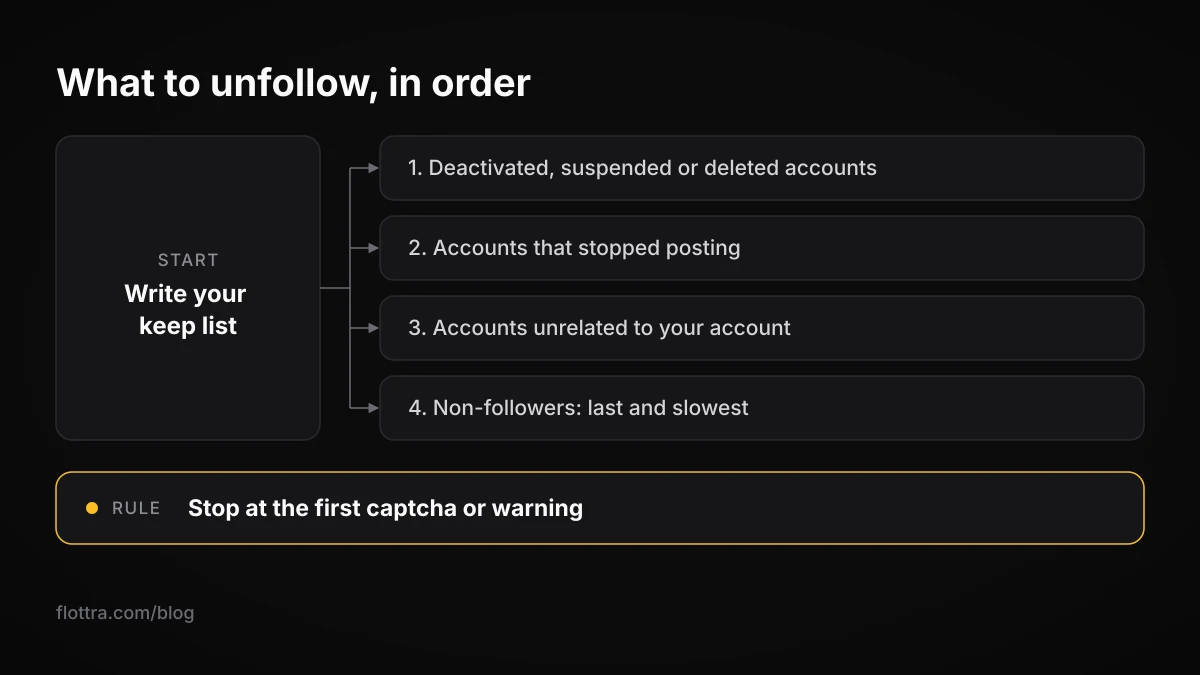
- Deactivated, suspended or deleted accounts. They post nothing, so removing them loses you nothing.
- Accounts that have stopped posting. Useful to remove, but read the next section on what “inactive” means.
- Accounts unrelated to what your account is about. Often left over from an old interest or a giveaway.
- Non-followers you followed only for a follow-back. The group most people mean by mass unfollow, and the one closest to the follow churn pattern in X's rules. Treat it last and slowest.
Before touching any group, write down the accounts you will keep whatever the filter says: people you talk to, sources you read, partners, your own other accounts. Some tools support this directly; Circleboom's blog describes a whitelist that excludes chosen accounts from bulk unfollow (checked 18 October 2026).
What “inactive” means, and why tools cannot see it
X's inactive account policy (checked 19 September 2026) says: “Inactivity is based on logging in.” Logins are invisible to anyone but X. So when a tool offers to unfollow inactive accounts, it is judging by the last post, not by X's definition. An account that reads every day and never posts will look inactive to every filter. Decide whether that matters for your list before you run one.
A staged cleanup
- Write your keep list.
- Remove deactivated and suspended accounts first.
- Move on to silent and unrelated accounts in short sessions, by hand or with a paced tool.
- Stop at the first captcha, error or “unusual activity” warning, and clear it before doing anything else.
- Spread the work over several days, and do not follow new accounts in the same sessions you unfollow in.
- Leave the non-follower sweep for last, and ask whether you need it at all (see the section on the 5,000 limit below).
Twitter unfollow tools in 2026, and how each one reaches X
Mass unfollow tools that still exist fall into three groups: services on X's official API, desktop apps, and browser extensions or console scripts that click buttons on x.com. The difference that matters is how each reaches X, because X's rules treat API use and scripting the website differently. The bulk and aggressive unfollowing rule applies to all of them.
| Method | Examples | How it acts | X rule that bears on it |
|---|---|---|---|
| By hand | X app or x.com | One click per account | Normal use; the bulk and aggressive rule still applies to volume |
| Official API service | Circleboom | Calls the unfollow endpoint for you, paced | API rate limits; bulk, aggressive or indiscriminate unfollowing |
| Desktop app | Redact | Preview, filters, automatic pacing; the page checked does not say whether through the API or a browser | Bulk, aggressive or indiscriminate unfollowing |
| Browser extension | Tweetstorm; X (Twitter) Mass Unfollow for Chrome; a Firefox fork | Clicks Unfollow in your logged-in browser | “Use non-API-based forms of automation, such as scripting the X website” |
| Console script | Jamie Mason's gist; XActions | Pasted into the browser's developer console, clicks Unfollow | Same as browser extensions |
API services and desktop apps
Circleboom's own help and blog (checked 18 October 2026) describe bulk unfollowing of non-followers, inactive and fake accounts. It says it uses X's official Enterprise API, paces at 50 unfollows per 15 minutes, caps runs at 800 a day and queues the rest for the next day, and recommends batches of 100 to 150 per session. The 800 figure is Circleboom's cap, not an X limit, and its “zero-suspension” wording is the vendor's claim. The unfollow endpoint acts only for the account that signed in: it “Causes the authenticated user to unfollow a specific user by their ID.”
Redact's blog (checked 18 October 2026) describes an Unfollow Accounts tool in its desktop app with a preview step, filters for choosing which accounts go, and automatic pacing because of platform rate limits. The page checked does not say whether the app acts through X's API or through a browser session, so it is listed separately from the API services above. The bulk and aggressive unfollowing rule applies either way.
Browser extensions and console scripts
These run inside your own logged-in browser and press the Unfollow button for you. Tweetstorm's mass unfollow extension unfollows by keyword in name, handle or bio, or unfollows all, with a maximum-accounts control, and its page says it is free to start with no card. The free X (Twitter) Mass Unfollow Chrome extension has a changelog up to version 1.2.3 and a Firefox fork exists. Jamie Mason's “Unfollow everyone on twitter.com” gist is a long-running console script, and XActions has a script marked as last updated January 2026 (all checked 18 October 2026).
All of them are, in X's terms, scripting the X website, which the automation page says “may result in the permanent suspension of your account.” Some scripts add random delays and claim this avoids detection; X does not publish its detection rules, so no delay can be shown to work. You decide whether the trade is worth it. The broader API versus browser question is covered in X automation in 2026.
Unfollow tools that no longer work: ManageFlitter, Tweepi, Crowdfire
Many guides still recommend unfollow tools that are gone. In January 2019 Twitter cut API access for ManageFlitter, Statusbrew and Crowdfire, saying the services had “repeatedly” violated its API rules, as reported by 9to5Mac. Social Media Today described the change as aimed at tools enabling bulk and aggressive following, “like following and unfollowing many accounts at once”.
- Tweepi: shut down in 2023 over X API pricing, according to hclout, a third-party source.
- ManageFlitter: closed in January 2022, according to the same source.
- Crowdfire, Unfollower Stats and Friend or Follow: listed as dead by TheGuideX (checked 18 October 2026), which also notes that many guides still recommend them.
- Audiense and SocialOomph: still named in older unfollow guides. Whether either currently offers an unfollow feature was not verified for this post.
The pattern is worth noticing. According to that reporting, the tools cut off in 2019 lost API access for the exact behaviour a mass unfollow involves, not for a technical fault.
Unfollowing to get under the 5,000 follow limit
Many people start a mass unfollow because they hit X's following ratio cap. The follow limit page (checked 19 September 2026) says: “Every X account can follow up to 5,000 accounts. Once you reach that number, you may need to wait until your account has more followers before you can follow additional accounts.” The obvious fix, unfollowing non-followers to make room and then following again, is close to the behaviour X prohibits.
Following accounts in the hope of a follow-back, unfollowing the ones that do not, and repeating is what the page calls follow churn: “following and then unfollowing large numbers of accounts in an effort to inflate one's own follower count”. One cleanup of a list built over years is not the same as running that loop every week, but X does not say where one ends and the other begins. If you are cutting the list in order to restart follow-for-follow, the cleanup is part of the pattern. The follow side, with the official numbers and why the loop fails, is in X follow bots, follow limits, and why follow/unfollow dies.
Where flottra fits, and where it does not
flottra has no unfollow feature, so it is not an option for the cleanup itself. If you follow again afterwards from many accounts, flottra's default hourly ceiling is 6 follows per account, and new accounts are held back by its warming gate (likes only for the first 3 days, follows added from day 4).
Cleaning up following lists across many accounts
If you run several X accounts, clean each one up on its own schedule rather than all of them in the same evening. A burst of unfollows across many accounts at once multiplies whatever pattern a single account shows, and if the accounts share a connection or a device, X may be able to link them (X does not publish how it detects related accounts). Work on one or two accounts at a time, and keep each account's sessions separate from its normal posting.
- Treat a challenge on one account as a signal for the others. If one account is locked mid-cleanup, pause the rest and look at what they have in common before continuing.
- Expect follower counts to move. X's enforcement options page (checked 19 September 2026) says that “when an account has been locked pending completion of a challenge (such as being required to provide a phone number), it is removed from follower counts, Reposts, and Likes.” A count that drops during a cleanup may reflect locked followers, not people unfollowing back.
- Keep a keep list per account. Accounts run for different purposes need different whitelists, and a shared filter will remove accounts one of them depends on.
Separating accounts properly, from the app switcher to one proxy per account, is covered in how many X accounts you can have, and how to run them.
Questions
- Is there an official unfollow limit on X?
- No daily unfollow limit appears on X's limits page, which lists a 400 a day follow limit and nothing for unfollows (checked 19 September 2026). The only unfollow figure X publishes is in its API documentation: 50 requests per 15 minutes per user on the unfollow endpoint. That is a ceiling on program requests, not a rule about safe behaviour. Figures such as 100, 150, 800 or 1,000 a day come from vendors and blogs, not from X.
- Can mass unfollowing get my X account locked or suspended?
- It can. X's automation rules say you may not unfollow “in a bulk, aggressive, or indiscriminate manner”, and its follow limit page prohibits follow churn and indiscriminate unfollowing. X does not publish the speed or volume that triggers action, or how long a resulting lock lasts. Scripting the website is separately named as something that “may result in the permanent suspension of your account”. Slow, selective cleanups spread over days carry less of the pattern the rules describe.
- Does the person know when I unfollow them on X?
- X does not tell them. Its following FAQ states that “X does not send a notification when you unfollow someone.” They can still find out by looking at their follower list, noticing that you no longer appear, or by using a third-party follower tracker that compares their follower list over time. Mass unfollowing makes this more likely to be noticed by accounts that watch their numbers closely.
- How do I unfollow inactive accounts on X?
- X has no built-in filter for this, so you either check accounts by hand from your Following list or use a tool with an inactivity filter. Know that X defines inactivity by logins, which only X can see. Tools judge by the date of the last post, so an account that reads daily but never posts will be flagged as inactive. Start with deactivated and suspended accounts, then review silent ones before removing them.
- Are browser extensions and console scripts for mass unfollowing allowed?
- X's automation rules say not to “Use non-API-based forms of automation, such as scripting the X website”, adding that this “may result in the permanent suspension of your account.” Extensions and console scripts work by clicking the Unfollow button on x.com from your logged-in browser, which is what that line describes. Some add random delays, but X does not publish its detection rules, so no delay can be shown to prevent detection.
- What happened to ManageFlitter, Tweepi and Crowdfire?
- Twitter cut API access for ManageFlitter, Statusbrew and Crowdfire in January 2019, saying they had repeatedly broken its API rules on bulk and aggressive following, as 9to5Mac and Social Media Today reported. Third-party sources report that ManageFlitter closed in January 2022 and that Tweepi shut down in 2023 over X API pricing. TheGuideX lists Crowdfire as dead. Guides that still recommend them are out of date.