How to delete tweets in bulk on X: the archive, the tools and the limits
X has no bulk delete: its help page says posts can only be deleted one by one. To remove many, you delete by hand from search, use a tool on X's paid pay-per-use API (one request per post, 50 deletes per 15 minutes per account, the archive needed past your latest 3,200 posts), or use an extension or app that works inside your own logged-in session.
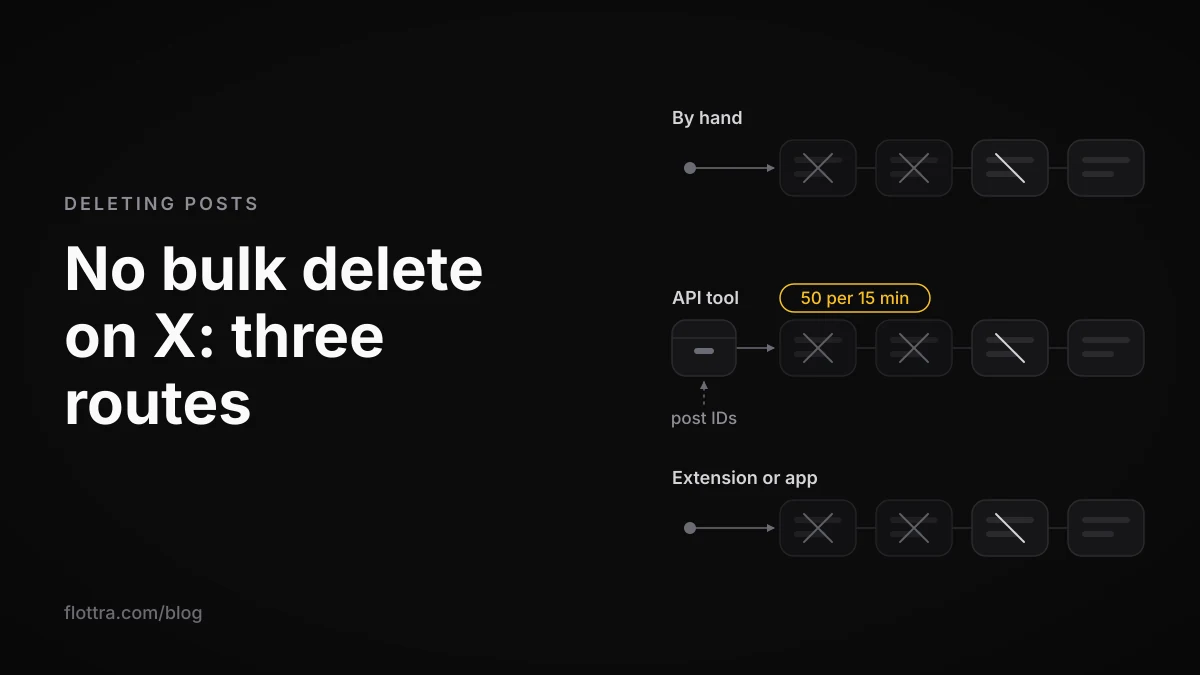
X (formerly Twitter) has no bulk delete. Its help page says so directly: "We do not provide a way to bulk-delete posts. You can only delete posts manually, one by one." (X Help Center, checked 18 October 2026.) Every tool that removes many posts at once is repeating that single deletion for you. It does this in one of two ways: through X's paid API, at 50 deletes per 15 minutes per account, or by clicking through your logged-in session as a browser extension or desktop app. Download your archive before you start. It is your backup, and it holds the post IDs that API tools need to reach anything older than your latest 3,200 posts.
Can you delete all your tweets at once on X?
No. X has no delete-all button, no date filter for deletion and no batch option on the website or in the apps. You delete your own posts one at a time from each post's menu. Every bulk method is software that repeats that single action for you, post by post. The methods differ only in who does the repeating, how fast, how far back it reaches, and what it costs.
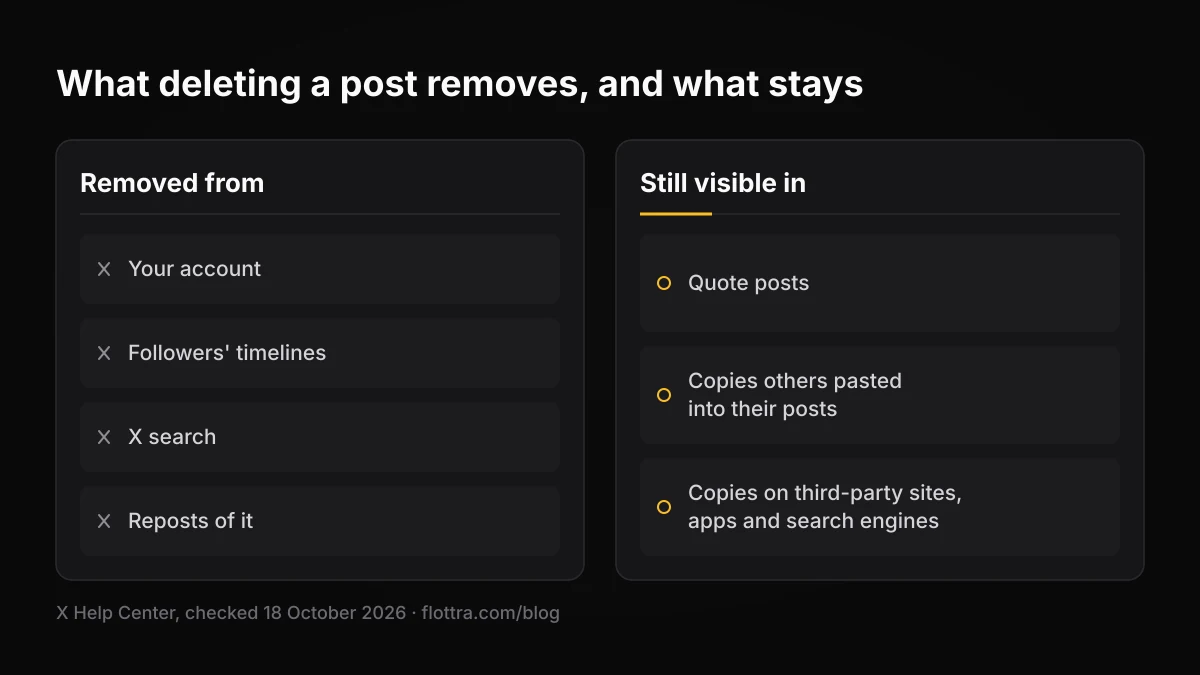
Deletion also does less than many people expect. According to the same help page (checked 18 October 2026), a deleted post goes from your account, from your followers' timelines and from X search, and reposts of it go too. These remain:
- Quote posts, where someone reposted you with their own comment.
- Copies that other people pasted into their own posts.
- Copies held by third-party sites, apps and search engines, which X says it cannot remove.
Bulk deletion tidies your profile and X search. It does not recall anything that has already been quoted, screenshotted or indexed elsewhere.
The three ways to delete tweets in bulk
In October 2026 there are three working ways to delete tweets in bulk. You can delete by hand from search results. You can use a tool that calls X's paid API once per post. Or you can use an extension or desktop app that works through your own logged-in session. They differ in speed, in how far back they reach, in whether they can remove likes, and in how they sit against X's automation rules.
| Route | How it works | Posts older than your latest 3,200 | Likes | Cost |
|---|---|---|---|---|
| By hand | You open each post and delete it yourself | Yes, if you can find them | Unlike one at a time | Free, apart from your time |
| API tool | One delete request per post ID through X's API | Only with your archive, which holds the IDs | Not on X's self-serve API since 20 April 2026 | X bills per request; the tool may pass the cost on |
| Extension or session-based app | Clicks delete inside your logged-in X session | Depends on the tool; some import your archive | Some list it, because they work in your session | The vendor's own price |
By hand from search
This is the only route that needs no tool and no authorisation. TweetDelete's own guide describes the method: use Advanced Search to narrow results to your account, a word and a date range, then delete each result on web or mobile. The X help pages read for this post do not document that search method, so test the filters before you rely on them. It works for a few dozen posts. It is impractical for thousands.
A tool on the X API
You authorise an API tool on your account. It then sends one request per post to X's delete endpoint, which X's API docs describe as: "Deletes a specific Post by its ID, if owned by the authenticated user." There is no batch version. The rate-limits page caps the endpoint at "50/15min" per user, and X bills every request (see the cost section below).
An extension or app in your own session
Session-based tools work inside the browser where you are already logged in. They do what you would do by hand, only faster. TweetStorm's extension for Chrome and Firefox deletes this way, one item at a time. Desktop apps such as Redact also run locally: its page says "The deletions run on your device". A tool that does not go through the API is not bound by the API's rate limit or billed per request. The vendor pages read for this post do not say how fast these tools run.
X's rule on scripting the website
X's automation rules (checked 19 September 2026) list this as a ground rule: "Use non-API-based forms of automation, such as scripting the X website. The use of these techniques may result in the permanent suspension of your account." The same page says: "You are ultimately responsible for the actions taken with your account, or by applications associated with your account."
The rules page does not mention deleting your own posts. Still, an extension that clicks delete for you is scripting the website in the plain sense of the words. You decide whether that risk is acceptable for the account in question.
Tools, from their own pages
Prices appear here only where the vendor's own page showed them on 18 October 2026. Labels such as "official X partner" are the vendors' own claims and were not checked with X.
| Tool | What its own page says | Price seen |
|---|---|---|
| TweetStorm | Chrome and Firefox extension; deletes posts, replies and retweets one at a time in your logged-in session | 15 free deletions a month; unlimited on the Professional plan at $12/month |
| Redact | Desktop app; tweets, retweets, quote tweets and replies, and also likes, DMs, lists and X Articles; filters by date, keyword, media and engagement; Premium can import your X data export | Not found on the pages read |
| TweetDelete | Deletes by age or keyword, once or on a schedule; homepage also covers likes; describes itself as an official X partner | Not found on the pages read |
| TweetEraser | Archive upload to delete all tweets, automatic tasks in the background, likes | Not found on the pages read |
| TweetDeleter | Upload your archive data files to reach all tweets | Not found on the pages read |
| Circleboom | Describes itself as an Official X Enterprise Developer; says it deletes beyond the 3,200-tweet API limit | Not confirmed; the indexed page is old |
Download your X archive before you delete anything
Request your X archive before any bulk deletion, for two reasons. It is your own copy of what you are about to remove. It also holds the post IDs that tools need to reach anything older than your latest 3,200 posts. X describes it as a "machine-readable archive of information associated with your account in HTML and JSON files" (X Help Center, checked 18 October 2026).
- Go to Settings and privacy, then Account, then Your X data.
- Verify yourself with the code X sends by email or phone.
- Select Request data.
- Wait for X's email or push notification that the archive is ready. X says: "It may take a few days for us to prepare the download of your X archive."
- Download it in the same browser where you are logged in to the account. Your email address must be confirmed.
- Keep a copy somewhere other than the computer you are cleaning from.
Source: How to download your X archive, checked 18 October 2026. X gives no firmer time than "a few days". Third-party blogs quote shorter waits and a limited download window, but X's page does not, so do not plan around them. One third-party source (Stashr) reports that the archive includes likes but not bookmarks. The X pages read for this post do not confirm that.
Why tools only see your last 3,200 tweets, and how to delete older ones
A tool that reads your posts through the X API can only see your most recent 3,200 of them, or 800 if replies are excluded. X's timeline docs (checked 18 October 2026) say: "Requesting Posts beyond these limits returns a successful response with no data." The tool gets no error. It simply sees nothing more. That is why a cleaner can report nothing left to delete while old posts are still on your profile.
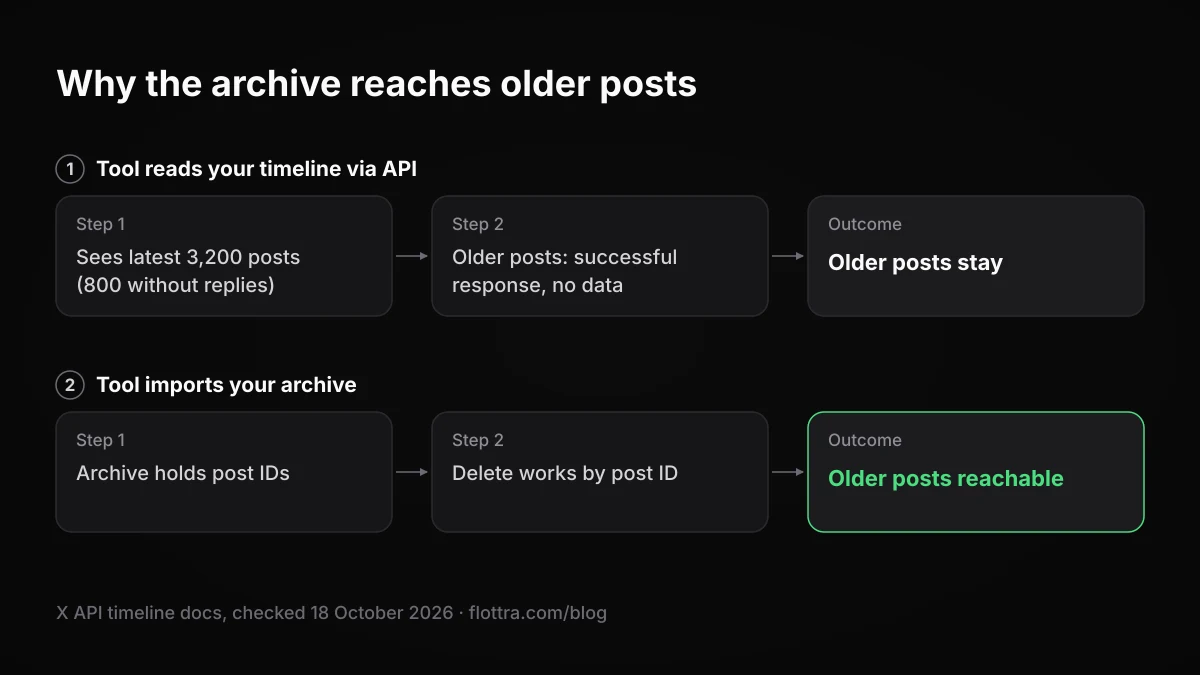
The delete endpoint works by post ID, so the fix is to hand the tool the IDs directly, and your archive contains them. This is why TweetEraser and TweetDeleter offer archive upload to reach all your tweets, and why Redact Premium imports your X data export. Circleboom advertises deletion "including tweets beyond the 3,200-tweet API limit". To bulk delete old tweets:
- Request your archive and wait for it to arrive.
- Choose a tool that accepts your archive files.
- Set the filter: everything, everything before a date, or posts containing a word.
- Let the tool work through the list at whatever pace its route allows.
- Check your profile and X search afterwards for anything it missed.
How long bulk deleting takes, and what the X API costs
Through the X API, one account can delete at most 50 posts per 15 minutes. That works out at 200 an hour, or 4,800 a day if the tool never pauses. The 50 per 15 minutes figure is X's limit for the delete endpoint (rate-limits page, checked 18 October 2026). The hourly and daily numbers are arithmetic from it, not figures X publishes.
| Posts to delete | Minimum time at 50 per 15 minutes | At $0.010 a request | At $0.005 a request |
|---|---|---|---|
| 1,000 | 5 hours | $10 | $5 |
| 3,200 | 16 hours | $32 | $16 |
| 10,000 | 50 hours (about 2 days) | $100 | $50 |
| 25,000 | 125 hours (about 5 days) | $250 | $125 |
XWipe's guide gives similar estimates from the same limit: about 5 hours for 1,000 tweets and about 2 days for 10,000. These are minimums. Any pause or failed request adds to them.
On cost, X's pricing page says: "The X API uses pay-per-usage pricing with no subscriptions." The monthly Basic and Pro tiers are gone, and there is no free self-serve tier for this use. The rate card lists "Interaction: Delete" at $0.010 per request and "Content: Manage" at $0.005 per request. Owned reads of your own data cost $0.001 per resource from 20 April 2026. The docs read for this post do not say which line a post delete is billed under, so budget about a cent or less per delete and check the Developer Console. If a vendor holds the API access, the per-request cost sits inside its own price. For the account limits that apply alongside these API numbers, see X rate limits in 2026.
Deleting likes, replies and retweets in bulk
Replies delete exactly like posts. Retweets are undone, not deleted. Likes are the hard part: since 20 April 2026, X's self-serve API can no longer remove them. Each one needs a different approach.
Replies
A reply is a post, so it goes through the same delete endpoint and the same 50 per 15 minutes limit. Most tools treat replies as a filter option. Keep the timeline cap in mind: when replies are excluded, the API timeline returns 800 posts rather than 3,200, so a tool that skips replies while reading sees even less of your history. The archive avoids the problem.
Retweets (reposts)
X's help page says you remove a repost of someone else's post by undoing it, not by deleting it. When a tool lists retweets among the things it clears, the action underneath is an undo. The original post stays on its author's account.
Likes
From 20 April 2026, X removed following, likes and quote-posting through API writes from all self-serve tiers. The announcement names "POST /2/users/{id}/likes (and DELETE for unlike)". The changelog says: "Following, Likes, and Quote-Posts via the API have been removed from all self-serve tiers." A tool on X's self-serve API can therefore no longer bulk unlike. That leaves Enterprise API access, or tools that work inside your own browser session.
X's own docs disagree
X's rate-limits page still lists DELETE /2/users/:id/likes/:tweet_id at 50 per 15 minutes and 1,000 per 24 hours per user (checked 18 October 2026). The changelog says the endpoint has been withdrawn from self-serve tiers. Trust the changelog.
Redact, TweetDelete and TweetEraser all list likes on their own pages. None of those pages, as read, says how they remove likes now that the self-serve unlike endpoint is gone, so ask before you pay. If the answer is that the tool clicks unlike in your browser, it belongs with the session-based tools above, and the same rule applies.
How to auto delete tweets older than a set number of days
X has no native auto delete. A rolling rule, such as deleting anything older than a month, exists only as a scheduled feature in third-party tools. TweetDelete says you can "run it once or automatically on a schedule", and TweetEraser offers automatic tasks that run in the background (both checked 18 October 2026).
Before you switch one on, consider three practical points:
- The tool keeps access to your account for as long as the schedule runs. The authorisation is not a one-off.
- Each run uses the same one-post-at-a-time delete. For API tools, that means the same rate limit and the same per-request billing. Once the backlog is cleared, each run only removes posts that have crossed the age line since the last one, which is a much smaller job.
- Download a fresh archive before the first run and at intervals afterwards. Once the rule has removed a post, your archive is the only copy you hold.
Can mass deleting tweets get your account locked?
Nobody outside X can say for certain. X publishes no limit on deleting your own posts beyond the API's 50 per 15 minutes per user. It does not say whether fast deletion through the website triggers locks or limits, and its automation rules do not address deleting your own posts. Because X does not publish its detection rules, any confident answer either way is a guess.
Here is what can be said. API tools work within a limit X publishes for that exact action. Session-based tools fall under the ground rule against "scripting the X website" quoted above, which names permanent suspension as a possible result. If an account is locked partway through a clean-up, stop the tool before you deal with the lock. X account locked: the three official routes out covers what to do next, and why X accounts get suspended covers the wider picture.
Giving a deleter access, and taking it back
- API tools: you authorise them on X. When the job is done and you are not using a schedule, revoke the app's access in X's settings and close your account with the vendor. X's help page on connected apps was not checked for this post, so follow the wording in your current settings.
- Extensions and session-based apps: they act inside your own logged-in browser, so there may be no app to revoke on X. Uninstall the extension when you have finished.
- Either way, read what a tool asks permission to do before you grant it, and prefer one that states plainly where the deletions run.
Bulk deleting tweets across several X accounts
Every limit, archive and authorisation in this process is per account. Cleaning ten accounts means ten archive requests, ten verification codes, ten authorisations or logins, and ten separate delete queues. Each queue is capped at 50 deletes per 15 minutes through the API. X states the limit per user, so one account's queue does not use up another's allowance.
For session-based tools, separation matters more than speed. If you run one deleter in one browser and log in and out of many accounts, all of those accounts pass through the same browser and the same connection. If your accounts already live in separate profiles, run the deleter in each account's own profile. flottra, for example, keeps a separate saved browser profile and proxy for each account on your Windows computer, but it does not delete posts and is not the tool for this job. For the wider setup, see how many X accounts you can have, and how to run them and X automation in 2026: what actually works.
Questions
- Can you delete all your tweets at once without a third-party tool?
- No. X's help page says it does not provide a way to bulk-delete posts and that posts can only be deleted manually, one by one. Without a tool, the closest you get is narrowing your posts with search and deleting each result yourself. That is workable for a few dozen posts. For thousands you need an API-based tool, an extension or a desktop app, and each of them still deletes one post at a time on your behalf.
- Is there a free way to bulk delete tweets?
- Deleting by hand is free, but the X API is not. X moved to pay-per-use billing with no free self-serve tier for this, and the rate-card lines that may apply to a post delete are $0.005 and $0.010 per request (X's docs do not say which). TweetStorm's extension page listed 15 free deletions a month on 18 October 2026. Circleboom's page title says free, but that could not be confirmed. Other vendors' free tiers were not found on the pages read, so check them on each vendor's site.
- How long does it take to delete 10,000 tweets?
- Through the X API, at least 50 hours. The delete endpoint allows 50 requests per 15 minutes per user, which is 200 an hour if the tool never pauses, so 10,000 posts take a little over two days. XWipe's guide reaches the same estimate of about 2 days. Session-based extensions are not bound by the API figure, but the vendor pages read for this post do not say how fast they run.
- How do I remove retweets in bulk?
- You undo a retweet, now called a repost, rather than delete it. X's help page says a repost of someone else's post is removed by undoing the repost. Tools that list retweets among what they clear, such as TweetStorm and Redact, perform that undo for each one. Undoing removes your repost from your profile, while the original stays on its author's account.
- Does deleting a tweet remove it from Google or archive sites?
- Not necessarily. X says a deleted post leaves your account, your followers' timelines and X search, and reposts of it go too. It does not remove quote posts that added a comment, or copies other people pasted into their own posts. Copies cached by third-party sites, apps and search engines also stay, and X says it cannot remove them. No X page says how long outside caches or archive sites keep a copy.
- Is it safe to give a tweet deleter access to my account?
- That depends on the route. An API tool gets an authorisation you can revoke afterwards, though a scheduled one keeps it for as long as the schedule runs. A browser extension acts inside your logged-in session. X's automation rules say scripting the website may lead to permanent suspension, and that you are responsible for apps associated with your account. Download your archive first, grant only what the tool needs, and remove access when you have finished.
- What does the X API cost to delete posts in 2026?
- X's API is pay-per-use with no subscriptions. Its rate card lists "Interaction: Delete" at $0.010 per request and "Content: Manage" at $0.005, and the docs read do not say which one applies to a post delete. Budget about a cent or less per post, roughly $50 to $100 for 10,000 posts. Add owned reads at $0.001 each if a tool reads your timeline. Your Developer Console shows the actual charge.