'This request looks like it might be automated' on X: what it is and what clears it
"This request looks like it might be automated" is a temporary block on one write action on X (posting, quoting, liking, replying, following or a DM), returned to API users as error 226. It is not a suspension, a lock or a shadowban. X publishes neither its triggers nor a duration; in user reports it lifts by itself after hours to a few days.
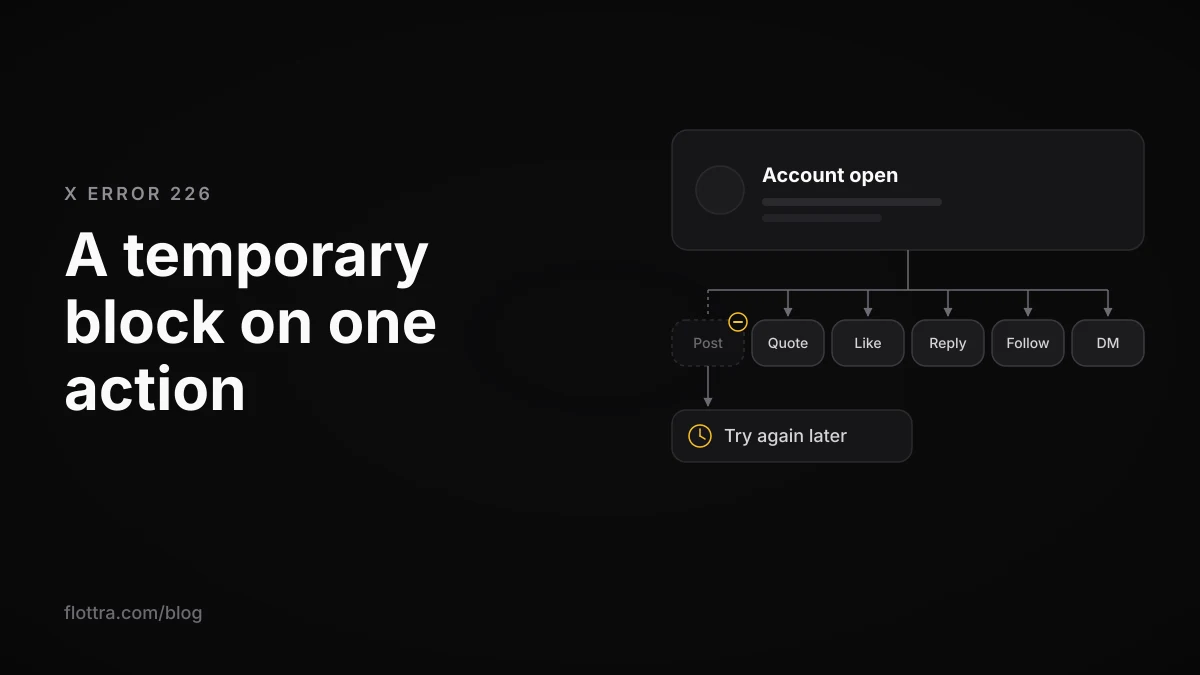
"This request looks like it might be automated" is X's message for a temporary, action-level block: one write action (an original post, a quote, a like, a reply, a follow or a DM) is refused while the account itself stays open. It is not a suspension, a lock or a shadowban, and API users get the same text as error code 226. X (formerly Twitter) publishes neither what triggers it nor how long it lasts; in user reports it has lifted by itself after a few hours to a few days. Stop the action, rule out your network and your post count, and only go further if a lock or suspension screen appears.
What 'This request looks like it might be automated' means on X
"This request looks like it might be automated" means X's anti-spam systems refused one action you just tried, such as a post, a quote, a like, a reply, a follow or a DM. The account is not suspended or locked: you can still log in and read, and other actions often keep working. The full message, as users saw it in May 2026, reads:
"This request looks like it might be automated. To protect our users from spam and other malicious activity, we can't complete this action right now. Please try again later." (posted on X by a user on 14 May 2026, checked 11 November 2026.)
The block is often partial. In a developer forum thread opened on 15 May 2026, the first poster could not post or quote but could still repost and like, and the block lifted briefly before coming back. In another thread from the same week, a user could reply but not publish original posts from 16 May, and a second user got the error without having posted anything.
No X Help Center page containing the message turned up when this was checked on 11 November 2026. What follows is pieced together from X's developer documentation, X's own enforcement pages and dated user reports, and each source is named so you can weigh it.
X error 226: the same block in the API
Error 226 is the code X's API returns with the text "This request looks like it might be automated." It is not new: a developer forum topic dated 15 April 2014 said developers were "receiving Error Code 226 in response to requests for tweet or direct message creation" and that the code, previously undocumented, had been added to the documentation.
X's API error troubleshooting page lists 226 with that text. The copy seen for this post was cached about three years ago, and whether the address now redirects to docs.x.com was not confirmed (checked 11 November 2026). The older error table, preserved only in a GitHub mirror of the error codes, described what the code means:
"We constantly monitor and adjust our filters to block spam and malicious activity on the Twitter platform. These systems are tuned in real-time. If you get this response our systems have flagged the Tweet or DM as possibly fitting this profile."
That wording could not be found on a live X page, so treat it as historical. It still fits what users describe: a filter adjusted continuously, flagging a particular post or message rather than announcing a penalty on the account. Third-party code, such as an unofficial Go client for X's web API, says 226 usually arrives inside an HTTP 403 response; no X page seen for this post says so.
There is one reported case where 226 was the symptom of something heavier. In a 2020 forum thread, a developer whose script posted every 10 seconds got 226 and then could not post even by hand. The reply said: "There was a read-only flag applied to your account. Whenever you tried to perform write actions using the API, it would return error 226". Who wrote that reply is not confirmed, but it matches the read-only mode on X's own enforcement page, covered below.
How it differs from rate limits, locks, read-only mode and suspension
The quickest way to tell X's blocks apart is what the screen asks of you. This message asks for nothing except to try again later. A lock asks you to verify a phone number, an email address or a captcha. A suspension tells you the account is suspended. A rate limit or the daily post limit is about volume; some reports say hitting a cap can also bring up this same message, so count your actions too.
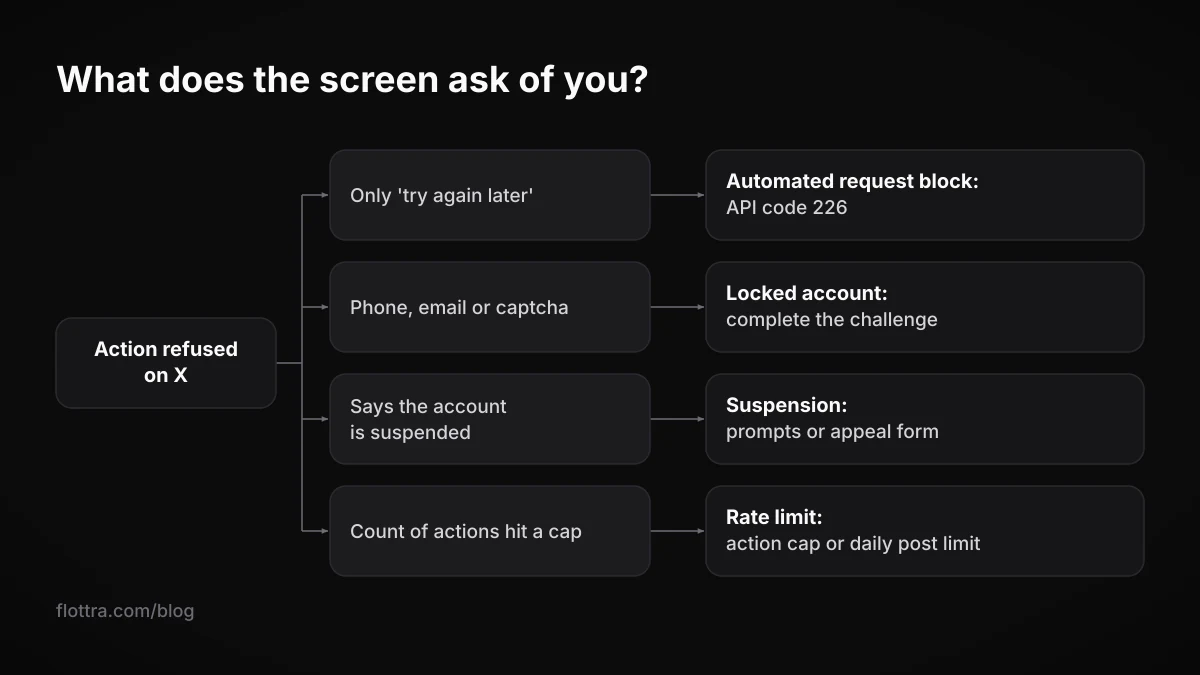
| What you see | What it is | What still works | What clears it |
|---|---|---|---|
| "This request looks like it might be automated" (API code 226) | A spam filter refusing one write action | Reading; in reports, often some other actions (reposts and likes, or replies) | Waiting, in user reports; no published duration |
| "Rate limit exceeded" | A limit on how many requests you send in a window | Everything outside that limit | The window resetting |
| Daily post limit reached | X's published cap: 50 original posts and 200 replies a day for unverified accounts, split into semi-hourly limits | Other action types | The daily and semi-hourly limits resetting |
| "Failed to send" | A separate posting failure: widespread in mid May 2026 with no comment from X, and on Android linked to a test build of the new X Android app (third-party reports) | Varies by report | No fix confirmed by X |
| Locked: phone, email or captcha challenge | An official lock; X wants proof of ownership or a captcha | Little until the challenge is passed | Completing the challenge |
| The human check keeps coming back | A verification challenge that repeats after you pass it | Little on that session | See the verification loop guide |
| Read-only mode | Official enforcement limiting posting, reposting and liking | Reading; DMs to followers only | X lifting it; no duration published |
| Suspended | Account-level enforcement | Logging in to follow prompts or appeal | Phone or email prompts, or the appeal form |
Read-only mode is the official enforcement that sounds most like a long-running 226. X's enforcement options page says, checked 19 September 2026: "Placing an account in read-only mode: We may temporarily limit an account's ability to post, Repost, or Like. The user can read their timelines and will only be able to send Direct Messages to their followers." The page does not say how long it lasts.
It is not what people call a shadowban either. That term usually means X limiting how far posts that did go out can travel; here the action never happens. For the neighbouring problems, see X rate limits in 2026, getting out of a locked X account, the verify-you-are-human loop and testing for a shadowban.
How long the automated request block lasts
X publishes no duration for this block on any page found for this post. The only evidence is what users report, and in those reports it has lifted by itself after a few hours, after about a day, or after several days. Each of these is one person's experience, not a rule:
- July 2023: during the rate-limit period, users including Twitter Blue subscribers got the message and many could only repost or view; one said it cleared after a few hours.
- July 2023: one user had it for about 10 hours, then wrote that around 8 hours after their post everything was back to normal.
- May 2026: one user was blocked for about 10 hours; another said on 14 May they could post again and would post only every few hours.
- May 2026: a thread titled "2 DAYS WITH THIS ISSUE", with no official reply visible.
- 2023: a user hit it after liking or replying to a few tweets in a short span, and it went on for days after the account was unsuspended.
- 2024: a new account hit it three times in its first month, and each time it cleared only by waiting.
Figures you will see elsewhere, such as "24 to 48 hours" or advice to pause for 72 hours, come without a source. Treat them as guesses.
The May 2026 wave and the new post limit
Many of the reports you will find date from a wave that started in mid May 2026, at about the time X cut its published post limit. In order:
- 5 May 2026: according to PiunikaWeb's Wayback Machine check, X's limits page still said 2,400 posts a day.
- 14 to 16 May 2026: forum threads multiply. The 15 May thread had about 110 replies and 3,394 views by about 19 May.
- 17 May 2026: PiunikaWeb reports non-Premium users unable to post with this message, and says Premium users were getting it too. Roboin reports users unable to post over Wi-Fi from about the same day.
- 19 May 2026: PiunikaWeb says a widespread "Failed to send" problem had run for about three days, that users it checked were nowhere near 50 original posts (one account from 2017 had sent two tweets all weekend), and that X had not commented.
- 20 May 2026: Insider Paper reports original posts and quote posts blocked, including for users who had not posted for days, with the cause unclear and no comment from X.
The X limits page, checked 19 September 2026, now says: "Posts: 50 original posts and 200 replies per day for unverified accounts. The daily update limit is further broken down into smaller limits for semi-hourly intervals." Lower down, the same page still says: "The post limit of 2,400 updates per day is further broken down into semi-hourly intervals." The page contradicts itself; the 50 and 200 figures are the ones in its current-limits list. It also says: "These limits may be temporarily reduced during periods of heavy site usage."
In the 15 May thread, a reply written as X said: "You are likely hitting our automated spam systems or hitting platform limits. Please review the platform limits here and avoid behavior that may be seen as spammy". Whether an X staff member wrote it is not confirmed, and X had not commented on the wave in any report found for this post, so whether it was a bug, an outage or a deliberate tightening is not known. The reports fit both a lower post limit and a spam filter catching ordinary users.
What seems to trigger the automated request error
X does not publish its detection rules, so nobody outside X can list the triggers with certainty. The patterns below recur in user and developer reports; each comes with the report it rests on, and none is confirmed by X.
- Bursts of actions close together. A 2023 user hit it after liking or replying to a few tweets in a short span; a 2020 developer hit it with a script posting every 10 seconds.
- Repeating the same thing. A DM chatbot developer got 226 when one user went through the same bot flow several times, sending identical messages.
- New or recently restored accounts. The 2024 new account above hit it three times in a month; the 2023 user had it for days after being unsuspended.
- VPNs that change location. A user in the 2024 thread linked it to a VPN with frequently changing locations.
- Particular link domains. ContentStudio's help docs say sharing with its default rplg.co short domain can cause this message.
- Reaching a published cap. xsenderapp, a DM tool vendor, says paid accounts that hit the DM cap can see the same error. X's limits page gives that cap as "Direct Messages (daily): The limit is 500 messages sent per day."
- Something on X's side. In May 2026, accounts that had barely posted were blocked too.
What is missing from that list is a number. You will find claims online that a set count of actions per hour trips the filter; none traced back to X, so none is printed here.
What to do when X says your request looks automated
When X says your request looks automated, the useful response is to stop, find out whether the cause is the account, the network or X itself, and wait. Nothing official clears this block on demand. Work through these in order:
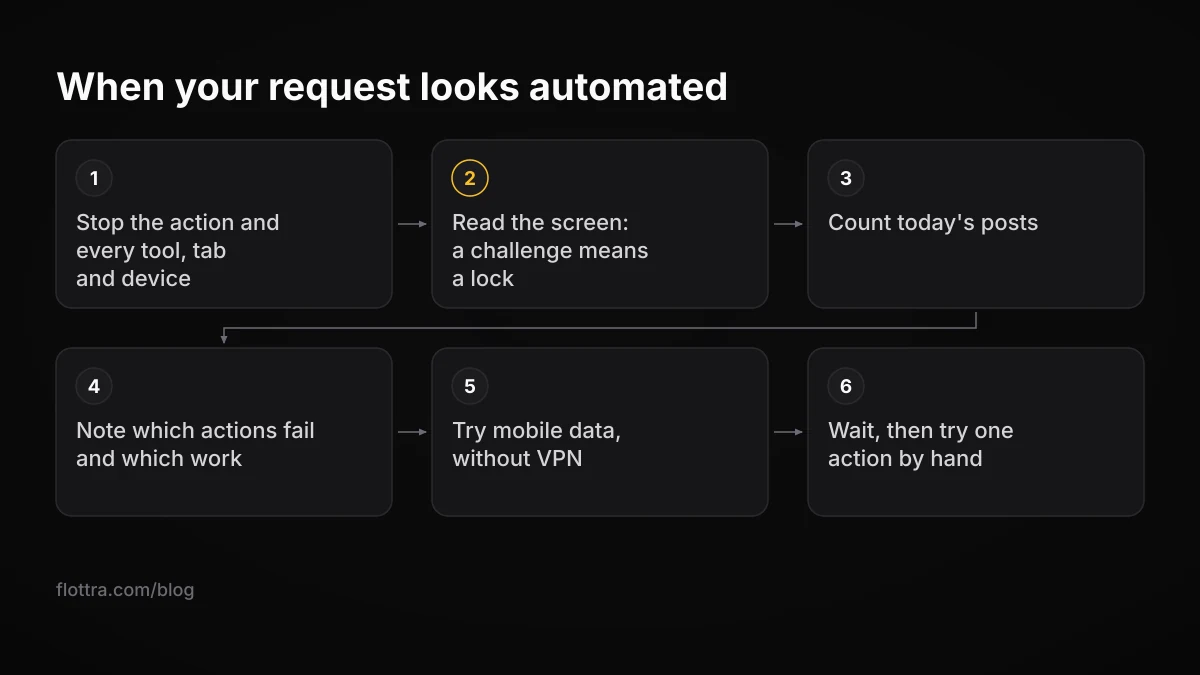
- Stop the action that failed, and everything else that acts for the account: schedulers, scripts, extensions that write to X, other tabs and other devices. xsenderapp advises stopping every tool and tab that sends. No source shows that retrying makes the block longer, but retrying a request that was just flagged tells you nothing new.
- Read the screen. If X asks for a phone number, an email code or a captcha, you are locked, not looking at a 226. The locked accounts page says, checked 19 September 2026: "If your account appears to have exhibited automated behavior that violates the X Rules, we may lock it and request that you pass a captcha challenge to confirm you are not a robot." Follow that route instead.
- Count today's posts. For an unverified account, 50 original posts and 200 replies a day is the published cap, with smaller semi-hourly limits inside it.
- Note which actions fail and which work. Reposts working while posts fail matches the May 2026 reports; nothing working at all points towards read-only mode.
- Rule out the network, as a diagnostic: try the official app on mobile data with Wi-Fi off. If the action works there, the problem follows the network or device. Roboin reported this pattern in May 2026. If you use a VPN, try without it.
- Try a clean session if you like: another browser, cleared cookies, logging out and in. A November 2024 thread suggested this; it is anecdotal, and adding a phone number did not help the person who started that thread.
- Wait, then try one ordinary action by hand. If it fails, wait longer rather than cycling through workarounds.
When to appeal, and when not to
There is nothing to appeal while the block is only this message. The appeal route on X's suspended accounts page is for suspensions: "First, log in to the account that is suspended. Then, open a new browser tab and file an appeal." If you open the appeal form from an account that is not suspended, it says "You are not currently logged into a suspended X account." For a real suspension, see how to appeal an X suspension.
Developers who think a post or DM was flagged in error have one older option: a 2022 forum answer quotes X's troubleshooting tip to file a ticket through a platform form. Whether that form still works was not checked.
Watch for the step up
If the message is followed by a phone or email prompt, a captcha, a read-only state that does not lift, or a suspension notice, you are dealing with a different problem. Handle it through the official route for that state, and do not keep running tools on the account while you do.
Running several X accounts without tripping it
If you run several X accounts, the habits that make one account look automated are multiplied, and a shared cause (one network, one IP, one tool) may be behind several accounts being blocked at once. If two or more of your accounts get the message within minutes of each other, look at what they share before you look at the accounts. The unofficial Go client mentioned above builds in exactly that check, flagging a possible shared cause when different accounts get 226 within 10 minutes of each other.
Read X's rules before deciding how you run accounts. The automation rules (page dated April 2026, checked 19 September 2026) say not to "Use non-API-based forms of automation, such as scripting the X website. The use of these techniques may result in the permanent suspension of your account." They also say: "Automated likes or hide replies: You may not like posts or hide replies in an automated manner." The authenticity policy says: "Multiple Accounts and Coordination: We prohibit coordinated inauthentic activity that artificially influences conversations or disrupts X." The decision is yours.
The habits that line up with the reports above:
- Space actions out. Bursts come up more than once in the reports. X publishes no hourly limit for likes or replies, so any pace you set is your own. For reference, Flottra's default hourly ceilings per account are 12 likes, 6 follows, 3 posts, 5 replies and 3 DMs, set as ceilings, not targets.
- One exit IP per account, and stable. Accounts sharing an IP may share whatever reputation it has (X does not publish whether it checks this), and a VPN that hops location appears in the reports. Flottra recommends one proxy per account, and its panel refuses to put more than five accounts on one static proxy. See choosing proxies for X accounts.
- Go slowly with new accounts. New accounts show up in the reports more than once; build up activity over weeks rather than starting at full pace.
- Never send identical text from several accounts. The authenticity policy's content spam rule names posting "in a bulk, duplicative, irrelevant or unsolicited manner".
- One tool per account. Two tools, or a tool and a person, acting on the same account at once produce the bursts you are trying to avoid.
None of this guarantees the message will not appear. The May 2026 reports include accounts that had barely posted, X does not publish what its filter looks at, and some accounts get blocked whatever you do.
Questions
What is X error 226?
Error 226 is the code X's API returns with the text "This request looks like it might be automated." It has existed since at least April 2014, when a developer forum topic reported it on tweet and DM creation. The older official description, now seen only in a mirror, says X's spam filters are tuned in real time and that the code means a post or DM was flagged as possibly spam. People on the website or apps see the same words without the number.
How long does the 'this request looks like it might be automated' block last?
X does not publish a duration. User reports vary: one July 2023 user said it cleared after a few hours, a May 2026 user was blocked for about 10 hours, and another titled their May 2026 thread as two days with the issue. Accounts that are new, or were just restored after a suspension, have reported it for days. Any precise figure you read elsewhere is a guess unless it cites X.
Is this error a suspension, a lock or a shadowban?
None of the three. A suspension says so on the account and is cleared through the official prompts or an appeal. A lock asks for a phone number, an email code or a captcha before you can carry on. A shadowban, in the sense people use it, limits how far published posts travel. This message blocks the action itself and only asks you to try later. If one of those other screens appears, treat it as that problem instead.
Why can I retweet and like but not post or quote?
Because the block applies to actions, not to the whole account, and reports show it hitting some actions and not others. In May 2026 the first poster in a widely read developer forum thread could repost and like but not post or quote, and another user could reply but not post originals. X has not explained the pattern. Its official read-only mode limits posting, reposting and liking together, so a partial block looks more like the spam filter.
Does X Premium stop the error?
There is no official statement that it does, and reports say it does not reliably. During the July 2023 wave, Twitter Blue subscribers reported the message, and PiunikaWeb wrote on 17 May 2026 that Premium users were seeing it too. X's limits page gives 50 original posts and 200 replies a day for unverified accounts but does not state the number for Premium accounts, so do not subscribe expecting it to remove the block.
Can a VPN, a proxy or Wi-Fi cause the error?
Possibly, but the evidence is anecdotal. A 2024 forum user linked their block to a VPN that changed location often, and a reply in another thread suggested reconnecting or dropping the VPN. In May 2026 Roboin reported users who could not post over Wi-Fi but could on mobile data. X does not publish what its filter checks, so treat the network as something to rule out: try the official app on mobile data and see whether the block follows.
Does retrying make it last longer?
No source found for this post shows that it does, and X says nothing either way. The case for stopping is practical: the request was flagged as looking automated, and repeating it quickly is that kind of behaviour. Roboin advised in May 2026 against retrying during the outage, and xsenderapp, a DM tool vendor, suggests stopping every tool and tab that sends for the account. Wait, then try a single action by hand.