X keeps asking you to verify you are human: why the loop happens and what stops it
X shows its Authenticate your account puzzle, a lock, or a liveness check when its systems flag a session or account for unusual or automated-looking activity. X does not publish the triggers. Keep one browser profile and one stable connection, let the challenge scripts load, and try the official app. If the loop persists, stop retrying and use the phone or email route.
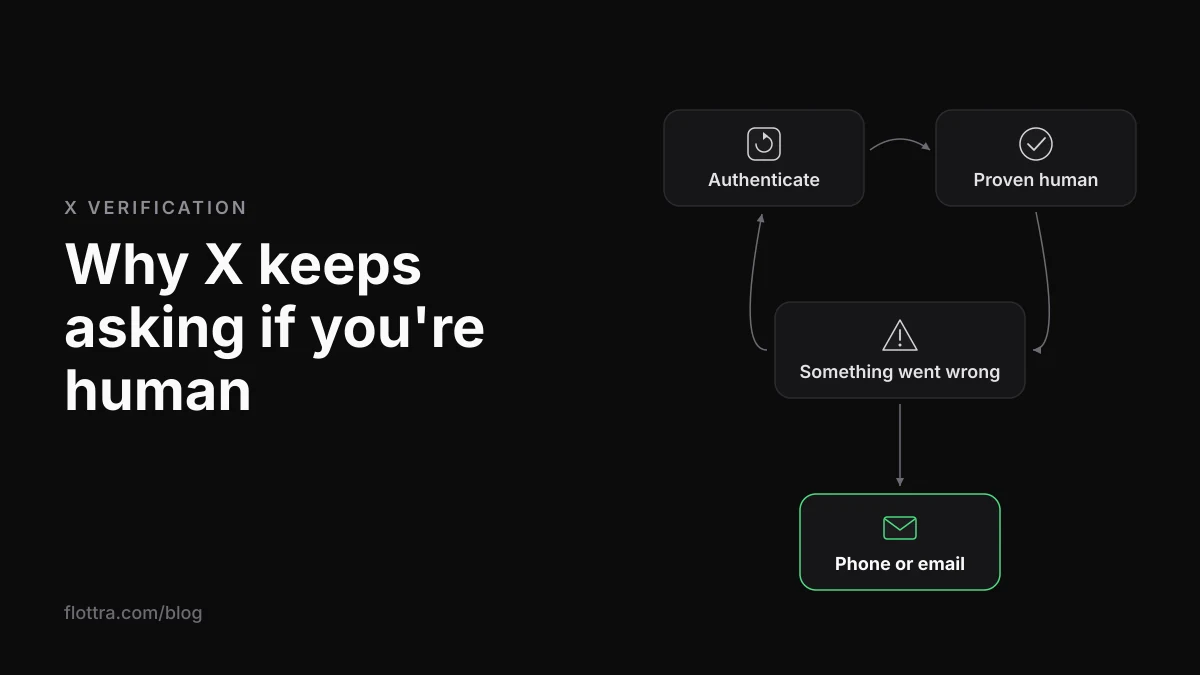
X (formerly Twitter) keeps asking you to verify you are human because its systems have flagged your session or your account for what it calls “unusual or automated-looking activity”. X does not publish what sets that off. The usual suspects are a connection with a poor reputation or one that changes mid-session, a new or freshly cleared browser, and bursts of actions. What clears it depends on the screen. The arrow puzzle needs a stable browser and connection that keep the pass. A lock is cleared by phone, email or a captcha. The liveness check, rolled out from early October 2026 according to news reports, needs Face ID, a fingerprint or a selfie video. If the loop keeps repeating, stop retrying and use the phone or email route.
Which X verification screen are you seeing?
X uses at least four different screens to check that a person is behind an account. Each one is cleared a different way, so the first step is to work out which one you have. Only two of them are documented in X's Help Center. The wording of the other two comes from users on X's own developer forum.
The arrow puzzle is the one most people mean by the captcha loop. A user on X's developer forum recorded the exact sequence. It opens with “Authenticate your account We need to make sure that you’re a real person. Authenticate”, then shows “Using the arrows, move the person to the indicated seat. (1 of 1)” and “You’ve proven you’re a human. Continue your action.”, and ends with “Something went wrong. Due to a technical issue, we couldn’t complete this request.” The thread is about two years old. The user says it was their second lockout in three months, and no fix is visible in it.
X's locked and limited accounts page now opens with this (checked 8 November 2026): “To make sure X is as safe as possible, you may see a message that says Please verify your account. When you see this message, you’ll need to verify ownership by phone, email or recaptcha.” X calls its puzzle “recaptcha” there and does not name the company that supplies it.
| Screen | What you see | Documented by X? | What clears it |
|---|---|---|---|
| Arrow puzzle | “Authenticate your account”, then “Using the arrows, move the person to the indicated seat.” | No. Wording comes from a user thread on X's developer forum | Passing the puzzle, if the session keeps the pass |
| Lock | “Please verify your account” | Yes, locked and limited accounts page | Phone, email or what X calls “recaptcha” |
| Liveness check | A request for Face ID, Touch ID, Android biometric unlock or a selfie video | Yes, liveness checks page | Passing any one of the methods |
| QR code screen | A full-page QR code with “Let's verify that you're human” | No. User reports from 2026 only | Not documented. Users report it is hard to clear without a smartphone |
Why X keeps asking you to verify you are human
X's own explanation is that its systems flag accounts for unusual or automated-looking activity, then ask the account to prove a person is operating it. The liveness checks page (checked 8 November 2026) says: “If our systems flag your account for unusual or automated-looking activity, we may ask you to complete a quick liveness check.” It adds: “That doesn't necessarily mean you did something wrong.”
The locked page says more about the captcha route (checked 19 September 2026): “If your account appears to have exhibited automated behavior that violates the X Rules, we may lock it and request that you pass a captcha challenge to confirm you are not a robot.”
X does not say which signals count. Everything below is a likely cause rather than a documented one. These triggers are repeated across vendor guides and forum threads, and they fit how bot detection generally works. Because X does not publish its detection rules, treat each one as a suspect, not a diagnosis.
- The reputation of your IP address. Data centre addresses look less like a home or mobile connection, and so do exit IPs shared by many accounts at once. Proxy vendors such as IPDEEP list proxies among the causes. Keep in mind that they also sell proxies. IPDEEP itself notes that X does not disclose all of the factors that trigger human verification.
- A connection that changes mid-session. With a VPN that hops between servers or countries, or a rotating proxy, the account appears from a new place between one request and the next.
- A new device, a new browser or cleared cookies. If the cookies that told X it had seen this browser before are gone, the session starts again as a stranger. A private window does this every time it closes.
- Bursts of actions. This means many follows, likes or replies in a short spell. X's limits page says (checked 19 September 2026): “These limits include actions from all devices, including web, mobile, phone, API, etc.” Work done on your phone and on the web counts together.
- Failing the checks themselves. InstaIP, another proxy vendor, lists repeated failed actions as a trigger. This is unconfirmed, but it is a good reason not to hammer the puzzle.
Why passing the X captcha still ends in Something went wrong
Sometimes X shows “You’ve proven you’re a human. Continue your action.” and then “Something went wrong. Due to a technical issue, we couldn’t complete this request.” That suggests the pass was recorded but the next step did not accept it. X has not documented why this happens. The four causes below are the likely ones, roughly in order of how easy they are to rule out. X has confirmed none of them.
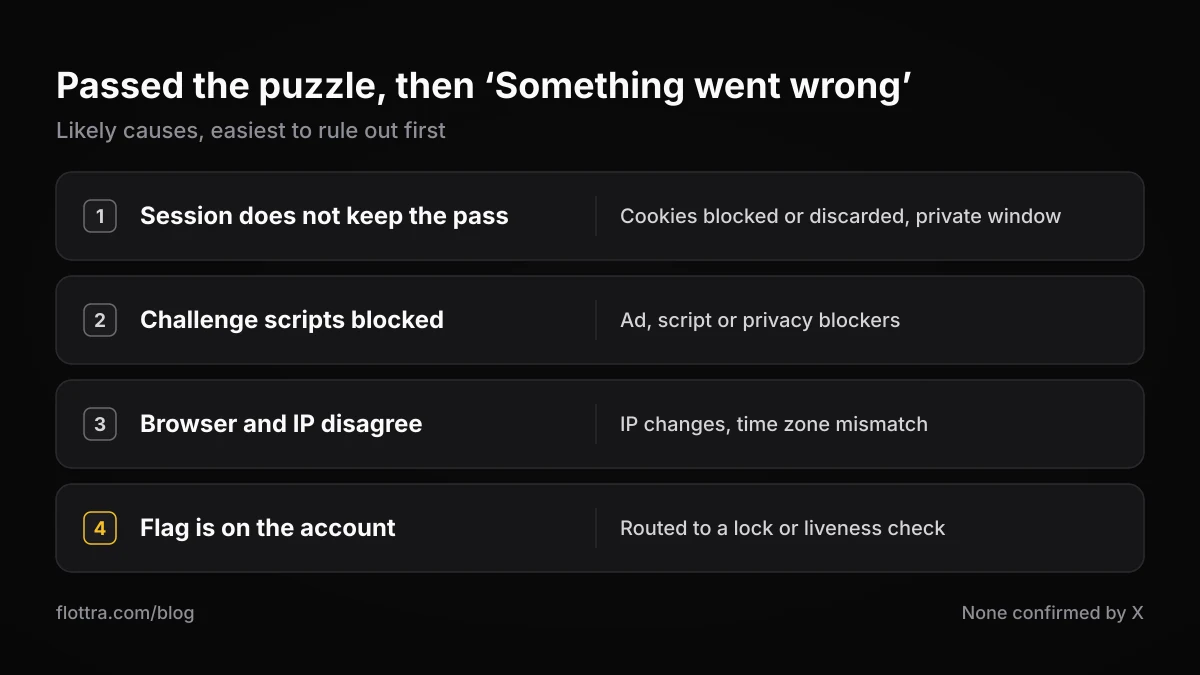
The session does not keep the pass
A passed challenge probably has to be carried into the next request, most likely by a cookie. The browser may block cookies for x.com, or discard them (a private window, a cleaner app, a strict privacy setting). The login may also span two tabs that disagree. In each case the action arrives without proof, and X asks again.
Something blocks the challenge scripts
Ad blockers, script blockers, privacy extensions and strict tracking protection can stop the puzzle frame from loading, or block the request that follows it. IPDEEP lists images that load endlessly and a return to the login screen after passing among the symptoms people see. A puzzle that renders but cannot report back would produce this kind of loop, although no source confirms that this is the cause.
The browser and the IP disagree
The IP may change between solving the puzzle and continuing. Or the browser's time zone and language may point to one country while the IP points to another. Either way, the pass and the next request may not look like they came from the same visitor. This is a plausible mechanism, not a documented one.
The flag is on the account, not the session
The puzzle clears a check on this session. If X has flagged the account itself, a session pass may not be enough. X may then route the account to a lock (phone or email) or to a liveness check instead. A loop that survives a clean browser, a stable connection and the official app most likely points here. The forum user who was stuck twice in three months fits this pattern, although the thread does not say how it ended.
How to stop the X captcha loop, step by step
Work through these steps in order, once, and avoid changing several things at the same time. None of them is an official fix. They are troubleshooting steps that remove the likely causes above without adding new signals.
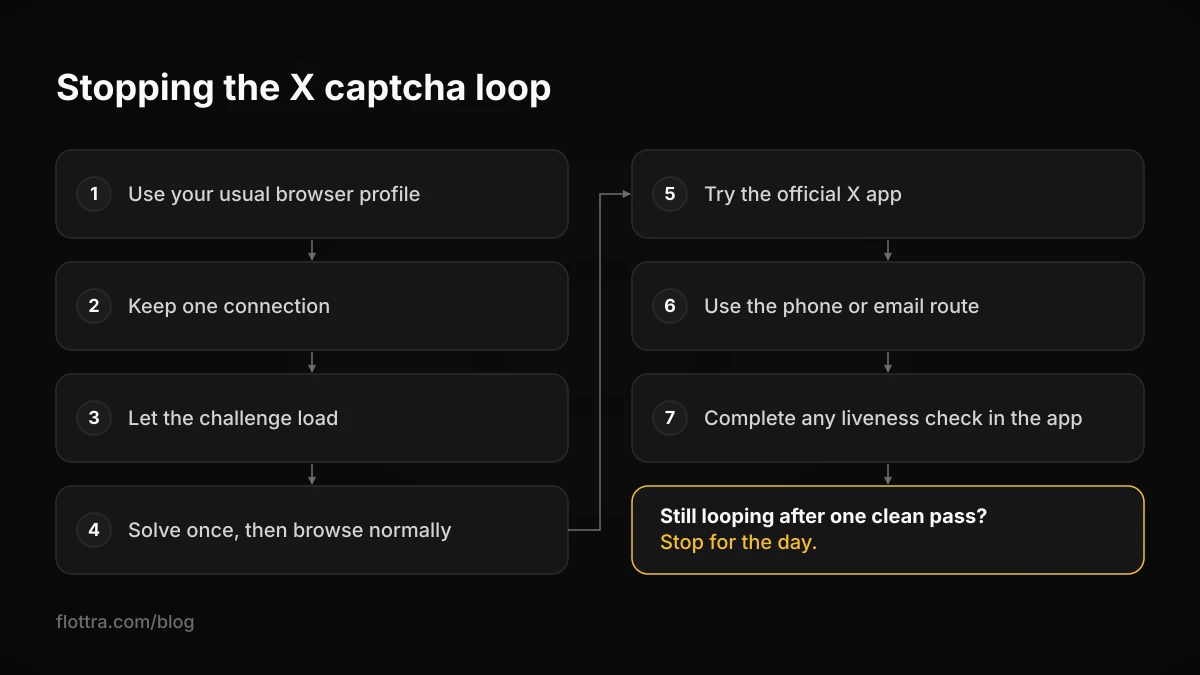
- Use the browser profile the account normally uses. Do not use a fresh private window or a different browser. If you already cleared cookies to fix the problem, the account has lost its familiar session once. Do not do it again.
- Keep one connection for the whole attempt. Switch the VPN off, or pin it to one server. If the account runs through a proxy, keep the same exit IP throughout. Swapping proxies in the middle of a challenge adds a change. It does not remove one.
- Let the challenge load. Pause ad blockers, script blockers and privacy extensions for x.com, and allow cookies for x.com. Check that the computer's clock is set automatically. Reload the page once after changing these settings.
- Solve the puzzle once, carefully, then do something ordinary. After “You’ve proven you’re a human”, open your timeline or profile. Do not go straight back to the burst of follows or replies that may have triggered the check.
- Try the official X app. Log in on the phone you normally use, on its own connection. If X wants a stronger check, it may offer it there, and the liveness methods X documents use a device's biometrics or a camera, which in practice usually means a phone.
- Use the phone or email route if X offers it. A “Please verify your account” prompt is a lock, so follow that prompt rather than the puzzle. The guide to getting out of an X lock covers the three official routes in detail.
- If a liveness check appears, complete it in the app. X's page says any one of the methods is enough.
When to stop retrying
X publishes no number of failed captchas that leads to a lock, and no duration for a lock. What it does publish is that it may lock accounts that appear to behave in an automated way. Solving the same puzzle over and over from changing connections looks like the pattern a bot produces.
If the loop survives one clean pass through the steps above, stop for the day. Do not rotate through fresh proxies or new browsers. Each one adds a signal, and that can turn a session problem into an account lock.
The X liveness check: Face ID, selfie video and the QR screen
A liveness check is X's newer test for humans, documented on its Help Center. News coverage dates the rollout to early October 2026. If X's systems flag an account, it may be asked to prove a real person operates it, using device biometrics or a short selfie video. Until it passes, it cannot post, follow or send DMs. X's page says passing one “restores full access to your account”.
The liveness checks page (checked 8 November 2026) is explicit about the block: “You will not be able to perform any “write” actions on your account, such as posting, following, sending a DM, etc., until you have completed a liveness check and confirmed that you are a human. You will retain access to X Money in this state.”
- Device biometrics: “verify with Face ID, Touch ID, or your Android device's biometric unlock.” X says: “The scan happens entirely on your device, performed by Apple or Android. X never receives your face, fingerprint, or iris data.”
- Selfie video: “record a short video of your face.” The page says the video is checked by an automated system run by a third-party provider, which it does not name. X receives a liveness confidence score, and the page says “your video is processed solely to confirm liveness.”
- A third method: the page says there are three methods, all of equal weight. MediaPost reports the third as a hand-motion check marked “coming soon”. It also reports that the checks offered may vary by device, app version and region.
ID Tech reports three further points. The checks can appear at sign-up or after unusual activity. You can pick another method if one fails. And X says it will not send liveness-check links by email, text message or DM. That last line was not seen on the parts of the help page that could be read, but it is a sensible rule anyway: a message with a verify-you-are-human link is far more likely to be phishing than to be from X.
The QR code screen on the web
Some users now see a full-page QR code on the web with the line “Let's verify that you're human”, and it blocks access to the site. As of 8 November 2026, X does not document this screen anywhere that could be found. It looks like a handoff from the web to a phone for a liveness check, but X has not confirmed that. A 2026 thread on X's developer forum describes a desktop-only user who could not get past it, and no resolution is visible. X also does not document whether a liveness check can be completed on a Windows desktop without a phone.
Does the captcha mean your X account is locked or about to be suspended?
A captcha by itself is not a suspension, and X says being flagged “doesn't necessarily mean you did something wrong”. But these screens sit next to enforcement states that do cost the account something while they last. X publishes no duration for any of them.
| State | What it looks like | What the account loses | How it ends |
|---|---|---|---|
| Session challenge | The arrow puzzle at login or before an action | The action you were taking | Passing the puzzle, if the session keeps the pass |
| Lock | “Please verify your account” | Removed from follower counts, Reposts and Likes while pending a challenge. Visitors may see an unusual activity notice | Phone, email or captcha |
| Liveness check pending | A request for biometrics or a selfie video | All write actions (posting, following, DMs). X Money stays available | Passing one method |
| Read-only mode | You can read but not post, Repost or Like | Posting, Reposts and Likes. DMs only to followers | Temporary. X gives no duration |
| Suspension | A suspended notice on the account | The account | Phone or email prompts, or an appeal |
The reach cost is on X's enforcement options page (checked 19 September 2026): “Note that when an account has been locked pending completion of a challenge (such as being required to provide a phone number), it is removed from follower counts, Reposts, and Likes.” Suspension has its own route. X's suspended accounts page says: “First, log in to the account that is suspended. Then, open a new browser tab and file an appeal.” The appeal guide covers what to write and when an appeal is worth it.
When you run several X accounts and they all get challenged
If several of your X accounts are challenged in the same week, look first for what they share. That might be one exit IP, one browser profile, one phone, or the same burst of activity at the same time. X does not confirm what it links between accounts, but a shared cause is more likely than a run of coincidences.
The October 2026 change matters most here. A liveness check points to a device with biometrics or a camera, usually a phone, and a real person in front of it. A setup that runs many accounts from one desktop cannot click through it the way it clicks through a puzzle. X does not document whether one person or one device can pass liveness checks for several accounts, or whether it connects the results. Nothing on its page says either way.
X's rules apply to the whole fleet. The authenticity policy says: “Multiple Accounts and Coordination: We prohibit coordinated inauthentic activity that artificially influences conversations or disrupts X.” The automation rules list this under what not to do: “Use non-API-based forms of automation, such as scripting the X website. The use of these techniques may result in the permanent suspension of your account.” They add: “You are ultimately responsible for the actions taken with your account, or by applications associated with your account.” (All checked 19 September 2026.)
- One account per browser profile. Two accounts logging in and out of the same browser carry each other's cookies and history. The guide on antidetect browsers covers when a normal browser profile is enough.
- A stable IP per account, without too many accounts behind it. The proxies guide compares residential, ISP, mobile and data centre proxies, and covers the leaks that undo them.
- A phone number that still receives codes for each account. The lock route depends on it. See phone number verification on X.
- No mass re-login after a wave of challenges. Logging every account back in from one connection within a few minutes repeats the pattern that may have caused the wave.
For the wider choice of setups, from the app switcher to browser profiles and panels, see how to manage multiple X accounts.
For reference, Flottra's desktop app runs on your own Windows computer and opens a real browser per account, each with its own saved browser profile and its own proxy. Its panel refuses to put more than five accounts on one static proxy, because accounts sharing one exit IP is what a farm looks like. That keeps accounts apart on the shared-session and shared-IP suspects above. It does not prevent challenges. Flottra does not solve captchas or liveness checks, and it does not appeal locks or suspensions, so a challenged account still needs its owner. It also works through X's website in a browser rather than the API, so the scripting rule quoted above applies to it, as it does to any browser-driven tool.
Questions
Is the X captcha made by Arkose Labs (FunCaptcha)?
X does not say. Its locked accounts page calls the method “recaptcha” and names no supplier. As of 8 November 2026, no primary source from X or from Arkose Labs could be found confirming that the arrow puzzle is FunCaptcha. The claim circulates on blogs and forums. For getting back into your account it makes no difference: the same steps apply whoever supplies the puzzle.
How many times can I fail the X captcha before the account gets locked?
X publishes no number. Its locked accounts page says only that an account which appears to have behaved in an automated way may be locked and asked to pass a captcha or verify by phone or email. Repeated rapid attempts from changing browsers or connections look more automated, not less. If a loop survives one careful pass through the troubleshooting steps, stop for the day and use the phone or email route if X offers it.
Can a VPN or proxy cause X's captcha loop?
Probably, although X does not publish its triggers. Vendor guides and forum users commonly name a VPN that changes server mid-session, a rotating proxy, or a data centre or heavily shared exit IP. The practical test is to hold one connection steady for the whole attempt. Turn the VPN off or pin it to one server, and keep a proxied account on the same exit IP rather than swapping mid-challenge.
Will using the X mobile app instead of a browser stop the captcha?
Sometimes, but it is not an official fix. The app runs on a different device and usually a different connection. The liveness methods X documents (Face ID, Touch ID, Android biometric unlock or a selfie video) also rely on a phone. A flag on the account itself is likely to follow you into the app. Still, if the web loop will not clear, logging in once on your usual phone is a reasonable next step.
What is the QR code screen on X, and what if I don't have a smartphone?
X does not document the “Let's verify that you're human” QR screen, so there is no official answer. Users on X's developer forum report being blocked by it on desktop, and no resolution appears in those threads. It looks like a handoff to a liveness check on a phone, but X has not confirmed that. Every liveness method X documents needs a device with biometrics or a camera, and no desktop-only route is documented.
Does X keep my face or video from a liveness check?
For device biometrics, X says the scan happens entirely on your phone, performed by Apple or Android, and that it never receives face, fingerprint or iris data. For the selfie video, the page says a third-party provider's automated system processes it, and that X receives a liveness confidence score. It also says the video is “processed solely to confirm liveness”. The parts of the page checked on 8 November 2026 do not name the provider or give a retention period.
Can browser extensions or ad blockers stop the X captcha from loading?
They can. Ad blockers, script blockers, privacy extensions and strict tracking protection can stop the puzzle, or the request after it, from loading. That shows up as images that load forever, or a return to the login screen after you pass. X does not document this. Still, pausing extensions for x.com and allowing its cookies is a quick test, and it changes nothing about your connection or your account.