X account hacked: how to recover it, and how to secure many accounts
To recover a hacked X account, change the password if you can still log in, log out all other sessions, revoke unknown apps and the X mobile apps, and add app or security-key 2FA. If you are locked out, use Forgot password. If the email was changed, check your old inbox for X's notice, then file X's support request from the original address with your username and last-access date.
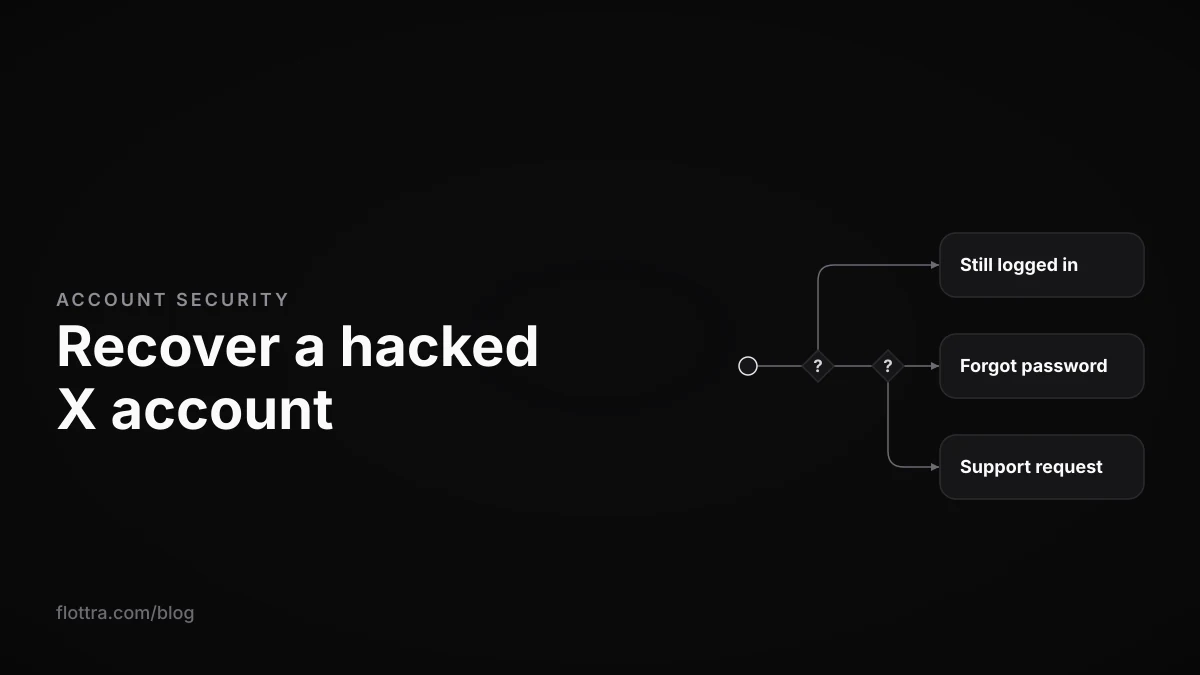
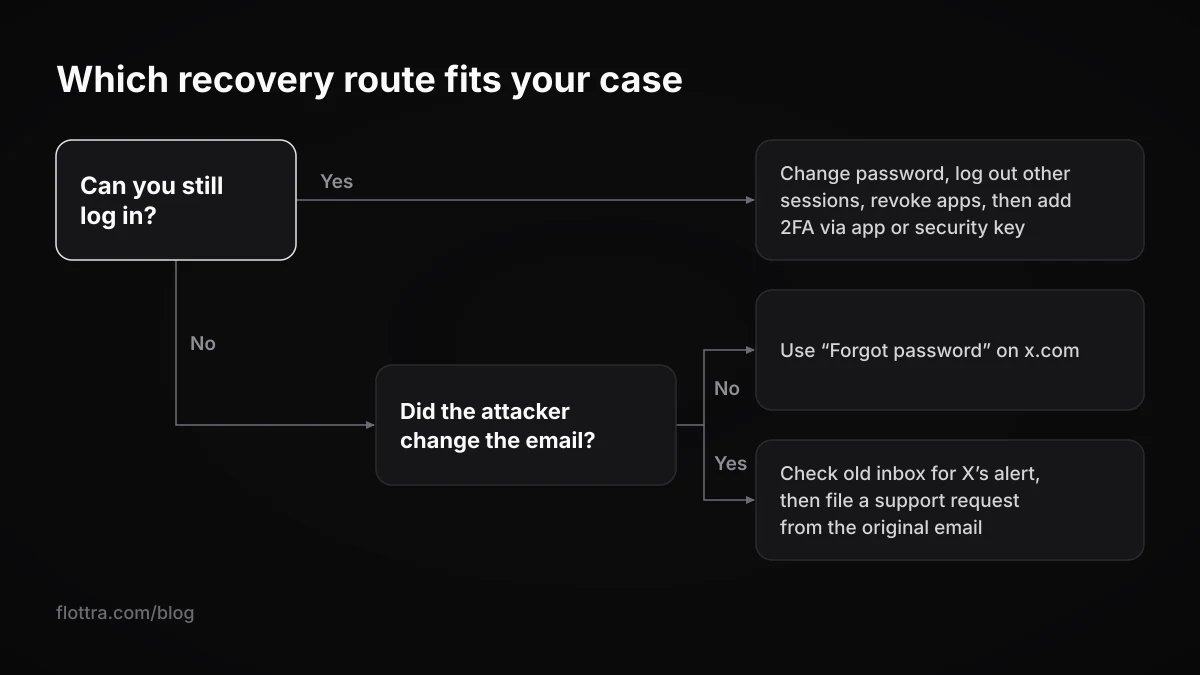
If your X (formerly Twitter) account has been hacked, the route back depends on two questions: can you still log in, and did the attacker change the account's email? If you are still logged in, change the password, log out all other sessions, revoke apps you do not recognise (including the X mobile apps, which a password change does not sign out), turn on two-factor authentication with an app or a security key, and delete what the attacker posted. If you are locked out but the email is still yours, use Forgot password. If the email was changed, look for X's change notice in your old inbox, then send X a support request from the email that was tied to the account, with your username and the date you last had access.
Every step below comes from X's own Help Center, quoted and dated. X publishes no recovery time and no success rate, so none is given here. The later sections cover how to tell a hack from a lock or suspension by X, which need different fixes, and how to secure many accounts so it does not happen again.
If you can still log in: secure the account in this order
If you can still get into a hacked X account, you can take it back yourself from settings, but the order matters, because the attacker may still hold a live session, a connected app or your mailbox. X's compromised account page (checked 9 November 2026) starts with the password: “Please change your password immediately from the Password tab in settings.”
Check the mailbox before anything else
X sends password reset links and change notices to the email on the account. If the attacker also has that mailbox, they can reset the X password again after you change it. Change the mailbox password, turn on its own two-step sign-in, and remove any forwarding rule or recovery address you did not add, before you touch X.
- Change the password. X asks you to “select a strong password you haven't used before.” Do not reuse one from another account or another site.
- Log out all other sessions. Go to Settings and privacy > Apps and sessions > Sessions. X's apps and sessions page (checked 9 November 2026) says you can “click the Log out button next to the session, or click Log out all other sessions at the top of the list to end all other sessions at once.”
- Revoke apps you do not recognise. In the same section, X's instruction is: “Revoke access for any third-party application that you don't recognize.”
- Revoke the X mobile apps as well. X says: “Changing an account's password does not automatically log the account out of X for iOS or X for Android applications.” Revoke the app from the Apps list in settings, and X says the next time it is launched it will ask for the new password. Do not assume the sessions button covers this.
- Undo what the attacker changed. Check the email, phone number, username, display name, bio, profile photo and pinned post, and put each one back.
- Turn on two-factor authentication with an authentication app or a security key. The 2FA section below explains why text message is not an option for most accounts.
- Delete what the attacker posted and sent. X's page includes deleting posts made while the account was compromised. If Direct Messages went out, tell the people who received them that they did not come from you.
X's pages are not consistent about labels: the account security page still says “Applications tab”, the compromised page says “Apps”, and the current menu says Apps and sessions. They all point to the same place.
If you are locked out but the email is still yours
If the attacker changed the password but not the email, the password reset is your way back in. X's instruction is: “If you are logged out, go to Login and click on Forgot Password to reset your password.” The reset uses the email still on the account, which the attacker has not changed, so you can finish it without anyone at X.
- Type x.com into the browser yourself. X's account security tips (checked 9 November 2026) say: “If you are ever unsure about a login page, go directly to x.com and enter your credentials there.”
- Choose Forgot password and enter the username or the email address.
- Follow the reset instructions X sends to your email and set a new password you have not used before.
- Work through every step in the section above: sessions, third-party apps, the mobile apps, the details the attacker changed, 2FA and the clean-up.
If X reset your password before you did
X sometimes steps in first. The same security page says: “If we suspect your account has been phished or hacked, we may reset your password to prevent the hacker from misusing your account. In this case, we'll email you a X.com password reset link.” A reset email you did not ask for may therefore be X protecting the account. If you are not sure an email is genuine, ignore its link and start the reset at x.com yourself, as X's own advice is to go directly to x.com when unsure about a login page.
If the reset does not work
X's compromised page covers this case: “If you still can't log in after attempting a password reset, contact us by submitting a Support Request. Be sure to use the email address you associated with the compromised X account; we'll then send additional information and instructions to that email address.” It also asks you to “Include both your username and the date you last had access to your account.”
If the hacker changed the email or phone number
If a hacker changed your X account's email, start with your old inbox: X says it sends a notice to the previous address every time the email changes. Then, because a password reset will now go to the attacker, file X's support request for a hacked or compromised account from the email address that was tied to the account, giving your username and the date you last had access.
The wording on X's account security tips (checked 9 November 2026) is: “Any time the email address associated with your X account is changed, we will send an email notification to the previously-used email address on your account. In the event your account is compromised, these alerts will help you take steps to regain control of your account.” Search the old inbox, including spam, and keep the notice. It confirms the change and when it happened. X's help pages do not say the notice contains a way to reverse the change, so do not rely on one.
The original address still counts. On its email address page (checked 9 November 2026), X says: “In addition, we will continue to store your previously-used email addresses, and will use this information for safety and security purposes.”
Finding X's hacked or compromised form
X's compromised page links to a “Support Request” rather than printing a form address. Two independent guides, Technobezz and Ministry of Cyber Affairs (both checked 9 November 2026), name the form Account is hacked or compromised. Technobezz places it in the Regain access section of X's help forms and also names a separate Problem with 2FA form. These names come from those guides, not from X's help pages, so check them against what X's own form page shows. Reach it from X's own help pages, not from a link someone sends you.
What to put in the support request
- Send it from the email address that was tied to the account. X says it will send further instructions to that address.
- Your username, spelled exactly.
- The date you last had access, which X asks for by name.
- What changed and when (password, email, phone number), using the times on any notices X sent you.
- Nothing secret. X's instructions ask for the username and the date, not for a password, a 2FA code or a backup code.
If the phone number was changed too
X's help pages do not say what happens when an attacker has changed both the email and the phone number, and X publishes no response time or success rate for the support request. Use the same request, from the original email, with the same details. While you wait, warn your followers through another channel, and secure any other account that shared a password or a mailbox with this one.
Hacked, locked or suspended: how to tell which one you have
A hacked X account, an account locked by X and a suspended account look alike from the outside: you cannot post, or you cannot get in. The difference is who acted. In a hack, a third party has taken control and you recover through a password reset or a support request. In a lock or suspension, X has acted, and you recover through X's verification prompts or an appeal. The wrong route wastes time.
Check the obvious first. X's compromised page warns: “Unexpected updates don't always mean that your account was compromised.” A forgotten scheduled post, an old connected app or a colleague with legitimate access can all look like an intruder.
| State | What you usually see | Who acted | First official step |
|---|---|---|---|
| Hacked | Posts or DMs you did not send, a password that no longer works, a notice that the email changed | A third party | Password reset; if that fails, the hacked or compromised support request |
| Locked or limited | X asks you to verify by phone, email or captcha; visitors may see a warning that the account has displayed unusual activity | X | Complete the verification X offers |
| Suspended | A suspension notice when you log in | X | Follow any phone or email prompts; otherwise appeal while logged in |
| Deactivated or removed | The profile is not found | You (or someone with your login), or X for prolonged inactivity | Find out which happened before acting |
The states overlap. X lists “Account security at risk” among its suspension reasons on its suspended accounts page (checked 19 September 2026), so a hacked account can end up suspended. X's locked and limited accounts page (checked 19 September 2026) says: “If your account appears to have exhibited automated behavior that violates the X Rules, we may lock it and request that you pass a captcha challenge to confirm you are not a robot.” An attacker spamming from your account can trigger that. For a lock, read what to do when X locks an account. For a suspension, start with how to appeal an X suspension. If the profile is simply gone, X deleted my account covers deactivation and removal for inactivity.
Two-factor authentication on X: which method to use
X offers three two-factor methods: text message, authentication app and security key. Text message 2FA has been limited to Premium subscribers since 20 March 2023, and X's current help page still says so, so for most accounts the real choice is an authentication app or a security key. Both mean a stolen password alone does not get anyone in.
X's two-factor authentication page (checked 9 November 2026) says: “There are three methods to choose from: Text message, Authentication app, or Security key.” The setting is under Settings and privacy > Security and account access > Security > Two-factor authentication. The same page carries the notice: “Effective March 20, 2023, we will no longer support two-factor authentication using text messages for non-Premium subscribers.”
| Method | Who can use it | What X says | Operator note |
|---|---|---|---|
| Text message | Premium subscribers only | Availability for Premium “may vary by country and carrier” | Ties the account's security to a phone line you must keep |
| Authentication app | Any account | X encourages app or key methods, which “require you to have physical possession of the authentication method” | One phone may hold many accounts' codes; record which phone |
| Security key | Any account | With a key added, X no longer requires another backup method | Record which key is registered on which account |
The 2023 change came from the X blog post on SMS two-factor (checked 9 November 2026), which says: “We encourage non-Twitter Blue subscribers to consider using an authentication app or security key method instead.” X's login authentication page (checked 9 November 2026) adds that non-Premium accounts still on text message 2FA are “prompted to disable it before you can continue to use your account.”
Backup codes
A backup code is your way in when the 2FA device is not available. X's login authentication page says: “If you are enrolled in two-factor authentication (2FA) and you generated a backup code, enter the backup code to access your account and update your Mobile settings.” The pages checked for this post do not say how many codes X issues or whether one works more than once, so treat each code as single-use and store it away from the phone that holds the 2FA.
Lost the 2FA device and have no backup code
Technobezz, one of the third-party guides above, names a separate Problem with 2FA form in X's Regain access section for this case; the X help pages checked for this post do not name it. X publishes no timeline for it. If the device was an iPhone you replaced, X's login authentication page notes: “Typically, iCloud backups alone do not preserve the key and without an encrypted backup, you may be required to log back into your app using a temporary password generated on X.com”. Use encrypted backups on any phone that holds 2FA for X.
How to secure many X accounts at once
Securing many X accounts is the single-account routine repeated with records: a separate email you control for every account, secured before the X account; authentication-app or security-key 2FA on every account; a written record of where each account's second factor and backup code live; and a regular check of Apps and sessions. The rest is refusing to hand credentials to anyone.
One email per account, secured first
X's email page is explicit: “Note: An email address can only be associated with one X account at a time.” Every account therefore needs its own mailbox, and that mailbox is the real key to the account, because resets and change notices go there. Give each mailbox its own password and two-step sign-in before you rely on it. The ways of organising several accounts, from the app switcher to separate browser profiles, are covered in how to manage multiple X accounts.
2FA and a record for every account
Turn on app or key 2FA on every account, then keep a record per account so a lost phone or a departed team member does not cost you several accounts at once:
- The handle and the email tied to it.
- The 2FA method and which phone or security key holds it.
- Where the backup code is stored.
- The phone number on the account, if any, and who controls that line.
- The date you last checked Apps and sessions.
Check Apps and sessions on every account
A session or app you no longer recognise is the easiest thing to miss across many accounts. X's advice is: “If you previously provided your password to an app that you are now unsure about, revoke its access on the Apps and sessions section of your account settings and change your password.”
Never give passwords to growth sites
X's compromised page lists how accounts get taken: “Accounts may become compromised if you've entrusted your username and password to a malicious third-party application or website, if your X account is vulnerable due to a weak password, if viruses or malware on your computer are collecting passwords, or if you're on a compromised network.” A follower or engagement site that asks for your login is the first item on that list.
Bought and aged accounts carry someone else's recovery details
If someone else registered an account, they may still control its original email or phone. X stores previously used email addresses for safety and security purposes, and its phone number FAQ (checked 19 September 2026) says a number can be claimed back when an account is “inactive for 45 or more days and the number attached to the account is added to a new account”. Treat any bought account as one whose recovery details another person may hold. Aged X accounts explains how that stock is made, and phone number verification on X covers number reuse. X's inactive accounts page (checked 19 September 2026) also says to “log in at least every 30 days”, which matters for accounts you park.
Keep the computer clean
Malware collecting passwords is on X's list, and a computer logged into many accounts is a single point of failure. If you run accounts through Flottra, each one opens in its own saved browser profile on your own Windows computer; no browser runs on its servers and it does not use the X API, so there is no connected API app of its own to find in Apps and sessions. The saved logins live on that computer, so its security is part of every account's security. Flottra does not recover hacked accounts or contact X for you; recovery is between you and X.
If several of your accounts are taken at the same time
When several X accounts are hacked at once, look for what they share before fixing any of them: a mailbox login, a reused password, a computer, or a tool or site that was given the passwords. X's list of causes (a malicious app or website, a weak password, malware, a compromised network) maps onto those shared points. Recovering accounts one by one while the shared cause is still open can hand them straight back.
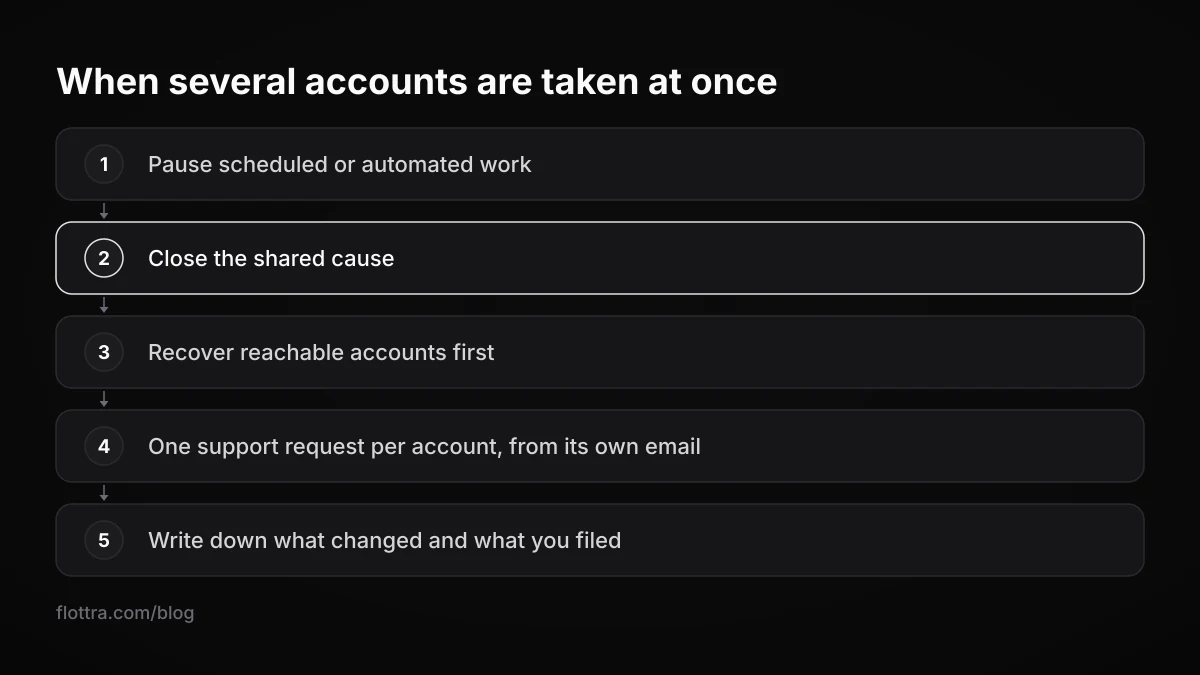
- Pause any scheduled or automated work on the affected accounts, so nothing acts on them while you change credentials.
- Close the shared cause: change the mailbox passwords, clean or rebuild the computer, replace any reused password everywhere it was used, and revoke the tool or site.
- Recover what you can still reach first: logged-in accounts, then accounts where a reset works, then support requests.
- File one support request per account, each from that account's own email, since X asks you to use the email associated with the compromised account.
- Write down, per account, what changed, when, and what you filed, so replies from X can be matched to the right account.
Paid recovery services and anyone who asks for your codes
Do not pay anyone to recover an X account, and do not give anyone your password, 2FA codes or backup codes. X's own recovery routes are the password reset and the support request, both done by you; none of the X pages checked for this post mentions a paid recovery service. Whoever holds your password and codes can take the account themselves.
No published times or success rates
X does not publish how long the support request takes or how often it succeeds. A service or page that quotes a recovery time is not quoting X.
X names entrusting your login to “a malicious third-party application or website” as the first way accounts get compromised. A recovery offer that asks for your login is the same risk in another form.
Questions
Does changing my X password log the hacker out?
Not everywhere. X says a password change “does not automatically log the account out of X for iOS or X for Android applications.” After changing it, open Settings and privacy, then Apps and sessions: log out all other sessions, revoke any third-party app you do not recognise, and revoke the X mobile apps so they ask for the new password at the next launch. Then add app or security-key two-factor authentication so a stolen password alone is no longer enough.
Does X tell me when my account email is changed?
Yes. X says it emails the previously used address any time the email on the account changes. If an attacker changed yours, search the old inbox, including spam, for that notice and keep it: it confirms the change and its time, which helps when X's support request asks for the date you last had access. X's help pages do not say the notice lets you reverse the change, so plan on filing the request.
Can I still use SMS two-factor authentication on X without Premium?
No. X's two-factor page, checked 9 November 2026, still says that from 20 March 2023 it no longer supports text message 2FA for non-Premium subscribers, and that availability for Premium may vary by country and carrier. Non-Premium accounts that still had it were prompted to turn it off. X recommends an authentication app or a security key instead, and both are open to every account.
What is an X 2FA backup code and what happens if I lose it?
It is a code X accepts when your two-factor device is not available; X says to enter it to access your account and update your settings. If you lose both the device and the code, a third-party guide (Technobezz) points to a Problem with 2FA form in X's Regain access section, and X publishes no timeline for it. Generate a backup code as soon as 2FA is on and store it apart from the phone.
Why was my hacked X account suspended?
X lists “Account security at risk” among its reasons for suspension, next to spam and abusive behaviour, so an account that was taken over, or used for spam while it was, can be suspended. If you log in and X prompts you to confirm a phone number or email, follow those prompts. Otherwise X's route is an appeal, filed in a new browser tab while you are logged in to the suspended account.
How did my X account get hacked?
X names four causes: giving your username and password to a malicious third-party app or website, a weak password, malware on your computer collecting passwords, and a compromised network. If you run several accounts, look first at any site or tool you gave passwords to, any password used on more than one account or mailbox, and the computer the accounts stay logged in on. Fix that before recovering the accounts.
How long does X take to restore a hacked account?
X does not publish a time. Its compromised account page describes the password reset and the support request but gives no response time or success rate, and none of the help pages checked for this post gives one either. Any figure you see elsewhere is that site's estimate. Use the wait to secure the mailbox, warn followers through another channel and check your other accounts for the same weakness.